

 rigaya
`--video-metadata clear` and `--audio-metadata clear` optimization
@rigaya HI, These parameters can now work normally, but in the output file generated after use, the video and audio have no bit rate and stream size. Hope to optimize it again, thanks!

Do you mean you're getting output of 0 byte? I've been trying with a small sample by options below, but having no problem.
x64\NVEncC64.exe -i input.mkv -o test.mkv -c hevc --profile main10 --audio-copy --audio-metadata clear --video-metadata clear
Output seems to be fine here.


My system is Ubuntu 18.04, my command is like this:
nvencc --avhw --profile main10 --preset quality --codec hevc --audio-codec aac --video-metadata clear --audio-metadata clear -i i.mkv -o o.mkv
The result is:
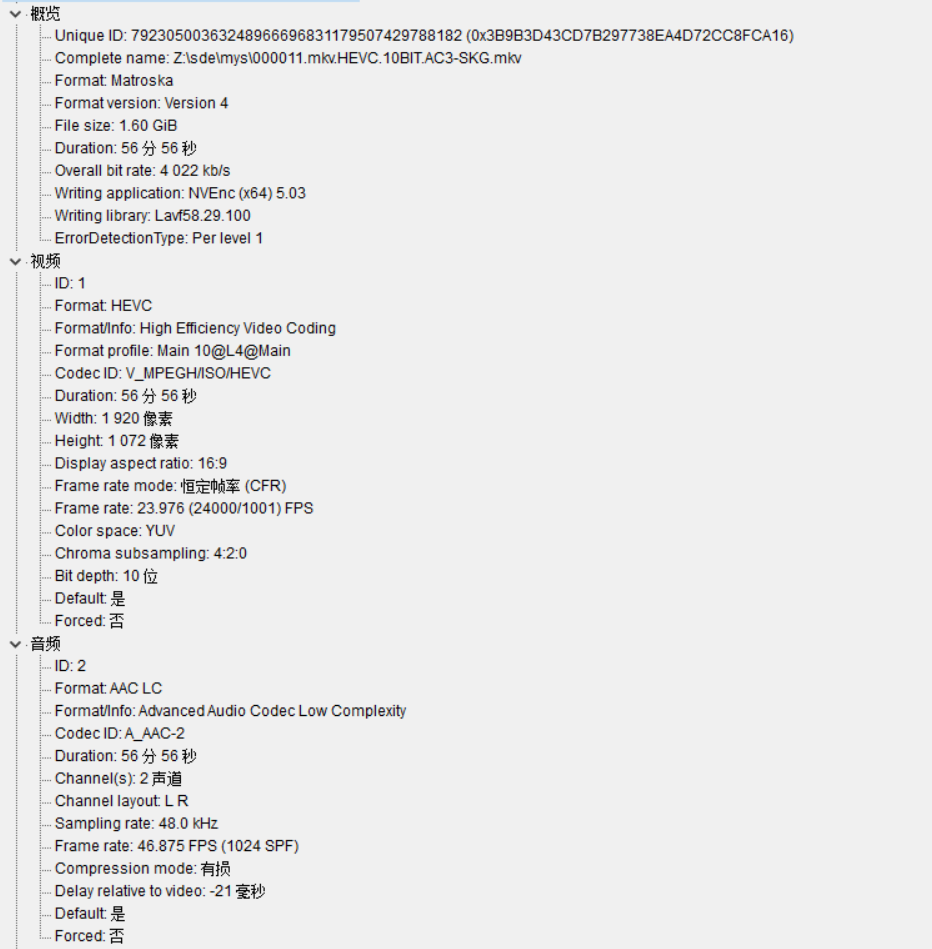
So you mean the output file is fine, but the MediaInfo cannot get the proper bitrate. I don't know how MediaInfo is getting the bitrate information, as it is not an information included in the header.
It seems to be not related to --video-metadata clear/audio-metadata clear. It happens without them when I use your options, and I've also checked the source code but the metadata options does nothing with bitrate. I cannot find something to do with this problem.
I've found that it seems to be some kind of problem when the output is in mkv format with aac. There seems to be no problem when you output in mp4 format, or the audio is in other codec (for example, ac3).