
Ricardo Boss




Ricardo Boss
Same here. Window opens up, white screen, Title is set, then it closes. Just downloaded the latest release, unpacked it, ran it. Then I needed to add D3DX11d_43.dll manually, because...
Process is dead and the file is empty. By dead I mean that the process is definitely done writing if it has started.
In case it helps, this is the entry in the windows event viewer: 
Nope. No editing of any files. Just added the missing library as I described before.
Integrated Intel Graphics. 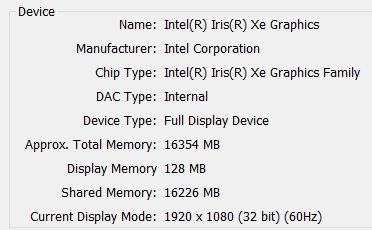
@JunioJsv: you can use `details` and `summary` tags to hide long logs and reports such as these. Makes the issue discussion more readable.
This is my `docker-compose.yml`: ```yaml version: "3.7" services: runner: image: tcardonne/github-runner:latest environment: RUNNER_NAME: "runner-x" RUNNER_REPOSITORY_URL: ${RUNNER_REPOSITORY_URL} RUNNER_ORGANIZATION_URL: ${RUNNER_ORGANIZATION_URL} GITHUB_ACCESS_TOKEN: ${GITHUB_ACCESS_TOKEN} RUNNER_TOKEN: ${RUNNER_TOKEN} RUNNER_LABELS: ${RUNNER_LABELS} volumes: - /var/run/docker.sock:/var/run/docker.sock ```
Thanks for your work! I solved it by copying and then executing the .exe on the network drive itself, which is only a temporary solution. Until a new version is...
You can set these values in your `.vsixmanifest` file before building your `.vsix`.
That let's me achieve the scroll physics I want, but it disables zooming in. I tried re-adding it using `InteractiveViewer`, but as I said, I'm not an experienced Flutter dev,...