restic
 restic copied to clipboard
 restic
unlock doesn't work, but telling "successfully removed"
Output of restic version
restic 0.12.0 compiled with go1.15.8 on windows/386
How did you run restic exactly?
I have a lock, the following command shows details and give hint what to do:
PS T:> restic -r restic-Stephan-local --password-file "C:/Users/steph/restic/pwrestic.txt" snapshots
repository bf940734 opened successfully, password is correct
unable to create lock in backend: repository is already locked exclusively by PID 13124 on Ladybird by LADYBIRD\Stephan (UID 0, GID 0)
lock was created at 2021-05-10 13:01:09 (18m21.169303s ago)
storage ID 985380f4
the unlock command can be used to remove stale locks
try to unlock, tells me "success": PS T:> restic -r restic-Stephan-local --password-file "C:/Users/steph/restic/pwrestic.txt" unlock repository bf940734 opened successfully, password is correct successfully removed locks
but lock still available:
PS T:> restic -r restic-Stephan-local --password-file "C:/Users/steph/restic/pwrestic.txt" snapshots
repository bf940734 opened successfully, password is correct
unable to create lock in backend: repository is already locked exclusively by PID 13124 on Ladybird by LADYBIRD\Stephan (UID 0, GID 0)
lock was created at 2021-05-10 13:01:09 (30m11.1639394s ago)
storage ID 985380f4
the unlock command can be used to remove stale locks
after waiting 30min, it worked: PS T:> restic -r restic-Stephan-local --password-file "C:/Users/steph/restic/pwrestic.txt" unlock repository bf940734 opened successfully, password is correct successfully removed locks PS T:> restic -r restic-Stephan-local --password-file "C:/Users/steph/restic/pwrestic.txt" snapshots repository bf940734 opened successfully, password is correct ID Time Host Tags Paths ...
What backend/server/service did you use to store the repository?
local
Expected behavior
if unlock was not successful, don't tell the user it is. give the reason, why unlock does not work (here, I guess, restic thinks it is a "lock" and not a "stale lock") give a hint to use parameter "--remove-all" if the lock is not categorized as "stale" if the process is dead (inbetween the 30 min), handle "lock" as a "stale lock" (like described in the documentation)
Actual behavior
it isn't unlocked, even if restic tells so. it can be unlocked after 30 min it can be unlocked with parameter "remove-all"
I checked for the PID (which is related to the lock) on my windows system, but I didn't find that PID running.
Steps to reproduce the behavior
Do you have any idea what may have caused this?
maybe on windows, the check for dead PID does not work properly (but that shouldn't result in an message "successfully removed locks"
Do you have an idea how to solve the issue?
Did restic help you today? Did it make you happy in any way?
This is my first report in GitHub, and I'm still not familiar with it. Please give me a hint, if I did something wrong or stupid.
Of course: Restic is fantastic and and easy to use (even if I'm comming from the windows side and do not use the command line very often) Hope, I can help to make restic a little better with my feedback

It would be interesting to get a file listing (that includes timestamps for the files) for the files in the locks/ directory, before and after the unlock command is run and tells you it successfully removed locks. The purpose would be to see if any files are affected at all. Files in that directory is what restic looks at. Is that something you can do, assuming you can reproduce the problem (if you can't it'll be hard to debug it).

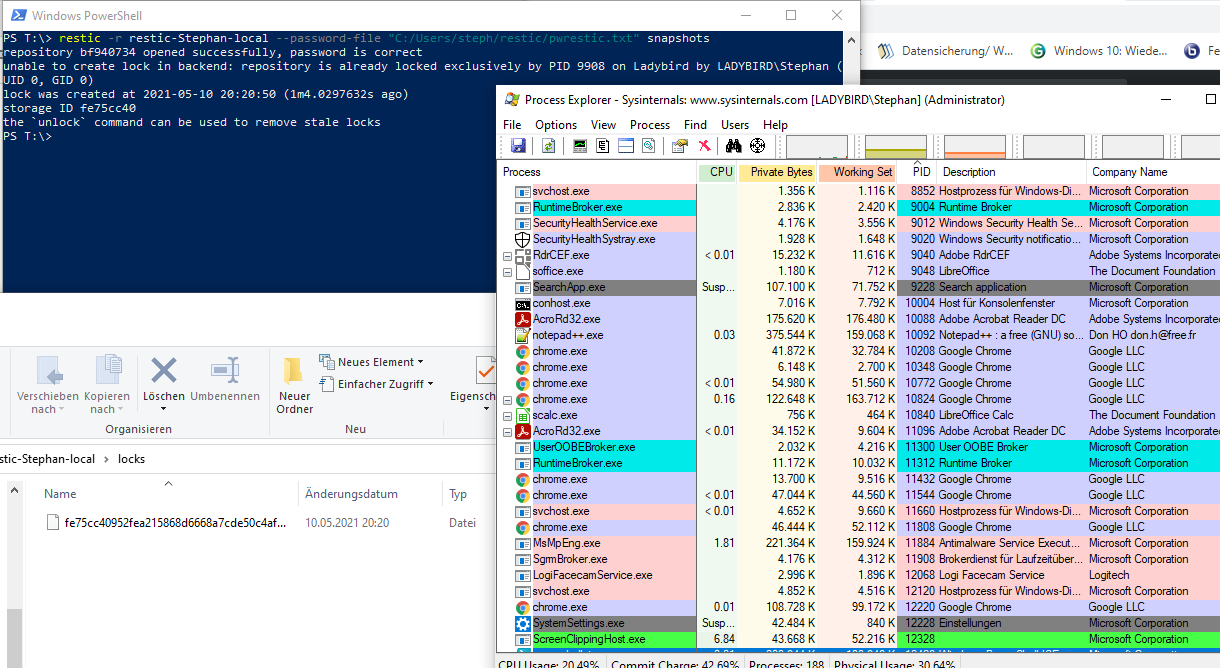
It's only one file in the locks/ directory (see screenshot) and the timestamp is the same (before and after performing the unlock command).
And that file will be successfully deleted, if I wait 30 min or use the parameter --remove-all.
One bug (in my eyes) is, that restic says "successfully removed locks", even if it couldn't (for what reason ever) Even if nothing is locked, it's the same text.
The other observation is that restic do not recognize the process who created the lock, as dead. At least, I do not find the PID in the list of running processes (see screenshot)
Here from description: When a lock is found, it is tested if the lock is stale, which is the case for locks with timestamps older than 30 minutes. If the lock was created on the same machine, even for younger locks it is tested whether the process is still alive by sending a signal to it. If that fails, restic assumes that the process is dead and considers the lock to be stale.
TL;DR: So in summary, the main two bugs here are:
- Message "successfully removed locks" should not be output blindly.
- Potentially the process detection, to determine a lock being stale due to the owning process no longer existing, may be broken.
Thanks for the detailed information, that's useful :) I agree with your observations, for example:
if unlock was not successful, don't tell the user it is.
Restic currently outputs successfully removed locks whenever the unlock command doesn't error prematurely, so this is indeed not right. If it doesn't know that a lock was deleted successfully, it shoulnd't (like now, blindly) print this text. It's done in cmd_unlock.go.
give a hint to use parameter "--remove-all" if the lock is not categorized as "stale" give the reason, why unlock does not work (here, I guess, restic thinks it is a "lock" and not a "stale lock")
Could be doable, it's a matter of code complexity.
And that file will be successfully deleted, if I wait 30 min or use the parameter --remove-all.
Since you say that the lock can be deleted either after 30 minutes of age (by which it's no longer considered stale) or by using the --remove-all option (by which restic will delete a lock even if it's not considered stale), the conclusion is that restic most likely considered that lock active/non-stale.
if the process is dead (inbetween the 30 min), handle "lock" as a "stale lock" (like described in the documentation)
This is certainly something to investigate - it would be interesting to know if restic sees that process ID or not. If you have a restic binary which has debugging enabled restic will output some additional information when it tries to discover the process for the lock. Building restic with debug enabled is simple as you can see by the instructions I linked to above, so if you want to do that it would be nice. But it's not super important assuming others can reproduce the problem on Windows.
@rawtaz: after installing go and compiling a debug binary (it was not so easy, because the description focus on linux), I was able to create a log-file. At first, I catched the situation (the lock was not unlocked), but at the moment, I can not reproduce any more. Please give me some time for futher investigation.
here is the debug log
- beginning line 2, it's working like expected (less than 30 min old, but PID not in use) --> lock was removed
- beginning line 36, the lock is not removed. But I do not find the PID in the list (I used command "tasklist"), and I did nothing different ;), I tried it many times. It's a kind of random.
But line 30 might be a hint:
30 2021/05/12 10:21:45 restic/lock_windows.go:20 restic.Lock.processExists 14 error searching for process 11424: OpenProcess: Falscher Parameter.
"Falscher Parameter", means "wrong parameter", it's the original output from restic, not an addition by me!
maybe there is a mismatch of the type of the variable (which lead to randomly result of processExists)
02  2021/05/12 10:21:45 restic/main.go:95	main.main	1	main []string{"D:\\work\\restic\\restic-master20210511\\restic-master\\restic.exe", "-r", "t:\\restic-Stephan-local", "unlock"}
03  2021/05/12 10:21:45 restic/main.go:96	main.main	1	restic 0.12.0 compiled with go1.16.4 on windows/amd64
04  2021/05/12 10:21:45 restic/global.go:669	main.open	1	parsing location t:\restic-Stephan-local
05  2021/05/12 10:21:45 restic/global.go:544	main.parseConfig	1	opening local repository at local.Config{Path:"t:\\restic-Stephan-local", Layout:""}
06  2021/05/12 10:21:45 local/local.go:33	local.Open	1	open local backend at t:\restic-Stephan-local (layout "")
07  2021/05/12 10:21:45 backend/layout.go:139	backend.ParseLayout	1	parse layout string "" for backend at t:\restic-Stephan-local
08  2021/05/12 10:21:45 backend/layout.go:99	backend.DetectLayout	1	detect layout at t:\restic-Stephan-local
09  2021/05/12 10:21:45 backend/layout.go:117	backend.DetectLayout	1	found default layout at t:\restic-Stephan-local
10  2021/05/12 10:21:45 backend/layout.go:163	backend.ParseLayout	1	layout detected: <DefaultLayout>
11  2021/05/12 10:21:45 local/local.go:198	local.(*Local).Stat	1	Stat <config/>
12  2021/05/12 10:21:45 repository/index.go:441	repository.(*Index).Finalize	1	finalizing index
13  2021/05/12 10:21:45 local/local.go:242	local.(*Local).List	1	List key
14  2021/05/12 10:21:45 repository/key.go:150	repository.SearchKey.func1	1	trying key "1b435f99d407413cac1906c595600c0f39493a3aef1f5e50add65cfa63ad792d"
15  2021/05/12 10:21:45 local/local.go:167	local.(*Local).openReader	1	Load <key/1b435f99d4>, length 0, offset 0
16  2021/05/12 10:21:45 repository/key.go:163	repository.SearchKey.func1	1	successfully opened key 1b435f99d407413cac1906c595600c0f39493a3aef1f5e50add65cfa63ad792d
17  2021/05/12 10:21:45 repository/repository.go:89	repository.(*Repository).LoadAndDecrypt	1	load config with id 0000000000000000000000000000000000000000000000000000000000000000
18  2021/05/12 10:21:45 local/local.go:167	local.(*Local).openReader	1	Load <config/0000000000>, length 0, offset 0
19  2021/05/12 10:21:45 cache/cache.go:110	cache.New	1	using cache dir C:\Users\steph\AppData\Local\restic\bf94073462a2d27b380d98fdbf063657279b3b9963a07001bf77fb2eb54cdc64
20  2021/05/12 10:21:45 repository/repository.go:70	repository.(*Repository).UseCache	1	using cache
21  2021/05/12 10:21:45 cache/cache.go:237	cache.OlderThan	1	0 old cache dirs found
22  2021/05/12 10:21:45 local/local.go:242	local.(*Local).List	9	List lock
23  2021/05/12 10:21:45 restic/lock.go:332	restic.ForAllLocks.func2	14	load lock f644f610ffb02c438880bc830359850435f4df52a00eaf00a9a7fd2171eb5d5f
24  2021/05/12 10:21:45 repository/repository.go:89	repository.(*Repository).LoadAndDecrypt	14	load lock with id f644f610ffb02c438880bc830359850435f4df52a00eaf00a9a7fd2171eb5d5f
25  2021/05/12 10:21:45 cache/backend.go:196	cache.(*Backend).Load	14	Load(<lock/f644f610ff>, 0, 0): delegating to backend
26  2021/05/12 10:21:45 local/local.go:167	local.(*Local).openReader	14	Load <lock/f644f610ff>, length 0, offset 0
27  2021/05/12 10:21:45 restic/lock.go:186	restic.(*Lock).Stale	14	testing if lock PID 11424 on Ladybird by LADYBIRD\Stephan (UID 0, GID 0)
28  lock was created at 2021-05-12 10:18:39 (3m6.0292564s ago)
29  storage ID f644f610 for process 11424 is stale
30  2021/05/12 10:21:45 restic/lock_windows.go:20	restic.Lock.processExists	14	error searching for process 11424: OpenProcess: Falscher Parameter.
31  2021/05/12 10:21:45 restic/lock.go:208	restic.(*Lock).Stale	14	could not reach process, 11424, lock is probably stale
32  2021/05/12 10:21:45 cache/backend.go:37	cache.(*Backend).Remove	14	cache Remove(<lock/f644f610ff>)
33  2021/05/12 10:21:45 local/local.go:227	local.(*Local).Remove	14	Remove <lock/f644f610ff>
34  2021/05/12 10:21:45 restic/lock.go:119	main.unlockAll	1	unlocking 0 locks
35
36  ##lock stays:
37  2021/05/12 12:06:51 restic/main.go:95	main.main	1	main []string{"D:\\work\\restic\\restic-master20210511\\restic-master\\restic.exe", "-r", "t:\\restic-Stephan-local", "unlock"}
38  2021/05/12 12:06:51 restic/main.go:96	main.main	1	restic 0.12.0 compiled with go1.16.4 on windows/amd64
39  2021/05/12 12:06:51 restic/global.go:669	main.open	1	parsing location t:\restic-Stephan-local
40  2021/05/12 12:06:51 restic/global.go:544	main.parseConfig	1	opening local repository at local.Config{Path:"t:\\restic-Stephan-local", Layout:""}
41  2021/05/12 12:06:51 local/local.go:33	local.Open	1	open local backend at t:\restic-Stephan-local (layout "")
42  2021/05/12 12:06:51 backend/layout.go:139	backend.ParseLayout	1	parse layout string "" for backend at t:\restic-Stephan-local
43  2021/05/12 12:06:51 backend/layout.go:99	backend.DetectLayout	1	detect layout at t:\restic-Stephan-local
44  2021/05/12 12:06:51 backend/layout.go:117	backend.DetectLayout	1	found default layout at t:\restic-Stephan-local
45  2021/05/12 12:06:51 backend/layout.go:163	backend.ParseLayout	1	layout detected: <DefaultLayout>
46  2021/05/12 12:06:51 local/local.go:198	local.(*Local).Stat	1	Stat <config/>
47  2021/05/12 12:06:51 repository/index.go:441	repository.(*Index).Finalize	1	finalizing index
48  2021/05/12 12:06:51 local/local.go:242	local.(*Local).List	1	List key
49  2021/05/12 12:06:51 repository/key.go:150	repository.SearchKey.func1	1	trying key "1b435f99d407413cac1906c595600c0f39493a3aef1f5e50add65cfa63ad792d"
50  2021/05/12 12:06:51 local/local.go:167	local.(*Local).openReader	1	Load <key/1b435f99d4>, length 0, offset 0
51  2021/05/12 12:06:51 repository/key.go:163	repository.SearchKey.func1	1	successfully opened key 1b435f99d407413cac1906c595600c0f39493a3aef1f5e50add65cfa63ad792d
52  2021/05/12 12:06:51 repository/repository.go:89	repository.(*Repository).LoadAndDecrypt	1	load config with id 0000000000000000000000000000000000000000000000000000000000000000
53  2021/05/12 12:06:51 local/local.go:167	local.(*Local).openReader	1	Load <config/0000000000>, length 0, offset 0
54  2021/05/12 12:06:51 cache/cache.go:110	cache.New	1	using cache dir C:\Users\steph\AppData\Local\restic\bf94073462a2d27b380d98fdbf063657279b3b9963a07001bf77fb2eb54cdc64
55  2021/05/12 12:06:51 repository/repository.go:70	repository.(*Repository).UseCache	1	using cache
56  2021/05/12 12:06:51 cache/cache.go:237	cache.OlderThan	1	0 old cache dirs found
57  2021/05/12 12:06:51 local/local.go:242	local.(*Local).List	13	List lock
58  2021/05/12 12:06:51 restic/lock.go:332	restic.ForAllLocks.func2	51	load lock 7648f6c6794ee3d1e8d321563d02d18447883b8d326373de6f0cb2c999d61b94
59  2021/05/12 12:06:51 repository/repository.go:89	repository.(*Repository).LoadAndDecrypt	51	load lock with id 7648f6c6794ee3d1e8d321563d02d18447883b8d326373de6f0cb2c999d61b94
60  2021/05/12 12:06:51 cache/backend.go:196	cache.(*Backend).Load	51	Load(<lock/7648f6c679>, 0, 0): delegating to backend
61  2021/05/12 12:06:51 local/local.go:167	local.(*Local).openReader	51	Load <lock/7648f6c679>, length 0, offset 0
62  2021/05/12 12:06:51 restic/lock.go:186	restic.(*Lock).Stale	51	testing if lock PID 12572 on Ladybird by LADYBIRD\Stephan (UID 0, GID 0)
63  lock was created at 2021-05-12 12:05:23 (1m28.4005956s ago)
64  storage ID 7648f6c6 for process 12572 is stale
65  2021/05/12 12:06:51 restic/lock.go:212	restic.(*Lock).Stale	51	lock not stale
66  2021/05/12 12:06:51 restic/lock.go:119	main.unlockAll	1	unlocking 0 locks
Thanks for good information! It's pretty peculiar/interesting. I've had limited time but a quick look yields:
internal/restic/lock.gocalls os.FindProcess() with a proper parameter value (we see the valid value of l.PID in the error message and the type of that argument is anintas perLock.PID).- os.findProcess(pid) is then what's being called, and also what returns the error we get.
- I noticed that the
internal/restic/lock_unix.gois deferring proc.Release() whileinternal/restic/lock_unix.godoes not, in case that is relevant. I'm not sure if that could cause a race condition with theProcess(proc), I'd guess no since this and the related Go code seems sequential. But might be good to see if we should wrap this and perhaps also move thedefer()calls for both unix and windows to right after theos.FindProcess()call? OpenProcess()documentation mentionERROR_INVALID_PARAMETERin relation to specifying "System Idle Process (0x00000000)" as the process. We're not specifying that process, but here and here it sounds like Windows'OpenProcess()may give anERROR_INVALID_PARAMETERfor when the specified process doesn't exist. This would make sense, that if what you ask to open isn't there, it's considered invalid.
I would like to have it verified that the last point above is indeed the case - if it is, then it would seem sensible to check for that specific error and if it's returned we treat this as the process not existing and return false in processExists() (still checking for other errors as usual though). I'd love others' input on this.
EDIT: @fizzie in #go-nuts on Freenode mentioned that "The returned error looks to be an os.SyscallError wrapping a syscall.Errno, so something like var errno syscall.Errno; if errors.As(err, &errno) && errno == windows.ERROR_INVALID_PARAMETER { ... }. Alternatively, perhaps this might be a better way to check the process existance.
I don't know that this is related but it is happening on my oracle linux os with arm64.
restic version output is restic 0.12.1 compiled with go1.16.6 on linux/arm

Still present in 0.14.0. Unable to delete a stuck lock and unable to use my repo now :(
Someone on IRC just advised me to try to unlock from the same machine with the same key that acquired the lock, and that did successfully remove the lock, so maybe that is a hint for the bug search.

@Gaibhne Restic first has to detect that a lock file is stale before it will be removed. And that detection just relies on the lock being too old, which currently uses a timeout of 30 minutes. On the same host, restic can check whether the process which created the lock is still running and can clean up the lock if that is not the case. So what you're seeing sounds like expected behavior (except for the somewhat mislead error message)

I ran into this issue as well, and the lock was less than 30 minutes old so I had to remove the file, as unlock did not do anything (although it was still reporting success).