

 replicate
WIP support for multiple concepts using filenames
this is a POC for testing what changes are needed to train for multiple concepts
If your instance_data has filenames:
"foo bar.jpg" -> "foo bar"
"foo_bar.jpg" -> "foo bar"
"foo bar-123.jpg" -> "foo bar"
If you send instance_prompt it is prepended to the prompt from each filename


@anotherjesse aside from some docs tweaks, what more does this need to be shippable?


@strickinato / other folks who want to try it out and give feedback:
The trainer_version in the dreambooth api can be any dreambooth version you have access to.
In this case, I have pushed a version to my personal account:
https://replicate.com/anotherjesse/dreambooth/versions/837450bfda6314d2290cc1d0c159843296f981c0b8a7f512d0efbf49970b5229
So to use this, follow along in the blog post, except specify trainer_version of 837450bfda6314d2290cc1d0c159843296f981c0b8a7f512d0efbf49970b5229:
curl -X POST \
    -H "Authorization: Token $REPLICATE_API_TOKEN" \
    -H "Content-Type: application/json" \
    -d '{
            "input": {
                "instance_prompt": "a photo of",
                "class_prompt": "a photo of person",
                "instance_data": "'"$SERVING_URL"'",
                "max_train_steps": 2000
            },
            "model": "yourusername/yourmodel",
            "trainer_version": "837450bfda6314d2290cc1d0c159843296f981c0b8a7f512d0efbf49970b5229",
            "webhook_completed": "https://example.com/dreambooth-webhook"
        }' \
    https://dreambooth-api-experimental.replicate.com/v1/trainings
This prototype takes the instance_prompt and combines it with your filename.
If instance_prompt is "a photo of" and the your instance_data data.zip has filenames, it will use the image with the prompt:
foo bar.jpg-> "a photo of foo bar"bar_baz.jpg-> "a photo of bar baz"- "foo baz-123.jpg" -> "a photo of foo baz"
Hey @anotherjesse I just tried training a new concept on top of an existing dreambooth model. The training was done surprisingly quickly but it has been stuck on "pushing" status since (been 30+ mins now). How do I troubleshoot this?

I think the issue is you changed the trainer_version to the dreambooth model you trained already - you need to keep it at 837450bfda6314d2290cc1d0c159843296f981c0b8a7f512d0efbf49970b5229
This prototype doesn't support continuing training from an existing training session. this trainer allows you to send in multiple concepts. We will want to bring these trainers together as we understand them more.
I followed the instructions and trained a model for a person and a style at the same time:
- Changed the trainer version to
837450bfda6314d2290cc1d0c159843296f981c0b8a7f512d0efbf49970b5229 - Created a set of images with specific file names:
concept-id.jpg- File name examples:
person-1.jpg,person-2.jpg, andstyle-1.jpg,style-2.jpg - 37 images (12 images of a person, 25 images of a style)
- File name examples:
- Run training with the following settings
- Instance name: sks
- Class name: person
- Steps: 3700
- Got a trained model with the following instance names
- sks person
- sks style
- Run predictions with the following prompts
- sks person, drinking coffee, sks style
- sks person in the sky, sks style
- sks person in an apartment, sks style
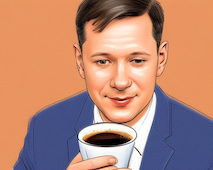


Limitations
- The training can't last longer than 30 min with this particular trainer (perhaps this is a limitation of anotherjesse's account on Replicate, which he used to upload the trainer). It's not enough to train a model with more than 5000 steps. This trainer, for example, has a limitation of 60 minutes.
- If I just use "sks style" without "sks person" to generate images, the generated images won't be in "sks style". "Sks style" only works with "sks person". On the other hand, if I generate images with "sks person" only, it works fine, and I get images with "sks person" in them.
Open questions
- How many concepts can I train at once?
- Can I use multiple class names?
- If I train a model and provide "style" instead of "person" as the class name, will I be able to generate images in "sks style" without "sks person"?

@ivan-volchenskov thanks for the great writeup & sharing your results!
30 minute timeout
You are correct about timing out because it is under my personal account. Once we have a version in the replicate account, it will have the same 60 minute timeout as the other trainers.
Your "open questions" highlight why this isn't yet on replicate's account. We need to ensure it both does what folks want - as well as document how to do so.
How many concepts at once?
Each image in your instance_data ends up with a unique training prompt. So I think you could do as many different concepts as you wish.
For instance you could make the instance_prompt a blank string, and then have the prompt for each image completely generated from the filename:
sks_style-1.jpg->sks style. (first style)asim_style.jpg->asim style(second style)sks_person.jpg->sks person. (person with same name as first style?)
The question I don't know is how all this plays together.
For instance I trained with two people by having instance_prompt of photo of with filenames containing the unique string
bfirsh-1.jpgbfirsh-2.jpgzeke-1.jpgzeke-2.jpg
Then I used a single class_prompt of photo of man
Multiple class names?
That is a good question. perhaps we should support both multiple class names and parsing the class prompt from the filename similar to how it works for instances?
Have you seen anywhere else training with multiple classes?
@ivan-volchenskov thanks for the great writeup & sharing your results!
Yes! Super helpful.
How many concepts at once?
I suppose you're right. There is one guy who has trained for seven of his styles.
The only limitation is the training time, which in your case will be 60 minutes. If we take an average of 15 input images per concept, we will end up with 4-6 concepts, depending on how many class_images we want to generate.
Have you seen anywhere else training with multiple classes?
There is an Automatic1111 plugin for the DreamBooth training.
You can train up to 4 concepts with their web UI, but with their JSON option "you can theoretically use any number of concepts".
Each concept parameters includes (among other things):
- Instance name
- Class name
- Maximum training steps
This means you can set a class name and training steps for each concept.
That is a good question. perhaps we should support both multiple class names and parsing the class prompt from the filename similar to how it works for instances?
Have you seen anywhere else training with multiple classes?
Yes. class prompt: [filewords] works. I think AUTOMATIC1111 repo has this.
Also, I've been testing this version for over 3 weeks and have occasionally gotten photos that look like your test ones with Zeke; I'm not sure if this version already includes the previous training or if it's a clean one.

Worked pretty well!
My goal was the ability to train both a person and a piece of clothing. I've done a bit already with Automatic1111 (example here).
I used the following parameters for the API:
curl -X POST \
    -H "Authorization: Token $REPLICATE_API_TOKEN" \
    -H "Content-Type: application/json" \
    -d '{
            "input": {
                "instance_prompt": "a photo of",
                "class_prompt": "a photo of person",
                "instance_data": "'"$SERVING_URL"'",
                "max_train_steps": 2000
            },
            "model": "yourusername/yourmodel",
            "trainer_version": "837450bfda6314d2290cc1d0c159843296f981c0b8a7f512d0efbf49970b5229",
            "webhook_completed": "https://example.com/dreambooth-webhook"
        }' \
    https://dreambooth-api-experimental.replicate.com/v1/trainings
And I followed the example pattern: If instance_prompt is "a photo of" and the your instance_data data.zip has filenames, it will use the image with the prompt:
foo bar.jpg -> "a photo of foo bar" bar_baz.jpg -> "a photo of bar baz" "foo baz-123.jpg" -> "a photo of foo baz"
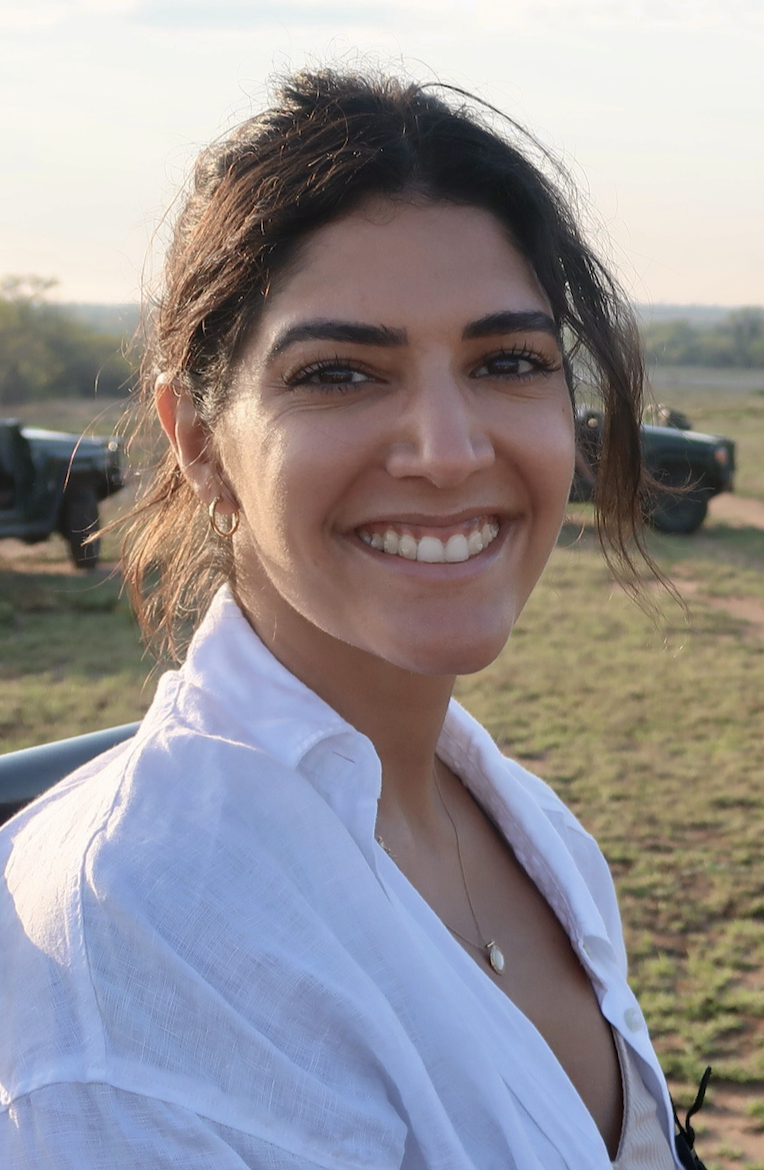
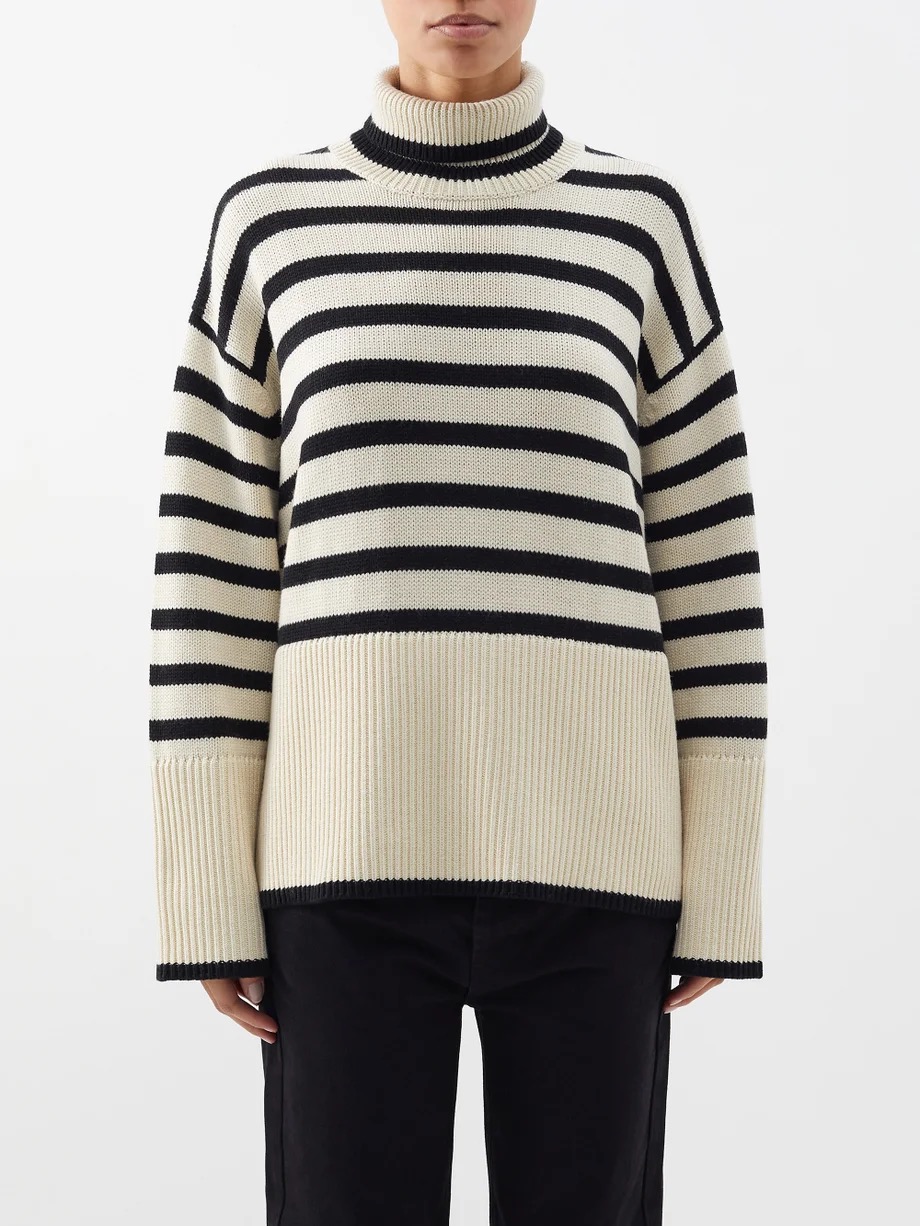
My file names were: trsz_person-[n].jpg zzyt_sweater-[n].jpg
I had 17 photos of the person and 13 photos of the sweater.
Training person photo example:
Training sweater photo example:
prompt used for the following output:
**prompt**
an analog portrait photo of a trsz model wearing a striped zzyt sweater

**negative prompt:**
cartoon, disfigured, kitsch, ugly, oversaturated, low-res, Deformed, blurry, bad anatomy, disfigured, mutation, mutated, ugly, glasses
Output:
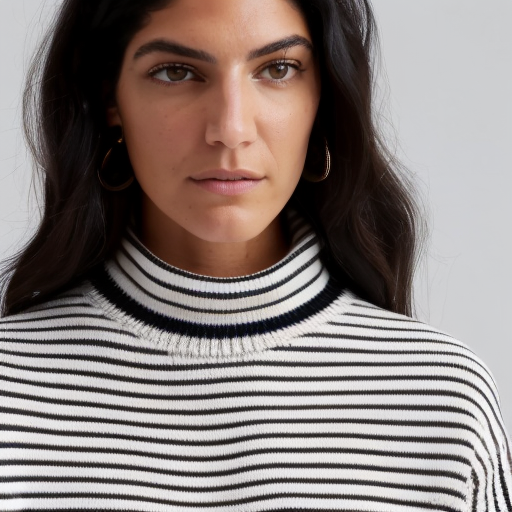
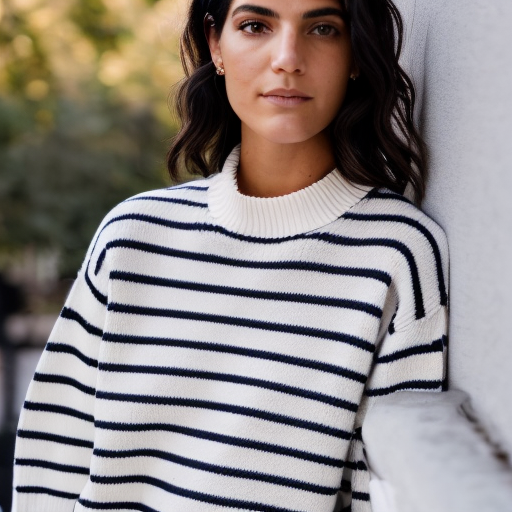
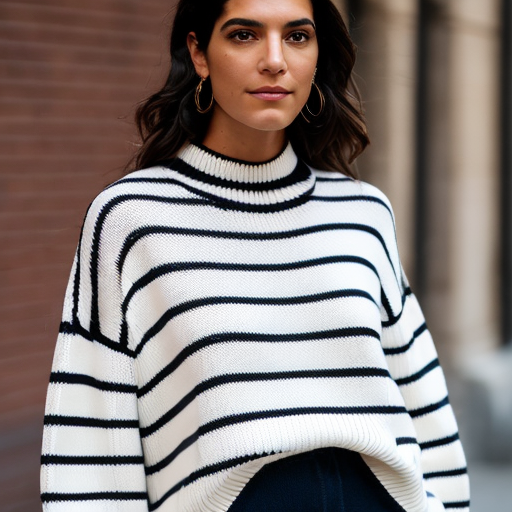
Outcome: The person is 95% there and the sweater is about 90% there -> mainly variances in the stripes and neckline.
TODO I will continue to tweak some of the settings and prompts to get a better output.
I also want to look further into training a model on a clothing item, then inpainting it onto a photo (as shown in my Automatic1111 example).
Thank you @anotherjesse!!
