reflex

reflex copied to clipboard
 reflex-dev
[Fix #697, #410] Allow f-strings
This PR allows to use f-strings
Very quick example and test
class State(pc.State):
    """The app state."""

    world = "World"

    # Brutal copy and paste :-), just test
    day = datetime.datetime.now().day
    month = datetime.datetime.now().month
    year = datetime.datetime.now().year
    hour = datetime.datetime.now().hour
    minute = datetime.datetime.now().minute

def index() -> pc.Component:
    return pc.center(
        pc.vstack(
            pc.text(f"Today is {State.day}/{State.month}/{State.year}"),
            pc.heading(f"Welcome to {State.world} at {State.hour}:{State.minute}!",
                       font_size="3em"),
        ),
        padding_top="5%",
    )
Generated code
<Center sx={{"paddingTop": "5%"}}><VStack><Text>{`Today is ${state.day}/${state.month}/${state.year}`}</Text>

<Heading sx={{"fontSize": "3em"}}>{`Welcome to ${state.world} at ${state.hour}:${state.minute}!`}</Heading></VStack>
Result:


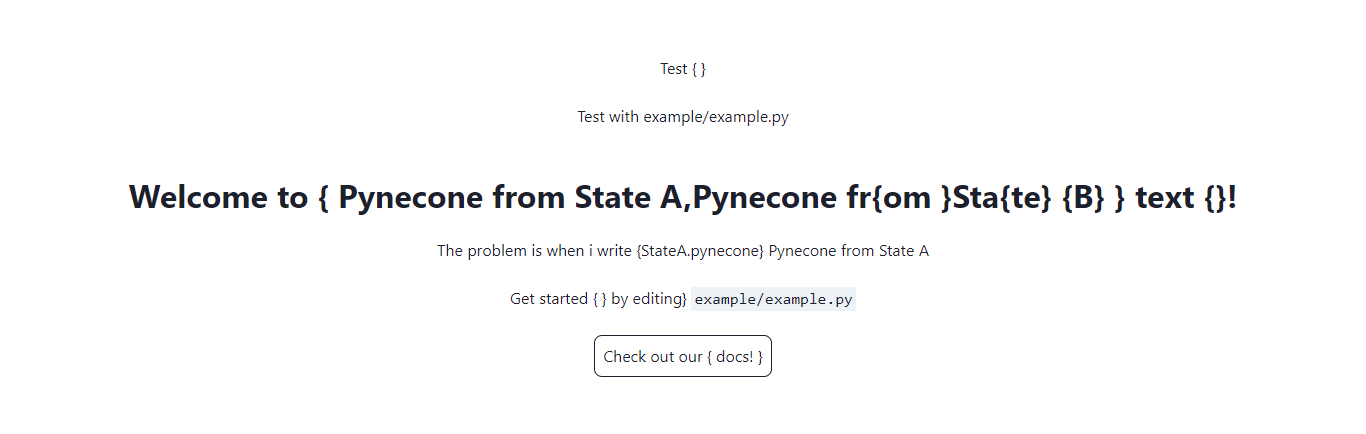
Updated code, test with arbitrarily placed curly brackets. I've posted this code so you can test it and let me know (thanks for your time). I will review it tomorrow since now it's night here (Italy).
"""Welcome to Pynecone! This file outlines the steps to create a basic app."""
from pcconfig import config

import pynecone as pc

docs_url = "https://pynecone.io/docs/getting-started/introduction"
filename = f"{config.app_name}/{config.app_name}.py"

class State0(pc.State):
    pass
class StateA(State0):
    pynecone = "Pynecone from State A"


class StateB(State0):
    pynecone = "Pynecone fr{om }Sta{te} {B}"


def index() -> pc.Component:
    return pc.center(
        pc.vstack(
            pc.text("Test { }"),
            pc.text(f"Test with {filename}"),
            pc.heading(f"Welcome to {{ {StateA.pynecone},{StateB.pynecone} }} text {{}}!", font_size="2em"),
            pc.text(f"The problem is when i write {{StateA.pynecone}} {StateA.pynecone}"),
            pc.box("Get started { } by editing}", pc.code(filename, font_size="1em")),
            pc.link(
                "Check out our { docs! }",
                href=docs_url,
                border="0.1em solid",
                padding="0.5em",
                border_radius="0.5em",
                _hover={
                    "color": "rgb(107,99,246)",
                },
            ),
            spacing="1.5em",
            font_size="2em",
        ),
        padding_top="10%",
    )


# Add state and page to the app.
app = pc.App(state=State0)
app.add_page(index)
app.compile()
<Center sx={{"paddingTop": "10%"}}><VStack spacing="1.5em"

sx={{"fontSize": "2em"}}><Text>{`Test { }`}</Text>

<Text>{`Test with example/example.py`}</Text>

<Heading sx={{"fontSize": "2em"}}>{`Welcome to { ${state0.state_a.pynecone},${state0.state_b.pynecone} } text {}!`}</Heading>

<Text>{`The problem is when i write {StateA.pynecone} ${state0.state_a.pynecone}`}</Text>

<Box>{`Get started { } by editing}`}

<Code sx={{"fontSize": "1em"}}>{`example/example.py`}</Code></Box>

<NextLink href="https://pynecone.io/docs/getting-started/introduction"

passHref={true}><Link sx={{"border": "0.1em solid", "padding": "0.5em", "borderRadius": "0.5em", "_hover": {"color": "rgb(107,99,246)"}}}>{`Check out our { docs! }`}</Link></NextLink></VStack>

<NextHead><title>{`Pynecone App`}</title>

<meta content="A Pynecone app."

name="description"/>

<meta content="favicon.ico"

property="og:image"/></NextHead></Center>
)