redpanda-data
Inconsistent order of fields in view message page
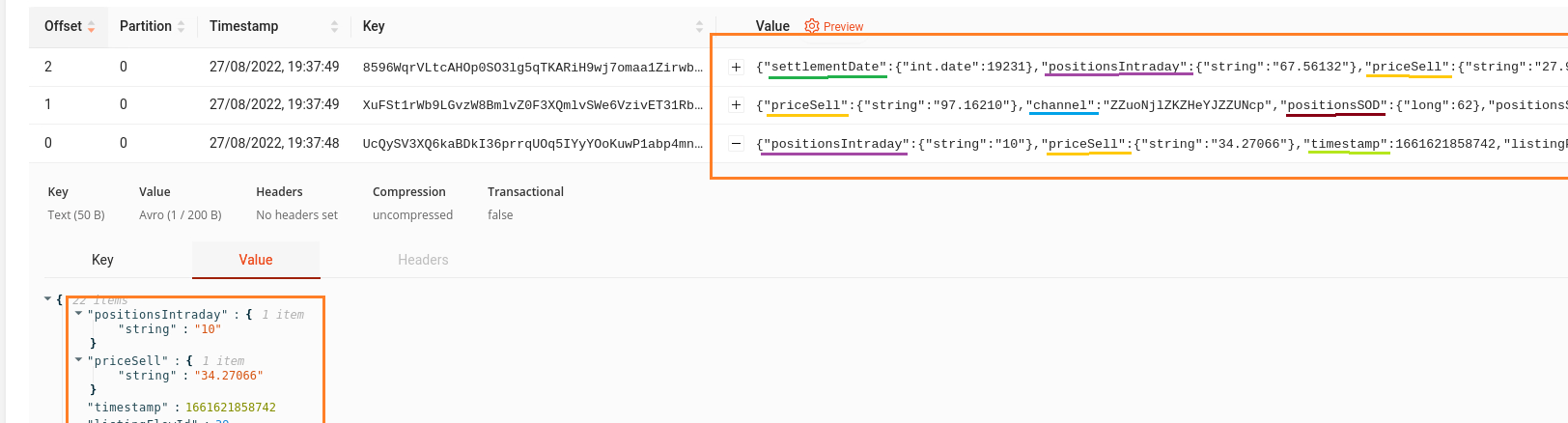
When viewing messages of a Kafka topic, the display order for the Value fields is inconsistent, changing randomly from message to message. This is visible both directly on the collapsed row, as displayed in the Value column of each row, and also when expanding the row (with "+") to view the message details.
In my Kafka topic the messages are saved in Avro format, with fields always in the same order, and other UI tools (like Kafdrop, Kafka UI) display them in a consistent order, the exact one from Kafka.
There is also no way to change the display order here. This affects usability, as it's difficult to find specific fields, or compare field values for multiple messages.
Desired behavior:
- at minimum, the Value fields should be displayed as they are on Kafka
- a better but more complex solution would be to allow custom sorting somehow (either with some button in this display page, or maybe better somewhere in a configuration/settings page, like the one where you can filter the fields displayed in the Value column for collapsed rows)
Note that this is similar, but technically a different issue from the similar ordering problem for Header fields, mentioned in issue #412