

 redpanda-data
The order of the fields in the message header.
Maybe I don't see an option to manage the order of the fields in the headers or the ability to filter them.
The order of the fields is displayed randomly. Which makes it difficult to find or compare.
The minimum solution is for the fields to be displayed as they are on Kafka. A slightly better solution would be to show as on Kafka by default, but also to be able to sort by clicking on 'Key' and then sort ascending or descending.
A great solution would be to configure the display as for messages - Preview functionality.
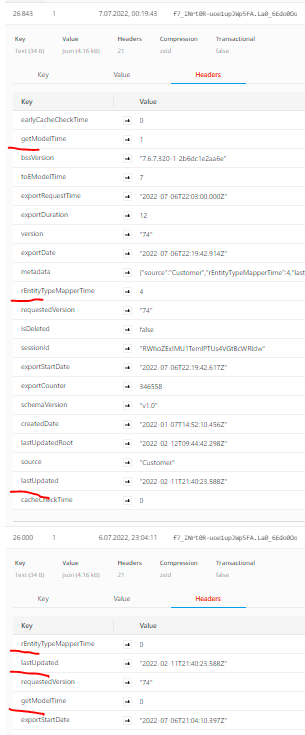

There is a similar problem with the display of the Value for messages: for these indeed you can filter them, but the ordering is still random between messages, and you have no way to change that. (speculating on the cause, maybe it's only a front end issue, regarding undefined order of fields in a JSON; or maybe it involves backend code too)
In my case I have Avro messages, which have the fields written in consistent order in topic, and for which other clients (Kafdrop, Kafka UI) display them in that consistent order also in UI.
Could you extend the solution from Header page and apply something similar also to Value page? (at minimum, have at least some consistent ordering, maybe the one from Kafka, maybe sorted alphabetically, etc.)

@cristi-maco I can imagine that this is indeed annoying and we want to fix this (as well as the issue with the headers)! Given that this is from a purely technical perspective a separate issue, do you mind creating a separate issue for that?

@weeco Ok, no problem, I've created now the separate issue #444 for my Value fields issue, with extra details / screenshot. Thanks for quick reply.
