
vscode-java
 vscode-java copied to clipboard
 redhat-developer
Problems (red) on Java files/packages mostly after cleaning workspace
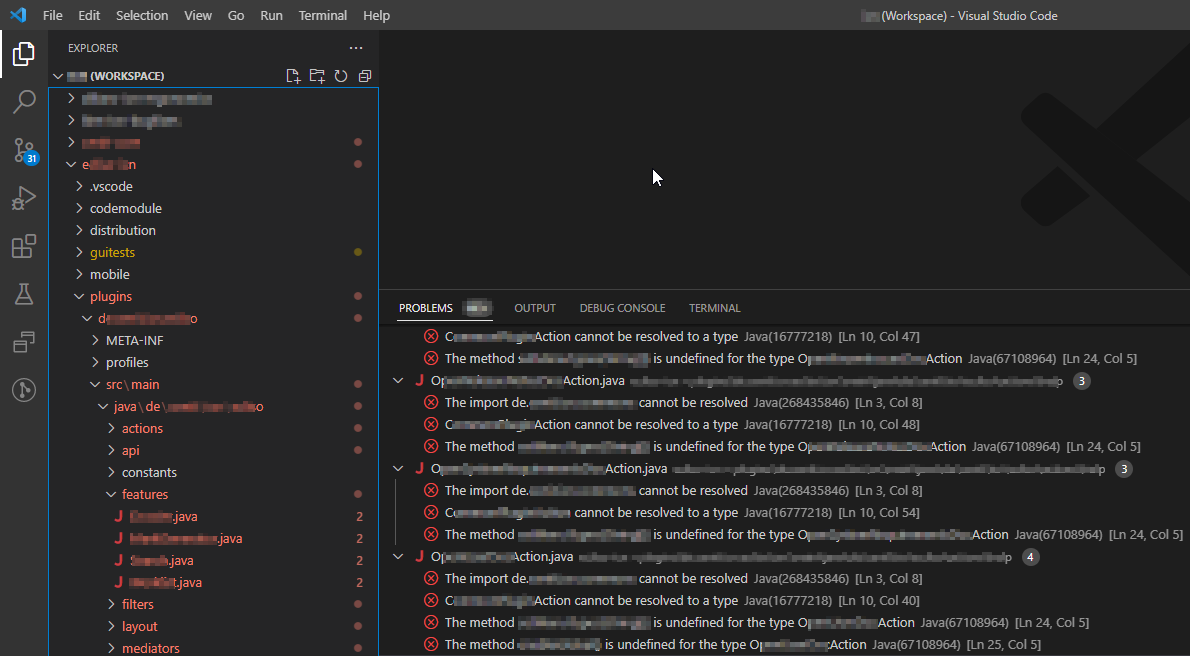
I have a problem where Java files and packages in vscode stay red showing a problem. This happens mostly after cleaning workspace. I use workspaces with many different maven projects in each and it occures in all of them.
The problems shown in the problems view are The import foo.bar cannot be resolved and MyJavaClass cannot be resolved to a type. I can only fix this, if I open every single file once. Then the problmes go away automatically, but this is really annoying to do.
Environment
- Operating System: Windows 10 20H2
- JDK version:
- Visual Studio Code version: 1.69.2
- Java extension version: 1.9.0
Steps To Reproduce
Clean workspace with multiple folders of multimodule maven projects. At least using my projects this happens.
Current Result
VS Code showing a bunch of problems and red projects
Expected Result
No problems in VS Code and no red projects.
Additional Informations
No more hints i can give.


Not sure if it's related with this one: https://github.com/microsoft/vscode-java-pack/issues/1042
@CsCherrYY do you have any insight?