
vscode-java
 vscode-java copied to clipboard
 redhat-developer
failed to run samples/webflux-websocket under Spring GraphQL project
See https://github.com/spring-projects/spring-graphql/issues/408 - Thought it's a Spring GraphQL problem, but turns out to be a VSCode Java problem. Running the sample project in command prompt works fine.
Environment
- Operating System: Debian (WSL)
- JDK version: JDK17
- Visual Studio Code version:
Version: 1.68.0 (user setup)
Commit: 4af164ea3a06f701fe3e89a2bcbb421d2026b68f
Date: 2022-06-08T11:44:16.822Z
Electron: 17.4.7
Chromium: 98.0.4758.141
Node.js: 16.13.0
V8: 9.8.177.13-electron.0
OS: Windows_NT x64 10.0.19044
- Java extension version: v0.23.0
Steps To Reproduce
Steps:
$ git clone [email protected]:spring-projects/spring-graphql.git
Cloning into 'spring-graphql'...
remote: Enumerating objects: 13481, done.
remote: Counting objects: 100% (2931/2931), done.
remote: Compressing objects: 100% (669/669), done.
remote: Total 13481 (delta 2257), reused 2461 (delta 2113), pack-reused 10550
Receiving objects: 100% (13481/13481), 2.23 MiB | 1.13 MiB/s, done.
Resolving deltas: 100% (5538/5538), done.

$ cd spring-graphql/samples/webflux-websocket/

$ code .  # launch VSCode which has Extension Pack for Java installed
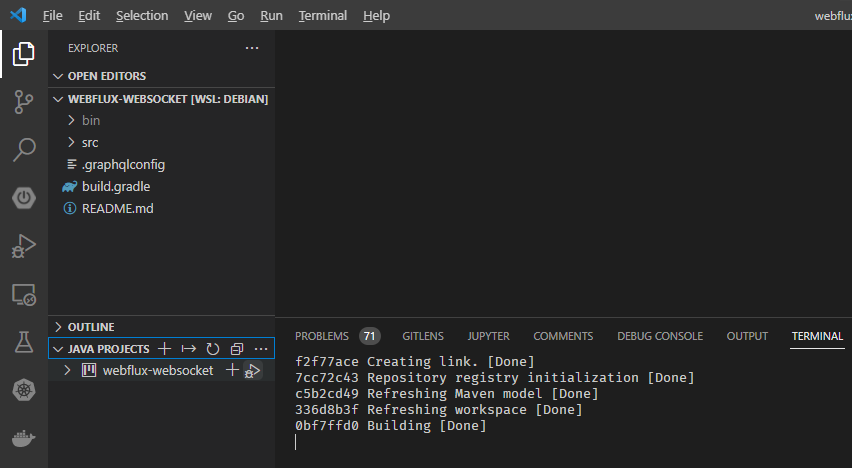
Wait for Java Build to complete (watch Java Build Status):
f2f77ace Creating link. [Done]
7cc72c43 Repository registry initialization [Done]
c5b2cd49 Refreshing Maven model [Done]
336d8b3f Refreshing workspace [Done]
0bf7ffd0 Building [Done]
Go to JAVA PROJECTS and click [Debug] Icon:
Then got results:
 =========|_|==============|___/=/_/_/_/
 :: Spring Boot ::       (v2.7.0-SNAPSHOT)

2022-06-10 10:58:50.883  INFO 10045 --- [  restartedMain] i.s.sample.graphql.SampleApplication     : Starting SampleApplication using Java 1.8.0_311 on powerberry with PID 10045 (/home/tigerinus/dev/tigerinus/spring-graphql/samples/webflux-websocket/bin/main started by tigerinus in /home/tigerinus/dev/tigerinus/spring-graphql/samples/webflux-websocket)
2022-06-10 10:58:50.885  INFO 10045 --- [  restartedMain] i.s.sample.graphql.SampleApplication     : No active profile set, falling back to 1 default profile: "default"
2022-06-10 10:58:50.957  INFO 10045 --- [  restartedMain] .e.DevToolsPropertyDefaultsPostProcessor : Devtools property defaults active! Set 'spring.devtools.add-properties' to 'false' to disable
2022-06-10 10:58:50.959  INFO 10045 --- [  restartedMain] .e.DevToolsPropertyDefaultsPostProcessor : For additional web related logging consider setting the 'logging.level.web' property to 'DEBUG'
2022-06-10 10:58:52.103 DEBUG 10045 --- [  restartedMain] reactor.netty.tcp.TcpResources           : [http] resources will use the default LoopResources: DefaultLoopResources {prefix=reactor-http, daemon=true, selectCount=4, workerCount=4}
2022-06-10 10:58:52.104 DEBUG 10045 --- [  restartedMain] reactor.netty.tcp.TcpResources           : [http] resources will use the default ConnectionProvider: reactor.netty.resources.DefaultPooledConnectionProvider@12e972e3
2022-06-10 10:58:52.586 DEBUG 10045 --- [  restartedMain] o.s.w.r.handler.SimpleUrlHandlerMapping  : Patterns [/webjars/**, /**] in 'resourceHandlerMapping'
2022-06-10 10:58:52.946  INFO 10045 --- [  restartedMain] o.s.b.a.e.web.EndpointLinksResolver      : Exposing 3 endpoint(s) beneath base path '/actuator'
2022-06-10 10:58:53.118 DEBUG 10045 --- [  restartedMain] o.s.w.r.r.m.a.ControllerMethodResolver   : ControllerAdvice beans: none
2022-06-10 10:58:53.161 DEBUG 10045 --- [  restartedMain] o.s.w.s.adapter.HttpWebHandlerAdapter    : enableLoggingRequestDetails='false': form data and headers will be masked to prevent unsafe logging of potentially sensitive data
2022-06-10 10:58:53.612  WARN 10045 --- [  restartedMain] onfigReactiveWebServerApplicationContext : Exception encountered during context initialization - cancelling refresh attempt: org.springframework.beans.factory.BeanCreationException: Error creating bean with name 'graphQlSource' defined in class path resource [org/springframework/boot/autoconfigure/graphql/GraphQlAutoConfiguration.class]: Bean instantiation via factory method failed; nested exception is org.springframework.beans.BeanInstantiationException: Failed to instantiate [org.springframework.graphql.execution.GraphQlSource]: Factory method 'graphQlSource' threw exception; nested exception is java.lang.ClassCastException: com.sun.proxy.$Proxy86 cannot be cast to org.springframework.graphql.data.method.annotation.BatchMapping
2022-06-10 10:58:53.645  INFO 10045 --- [  restartedMain] ConditionEvaluationReportLoggingListener :

Error starting ApplicationContext. To display the conditions report re-run your application with 'debug' enabled.
2022-06-10 10:58:53.671 ERROR 10045 --- [  restartedMain] o.s.boot.SpringApplication               : Application run failed

org.springframework.beans.factory.BeanCreationException: Error creating bean with name 'graphQlSource' defined in class path resource [org/springframework/boot/autoconfigure/graphql/GraphQlAutoConfiguration.class]: Bean instantiation via factory method failed; nested exception is org.springframework.beans.BeanInstantiationException: Failed to instantiate [org.springframework.graphql.execution.GraphQlSource]: Factory method 'graphQlSource' threw exception; nested exception is java.lang.ClassCastException: com.sun.proxy.$Proxy86 cannot be cast to org.springframework.graphql.data.method.annotation.BatchMapping
If I do
$ cd spring-graphql/samples/webflux-websocket/
$ ../../gradlew bootRun
... then everything works fine.
So it's something related to VSCode Java support.
I tried both JDK17 and JDK8 in VSCode and got the same error. I tried both JDK17 and JDK8 in command line and they are working fine.

Yes I can observe the same error when running SampleApplication in webflux-websocket.
@CsCherrYY Let's add this project into the test projects and see what's the gap.
