
BardToolbox-Release
 BardToolbox-Release copied to clipboard
 reckhou
An all-in-one toolbox, providing all the essentials bards & bands would need every day.
Bard Toolbox
Bard Toolbox is an all-in-one FFXIV Dalamud plugin for bards and bands, providing all the essential functions that people would need every day.
Please join our Discord Server!
Support me on Ko-Fi:

The major functions of Bard Toolbox are as below:
Multiboxing
- Supports multiple instances of game clients.
Camera Utility
- Disables rendering when entering performance mode, or toggle on/off by hand.
Window Utilities
- Shows the character name on the window title.
- Removes game window size restriction.
- Saves/loads window positions and sizes by character names, or chooses between some pre-made formations.
- Minimizes game clients.
Party Utilities
- Invites all local characters to your party.
- Auto accepts party invitations.
- Auto accepts teleport invitations.
- Gets the party leader/disbands the party.
Formations
- Saves the relative positions and facings of your local characters as formations.
- Loads the saved formation, and all saved characters will move to the corresponding positions with the correct facing.
- Supports any number of local characters, and doesn't need to be in a party.
- Supports multiple presets and you may preview each formation on the UI.
Broadcasting
- Broadcasts key pressings to all characters.
- Broadcasts system commands and macros to all characters, and supports text commands of any plugins as well.
- These functions allow you to make bards doing synchronized emotes and macros.
System Config Utilities
- Toggles auto-AFK timer.
- Toggles background framerate limit when not in perform mode.
- Sets lowest graphic setting when in perform mode.
- Sets lowest maximum object display quantity when in perform mode.
- Mutes/unmutes other clients.
CPU Affinity Control
- Distributes CPU cores to each client automatically.
- This function stabilizes CPU resource distribution, so all clients may run at a stable framerate.
Login Utilities
- Logs in/out all your characters.
- This is useful when you wish to do data center travel.
We are adding text commands for each function, so you may bind those to QoL Bar as shortcuts.
Hope you enjoy our work, and if you have any questions, feel free to ask on our Discord!
Installation
To install Bard Toolbox, you'll need to use XIVLauncher with the in-game addon (Dalamud) enabled. Once Dalamud has loaded, you can type /xlplugins in game to open the plugin installer.
Please open Dalamud Settings, on Experimental page, add the Custom Plugin Repository as below:
https://raw.githubusercontent.com/BardToolbox/BardToolbox-Release/master/pluginmaster.json
Back to Plugin Installer, search BardToolbox and install.


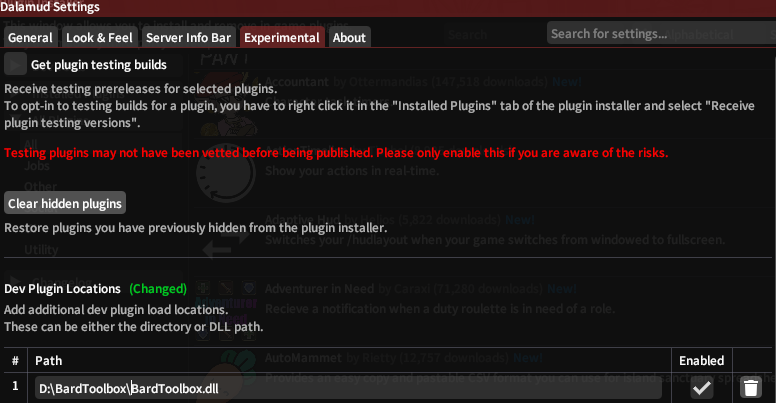
If Bard Toolbox fails to install on your system, this is probably caused by firewalls, other multiboxing software also has similar issues so that's out of our control. If you have encountered this problem, please add %AppData%\XIVLauncher and your FFXIV installation folders as exceptions in your firewall's settings. If this still doesn't work you may download the zip file below and extract it, then load BardToolbox.dll as a dev plugin in Dalamud:
https://github.com/BardToolbox/BardToolbox-Release/raw/master/plugins/BardToolbox/latest.zip
 reckhou