
rebass

rebass copied to clipboard
 rebassjs
A better way to debug with Chrome Devtools / React Devtools?
I often find the code that I'm looking for in two ways. Either from Chrome Inspector or React Devtools. Currently, both of them can't help me.
Given the following code:
import { Input } from "@rebass/forms";
import React from "react";
import { Box, Flex } from "rebass";

const Component = (props: {}) => {
    return (
        <Flex justifyContent="flex-end" alignItems="center">
            <Box mx={1}>
                <Input placeholder="Placeholder" />
            </Box>
        </Flex>
    );
};
I get the following results:
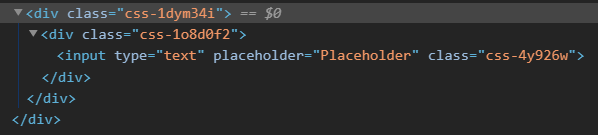
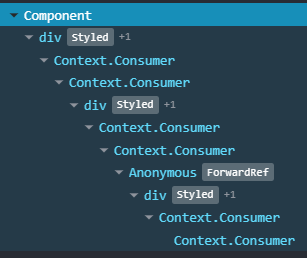
After a quick search, I found out about babel-plugin-emotion which has autoLabel, so I integrated it (or at least I tried) to my NextJS app:
{
    "presets": ["next/babel"],
    "plugins": [
        [
            "emotion",
            {
                "sourceMap": true,
                "autoLabel": true,
                "labelFormat": "[local]",
                "cssPropOptimization": true
            }
        ]
    ]
}
But it made no difference. In the current state, it gives me no choice but to ditch rebass/emotion/style-component or any related packages since it has a profound effect on my productivity. Any help would be very much appreciated.
