

 realthunder
tab autocomplete in python console not always working
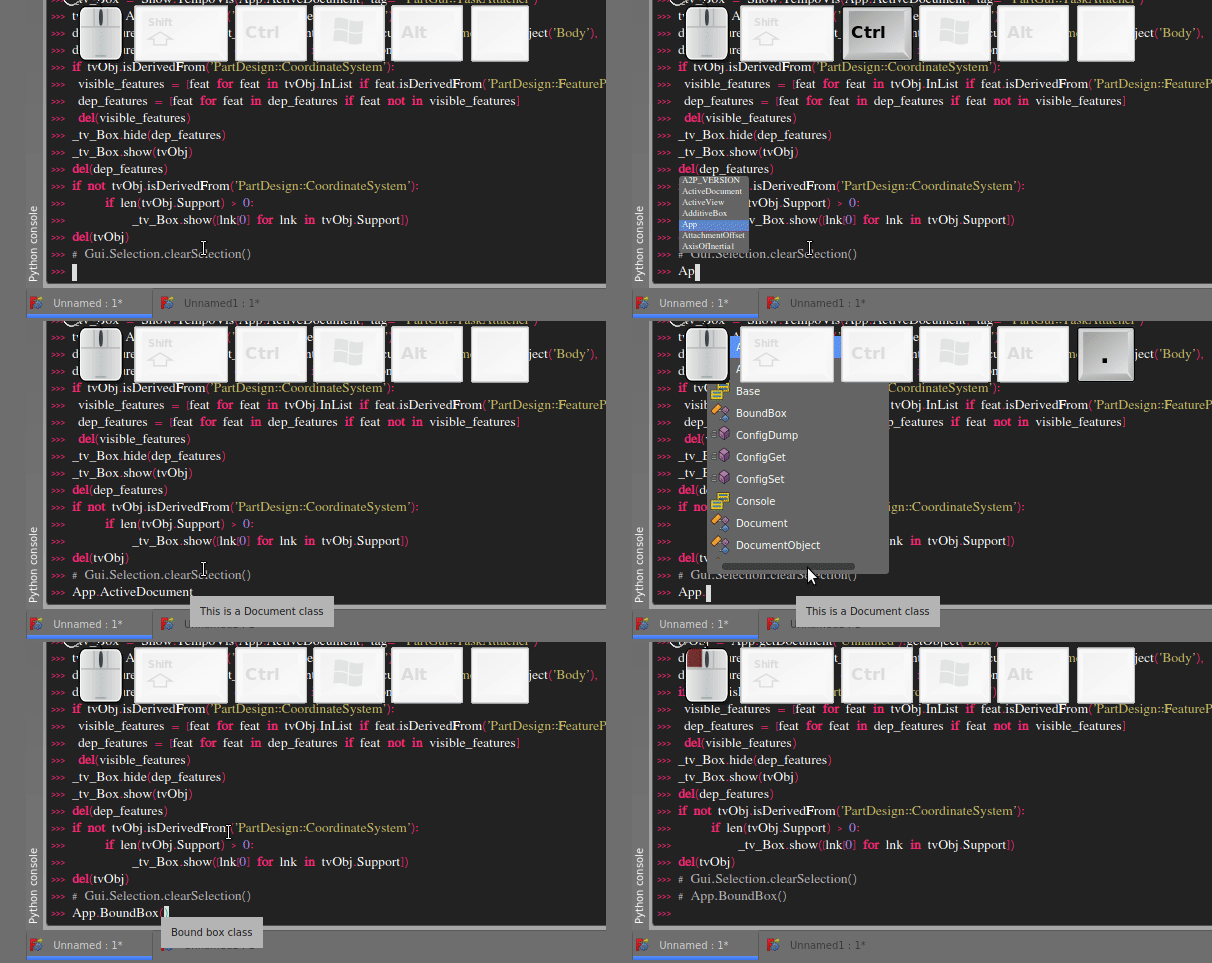
There is no Tab-autocomplete in the python console when entering a word. But since there is autocompletion menu with tab, i guess it is supposed to work. When the element operator (".") is used the menu shows up and it can be selected via tab.

Is there a possibility to connect an external python console, preferably ipython console, to a running FreeCAD instance?
OS: Linux Mint 20.1 (XFCE/xfce)
Word size of OS: 64-bit
Word size of FreeCAD: 64-bit
Version: 2021.717.24301 +3842 (Git) AppImage
Build type: Release
Branch: LinkDaily
Hash: 44be6d539871be4083e83f428e8fcfbcf38408ef
Python version: 3.9.6
Qt version: 5.12.9
Coin version: 4.0.1
OCC version: 7.5.2
Locale: English/United States (en_US)

I just realized that the auto completion is triggered via Ctrl + Space. But the font and window is tiny in all stylesheets i've tried. Seems there are different ways of displaying the auto completion suggestions.
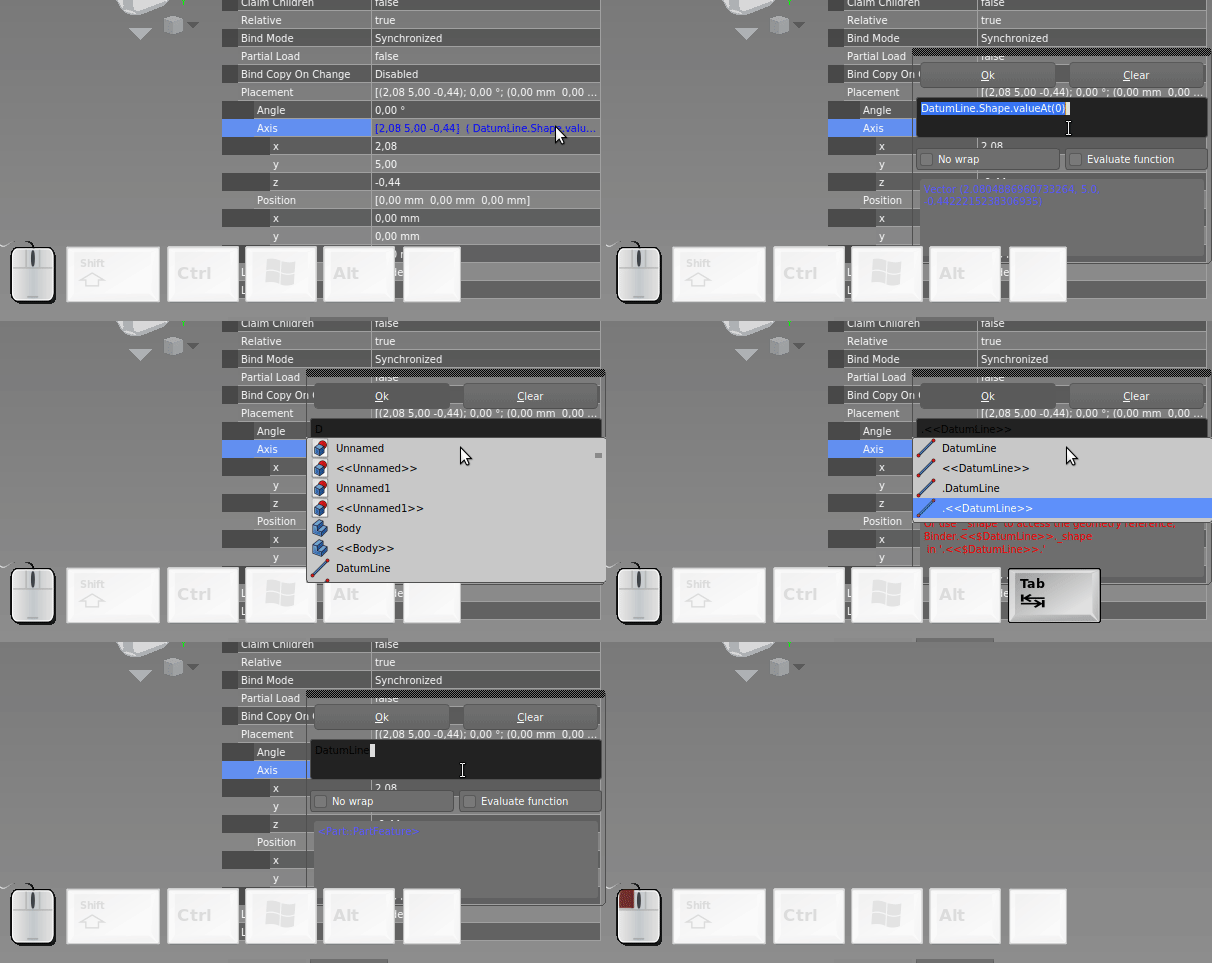
Also the user interaction is rather inconsistent. The autocomplete in the Properties view works different. There the Tab key is used to cycle trough the suggestions and not to accept them.
Is there a possibility to connect an external python console, preferably ipython console, to a running FreeCAD instance?
There is built-in support for using Jupyter with FreeCAD in both of my Windows and Linux release.
For Windows, just double click RunJupyter.bat inside the directory.
For Linux, type the following command in a terminal
./FreeCAD-asm3-Daily-Conda-Py3-Qt5-20210717-glibc2.12-x86_64.AppImage jupyter notebook
Once launched in the browser, select New -> FreeCAD, and run the following command to start FreeCAD
%init_freecad gui

Yeah, i was looking for that for a while. I believe i had seen something on a picture in a tweet but haven't found documented how to do it anywhere. This opens up a lot new possibilities for scripting or ploting.
With %qtconsole a QT console can be opened from within jupyter and with
./FreeCAD.AppImage jupyter console --existing a text console can be connected from the terminal.
Works great as far as i can see. Just one thing: when i use the normal console in the FreeCAD GUI, then the stderr is redirected to the terminal where i started freecad from and in the jupyter output. But the stdout is missing. The stdout can be seen in the qtconsole but there the stderr is not printed unless it came from the other terminal console. Seems kind of arbitrary and confusing. Would be nice if both stdout and stderr shows on all terminals (gui console, jupyter, qtconsole, and any other connected consoles). Or at least in the FreeCAD gui console if the command is entered there.
For Linux, type the following command in a terminal
./FreeCAD-asm3-Daily-Conda-Py3-Qt5-20210717-glibc2.12-x86_64.AppImage jupyter notebook
Does not work anymore with the latest release. I get following errors:
> Applications/FreeCAD-Link-Stable-Linux-x86_64-py3.11-20241003_94d2fcf5a50a9ab447b36047a29c994b.AppImage jupyter notebook .
/tmp/.mount_FreeCATFU9qS
[W 2025-02-16 11:15:15.425 ServerApp] jupyter_server_fileid | error adding extension (enabled: True): The module 'jupyter_server_fileid' could not be found (No module named 'jupyter_server_fileid'). Are you sure the extension is installed?
    Traceback (most recent call last):
      File "/tmp/.mount_FreeCATFU9qS/usr/lib/python3.11/site-packages/jupyter_server/extension/manager.py", line 323, in add_extension
        extpkg = ExtensionPackage(name=extension_name, enabled=enabled)
                 ^^^^^^^^^^^^^^^^^^^^^^^^^^^^^^^^^^^^^^^^^^^^^^^^^^^^^^
      File "/tmp/.mount_FreeCATFU9qS/usr/lib/python3.11/site-packages/jupyter_server/extension/manager.py", line 187, in __init__
        self._load_metadata()
      File "/tmp/.mount_FreeCATFU9qS/usr/lib/python3.11/site-packages/jupyter_server/extension/manager.py", line 202, in _load_metadata
        raise ExtensionModuleNotFound(msg) from None
    jupyter_server.extension.utils.ExtensionModuleNotFound: The module 'jupyter_server_fileid' could not be found (No module named 'jupyter_server_fileid'). Are you sure the extension is installed?
[W 2025-02-16 11:15:15.460 ServerApp] jupyter_server_ydoc | error adding extension (enabled: True): The module 'jupyter_server_ydoc' could not be found (No module named 'jupyter_server_ydoc'). Are you sure the extension is installed?
    Traceback (most recent call last):
      File "/tmp/.mount_FreeCATFU9qS/usr/lib/python3.11/site-packages/jupyter_server/extension/manager.py", line 323, in add_extension
        extpkg = ExtensionPackage(name=extension_name, enabled=enabled)
                 ^^^^^^^^^^^^^^^^^^^^^^^^^^^^^^^^^^^^^^^^^^^^^^^^^^^^^^
      File "/tmp/.mount_FreeCATFU9qS/usr/lib/python3.11/site-packages/jupyter_server/extension/manager.py", line 187, in __init__
        self._load_metadata()
      File "/tmp/.mount_FreeCATFU9qS/usr/lib/python3.11/site-packages/jupyter_server/extension/manager.py", line 202, in _load_metadata
        raise ExtensionModuleNotFound(msg) from None
    jupyter_server.extension.utils.ExtensionModuleNotFound: The module 'jupyter_server_ydoc' could not be found (No module named 'jupyter_server_ydoc'). Are you sure the extension is installed?
Fail to get yarn configuration. /usr/bin/node: /tmp/.mount_FreeCATFU9qS/usr/lib/libcrypto.so.3: version `OPENSSL_3.4.0' not found (required by /usr/bin/node)

[W 2025-02-16 11:15:15.896 ServerApp] nbclassic | error adding extension (enabled: True): The module 'nbclassic' could not be found (No module named 'nbclassic'). Are you sure the extension is installed?
    Traceback (most recent call last):
      File "/tmp/.mount_FreeCATFU9qS/usr/lib/python3.11/site-packages/jupyter_server/extension/manager.py", line 323, in add_extension
        extpkg = ExtensionPackage(name=extension_name, enabled=enabled)
                 ^^^^^^^^^^^^^^^^^^^^^^^^^^^^^^^^^^^^^^^^^^^^^^^^^^^^^^
      File "/tmp/.mount_FreeCATFU9qS/usr/lib/python3.11/site-packages/jupyter_server/extension/manager.py", line 187, in __init__
        self._load_metadata()
      File "/tmp/.mount_FreeCATFU9qS/usr/lib/python3.11/site-packages/jupyter_server/extension/manager.py", line 202, in _load_metadata
        raise ExtensionModuleNotFound(msg) from None
    jupyter_server.extension.utils.ExtensionModuleNotFound: The module 'nbclassic' could not be found (No module named 'nbclassic'). Are you sure the extension is installed?
[I 2025-02-16 11:15:15.900 ServerApp] jupyter_lsp | extension was successfully linked.
[I 2025-02-16 11:15:15.909 ServerApp] jupyter_server_terminals | extension was successfully linked.
[I 2025-02-16 11:15:15.916 ServerApp] jupyterlab | extension was successfully linked.
[I 2025-02-16 11:15:15.923 ServerApp] notebook | extension was successfully linked.
[I 2025-02-16 11:15:17.561 ServerApp] notebook_shim | extension was successfully linked.
[I 2025-02-16 11:15:17.617 ServerApp] notebook_shim | extension was successfully loaded.
[I 2025-02-16 11:15:17.622 ServerApp] jupyter_lsp | extension was successfully loaded.
[I 2025-02-16 11:15:17.623 ServerApp] jupyter_server_terminals | extension was successfully loaded.
[I 2025-02-16 11:15:17.628 LabApp] JupyterLab extension loaded from /tmp/.mount_FreeCATFU9qS/usr/lib/python3.11/site-packages/jupyterlab
[I 2025-02-16 11:15:17.628 LabApp] JupyterLab application directory is /tmp/.mount_FreeCATFU9qS/usr/share/jupyter/lab
[I 2025-02-16 11:15:17.629 LabApp] Extension Manager is 'pypi'.
[I 2025-02-16 11:15:17.651 ServerApp] jupyterlab | extension was successfully loaded.
[I 2025-02-16 11:15:17.661 ServerApp] notebook | extension was successfully loaded.
[I 2025-02-16 11:15:17.662 ServerApp] Serving notebooks from local directory: /tmp/.mount_FreeCATFU9qS/usr/bin
[I 2025-02-16 11:15:17.663 ServerApp] Jupyter Server 2.14.2 is running at:
[I 2025-02-16 11:15:17.663 ServerApp] http://localhost:8888/tree?token=878132d9b2f8c60a54c186111f3257205831176f4530594f
[I 2025-02-16 11:15:17.663 ServerApp]     http://127.0.0.1:8888/tree?token=878132d9b2f8c60a54c186111f3257205831176f4530594f
[I 2025-02-16 11:15:17.663 ServerApp] Use Control-C to stop this server and shut down all kernels (twice to skip confirmation).
[C 2025-02-16 11:15:17.753 ServerApp]

    To access the server, open this file in a browser:
        file:///home/user/.local/share/jupyter/runtime/jpserver-90959-open.html
    Or copy and paste one of these URLs:
        http://localhost:8888/tree?token=878132d9b2f8c60a54c186111f3257205831176f4530594f
        http://127.0.0.1:8888/tree?token=878132d9b2f8c60a54c186111f3257205831176f4530594f
[W 2025-02-16 11:15:17.898 ServerApp] Could not determine npm prefix: Command '['/usr/bin/npm', 'prefix', '-g']' returned non-zero exit status 1.
[I 2025-02-16 11:15:17.969 ServerApp] Skipped non-installed server(s): bash-language-server, dockerfile-language-server-nodejs, javascript-typescript-langserver, jedi-language-server, julia-language-server, pyright, python-language-server, python-lsp-server, r-languageserver, sql-language-server, texlab, typescript-language-server, unified-language-server, vscode-css-languageserver-bin, vscode-html-languageserver-bin, vscode-json-languageserver-bin, yaml-language-server
[W 2025-02-16 11:15:18.373 ServerApp] 404 GET /api/collaboration/room/JupyterLab:globalAwareness (56fc154f0af84756836e75d6e370105f@::1) 54.95ms referer=None
[W 2025-02-16 11:15:21.346 ServerApp] 404 GET /api/collaboration/room/JupyterLab:globalAwareness (56fc154f0af84756836e75d6e370105f@::1) 2.16ms referer=None
[W 2025-02-16 11:15:24.425 ServerApp] 404 GET /api/collaboration/room/JupyterLab:globalAwareness (56fc154f0af84756836e75d6e370105f@::1) 4.64ms referer=None
[W 2025-02-16 11:15:27.499 ServerApp] 404 GET /api/collaboration/room/JupyterLab:globalAwareness (56fc154f0af84756836e75d6e370105f@::1) 2.98ms referer=None
[W 2025-02-16 11:15:31.746 ServerApp] 404 GET /api/collaboration/room/JupyterLab:globalAwareness (56fc154f0af84756836e75d6e370105f@::1) 3.88ms referer=None
[W 2025-02-16 11:15:37.296 ServerApp] 404 GET /api/collaboration/room/JupyterLab:globalAwareness (56fc154f0af84756836e75d6e370105f@::1) 4.05ms referer=None
[W 2025-02-16 11:15:43.094 ServerApp] 404 GET /api/collaboration/room/JupyterLab:globalAwareness (56fc154f0af84756836e75d6e370105f@::1) 1.73ms referer=None
[W 2025-02-16 11:15:47.752 ServerApp] 404 GET /api/collaboration/room/JupyterLab:globalAwareness (56fc154f0af84756836e75d6e370105f@::1) 4.72ms referer=None
[W 2025-02-16 11:15:53.167 ServerApp] 404 GET /api/collaboration/room/JupyterLab:globalAwareness (56fc154f0af84756836e75d6e370105f@::1) 1.98ms referer=None
[W 2025-02-16 11:15:59.598 ServerApp] 404 GET /api/collaboration/room/JupyterLab:globalAwareness (56fc154f0af84756836e75d6e370105f@::1) 3.83ms referer=None
[W 2025-02-16 11:16:06.304 ServerApp] 404 GET /api/collaboration/room/JupyterLab:globalAwareness (56fc154f0af84756836e75d6e370105f@::1) 1.43ms referer=None
[W 2025-02-16 11:16:12.299 ServerApp] 404 GET /api/collaboration/room/JupyterLab:globalAwareness (56fc154f0af84756836e75d6e370105f@::1) 1.51ms referer=None
[W 2025-02-16 11:16:19.591 ServerApp] 404 GET /api/collaboration/room/JupyterLab:globalAwareness (56fc154f0af84756836e75d6e370105f@::1) 3.63ms referer=None
[W 2025-02-16 11:16:24.965 ServerApp] 404 GET /api/collaboration/room/JupyterLab:globalAwareness (56fc154f0af84756836e75d6e370105f@::1) 3.98ms referer=None
- Seems modules
jupyter_server_fileid,jupyter_server_ydocandnbclassicare missing. - OpenSSL Version Conflict (OPENSSL_3.4.0 not found), (
libcrypto.so.3exists in AppImage)
I found a fix for me:
# extract the AppImage
./FreeCAD-Link-Stable-Linux-x86_64-py3.11-20241003_94d2fcf5a50a9ab447b36047a29c994b.AppImage --appimage-extract

# install missing python packages
cd squashfs-root
./AppRun python -m pip install --upgrade jupyterlab notebook jupyter-server jupyter-server-fileid pycrdt pycrdt-websocket nbclassic

# now, either just run it from the extracted folder ...
./AppRun jupyter notebook --notebook-dir=/home/username

# ... or repackage it
appimagetool --no-appstream squashfs-root FreeCAD-Fixed.AppImage
It might be necessary to change the ~/.local/share/jupyter/kernels/freecad-conda/kernels.json according to https://github.com/akloster/freecad_jupyter .
This works so far, but i get an error for the repackaged AppImage that it cannot write to the sqlite database, which seems to be connected with jupyter's collaborative features.
I get this when creating a new notebook. Notebook opens though.
SQLite exception
Traceback (most recent call last):
  File "/tmp/.mount_FreeCAmpGiFB/usr/lib/python3.11/site-packages/pycrdt/store/sqlite.py", line 244, in write
    await cursor.execute(
  File "/tmp/.mount_FreeCAmpGiFB/usr/lib/python3.11/site-packages/sqlite_anyio/sqlite.py", line 92, in execute
    real_cursor = await to_thread.run_sync(self._real_cursor.execute, sql, parameters, limiter=self._limiter)
                  ^^^^^^^^^^^^^^^^^^^^^^^^^^^^^^^^^^^^^^^^^^^^^^^^^^^^^^^^^^^^^^^^^^^^^^^^^^^^^^^^^^^^^^^^^^^
  File "/tmp/.mount_FreeCAmpGiFB/usr/lib/python3.11/site-packages/anyio/to_thread.py", line 56, in run_sync
    return await get_async_backend().run_sync_in_worker_thread(
           ^^^^^^^^^^^^^^^^^^^^^^^^^^^^^^^^^^^^^^^^^^^^^^^^^^^^
  File "/tmp/.mount_FreeCAmpGiFB/usr/lib/python3.11/site-packages/anyio/_backends/_asyncio.py", line 2405, in run_sync_in_worker_thread
    return await future
           ^^^^^^^^^^^^
  File "/tmp/.mount_FreeCAmpGiFB/usr/lib/python3.11/site-packages/anyio/_backends/_asyncio.py", line 914, in run
    result = context.run(func, *args)
             ^^^^^^^^^^^^^^^^^^^^^^^^
sqlite3.OperationalError: attempt to write a readonly database