

 readthedocs
Search page empty
Problem
When opening search page directly in the browser, it is blank:

The link to a search page is included in the default master document in Sphinx, so it's quite likely that many docs contain that.
Originally reported by @baffclan as https://github.com/WeblateOrg/weblate/issues/4552
Reproducible Project
It is visible on sphinx_rtd_theme docs as well:
https://sphinx-rtd-theme.readthedocs.io/en/latest/search.html
Error Logs/Results
N/A
Expected Results
The search input should be shown there if no search has been performed.
Environment Info
- Python Version: any
- Sphinx Version: any
- RTD Theme Version: 0.5.0

The desired behaviour would be to show the page of search results without any search result found (example with sphinx-rth-theme)?

When searching then it makes sense to display result. Without any parameter, it should IMHO show search form. Or at least something that looks reasonable and not blank page with two horizontal lines.
- The link to search page is in the default Sphinx master document, so my guess is that quite many projects will have it.
- Themes shipped with Sphinx do have search input box on the search page:
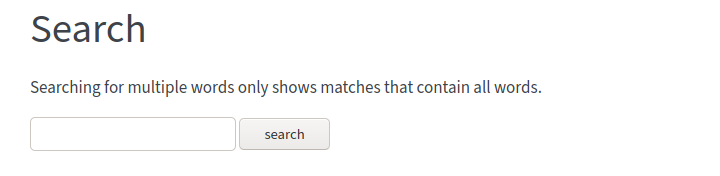
It seems that the reasonable behavior would be showing a simple search form, do not render the search form in the navigation bar, like alabaster does.
So, is displayed like that because the search form is at the left, I agree that putting the form in the page itself is more intuitive

This is going to be fixed with https://github.com/readthedocs/sphinx_rtd_theme/pull/1022

@Blendify this issue isn't related to that bug. This is about the search input not being shown in the page https://sphinx-rtd-theme.readthedocs.io/en/latest/search.html (only shown in the sidebar)
Are there any plans to fix this bug? ``:ref:`search``` is a standard sphinx feature.
