

 reactivemarbles
feature: Change TransformAsync implementation to be more similar to normal Transform
- Reuse TransformedItemContainer.
- Add more overloads, like normal Transform
- Add transformOnRefresh, like normal Transform

The failing test works on my computer, and does not seem to be using any of the code I changed..
Thanks, l am on holiday right now (at 3.5k altitude in the Alps as I type ), so can't look into it. I'll get straight on the case as soon as I am home.

@RolandPheasant With your suggested change, the test I added fails. I'm not sure if the test is wrong or the implementation...
@RolandPheasant With your suggested change, the test I added fails. I'm not sure if the test is wrong or the implementation...
That's really odd. I just run it again locally and it passes! Does it run locally for you too?
@RolandPheasant With your suggested change, the test I added fails. I'm not sure if the test is wrong or the implementation...
That's really odd. I just run it again locally and it passes! Does it run locally for you too?
It passes for me locally :P
It passes for me locally :P
I have seen such issues before when running code on a build server (when using Tasks within RX). It's a bit of a guess but I suspect the issue comes as a result of parallelised running of tests where for some reason task awaiting behaves oddly. Perhaps a context switch due to internal .ConfigureAwait(false) usage plays weirdly with the test runner - if that's the case it would just be a timing issue which is not an actual issue but is a test issue.
I am happy the code works and suggest we ignore the test by making it private, not public. Add a comment with a link to this discussion.
It passes for me locally :P
I have seen such issues before when running code on a build server (when using Tasks within RX). It's a bit of a guess but I suspect the issue comes as a result of parallelised running of tests where for some reason task awaiting behaves oddly. Perhaps a context switch due to internal
.ConfigureAwait(false)usage plays weirdly with the test runner - if that's the case it would just be a timing issue which is not an actual issue but is a test issue.I am happy the code works and suggest we ignore the test by making it private, not public. Add a comment with a link to this discussion.
Hm ok, I did as you suggested, but I am concerned that this problem indicates there is a deeper bug somewhere in the implementation (not in the test).
@oysteinkrog I've worked out the issue.
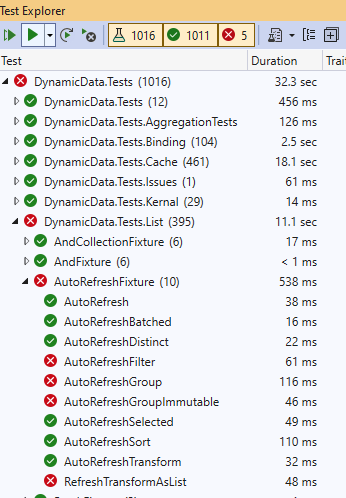
I tried running all the tests on your branch and found there was several failures including with AutoRefresh and Transform. This struck me as odd, then i realised you'd branched from an old branch and there's been a load of changes since.
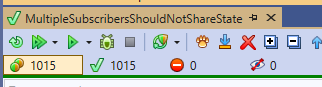
So I grabbed a later branch and manually copied all your code over to the clean branch and all the tests run.
Before on your branch.
Code cloned to clean branch
So the choice is either you repeat what I did on a new PR, or alternatively I could check the changes in on my branch. What do you think?
So the choice is either you repeat what I did on a new PR, or alternatively I could check the changes in on my branch. What do you think?
I'm not sure I understand this, I just rebased the PR to latest main branch. Is there another branch I should base my PR on? I don't mind either way, I really just want to get this in, as for me (in our product) it also fixes #623 :)
I can't entirely explain why myself but sometimes merge, rebases or force push does not always behave perfectly. However what I also cannot understand is why the AutoRefresh tests plus one of the Transform (not TransformAsync!) fails on your branch (and also on the build server). That's why for an experiment I manually copied the code over to a clean branch and the results are clear .
I suggest leaving this PR open for now. I'll raise a PR with the cloned changes and lets see what happens. It may be that the TransformAsync.TransformOnRefresh stills fails, but there will be no harm trying.
This pull request has been automatically locked since there has not been any recent activity after it was closed. Please open a new issue for related bugs.
![github-actions[bot] avatar](https://avatars.githubusercontent.com/in/15368?v=4 "Published by a pub.dev verified publisher")