

 react-navigation
Can not hide header when using headerBackground option
Current behavior
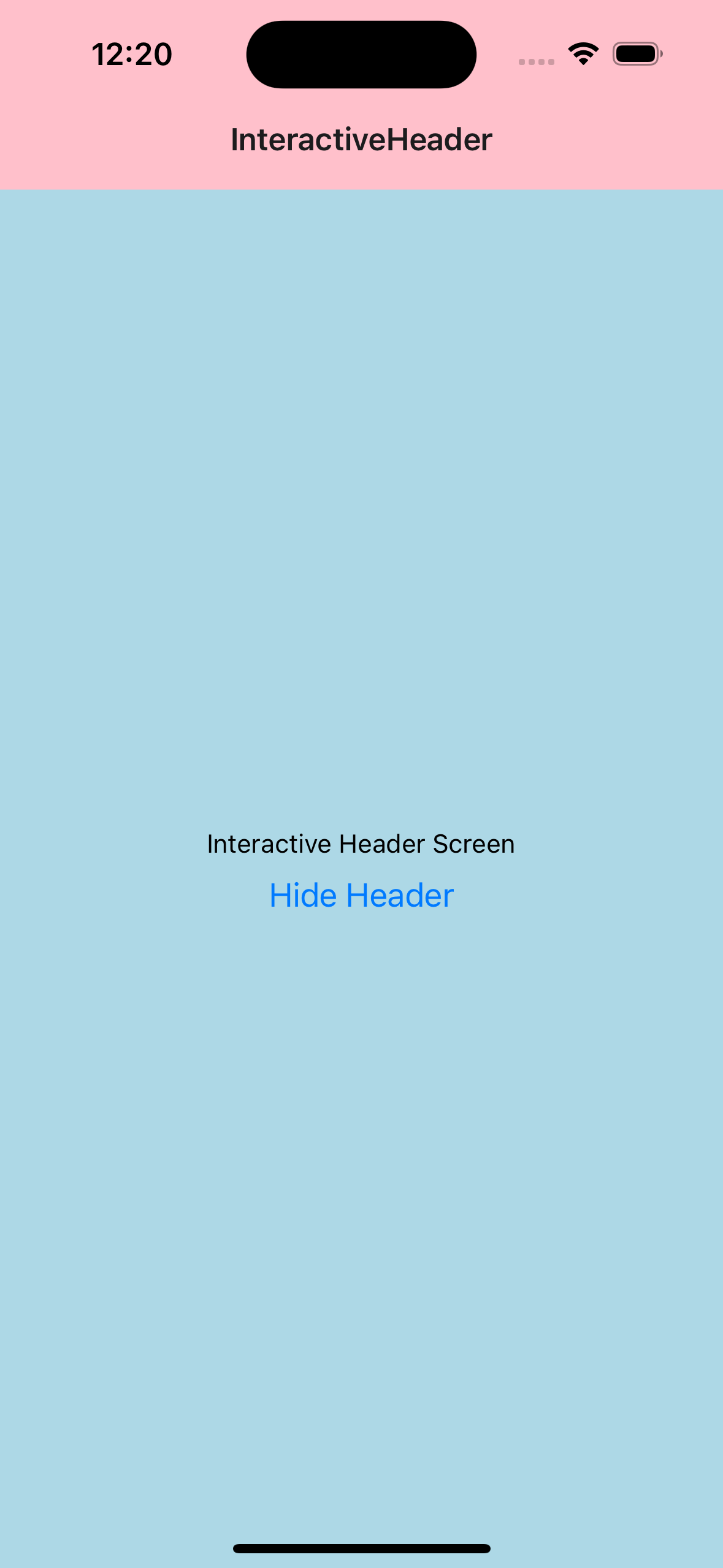
I want to hide the header on a specific screen, this can be done interactively (like in the example below) but also will reproduce if we want the header to be hidden all the time (by setting the option headerShow to false on the Screen definition).
This functionality is useful if we want to remove the header to display a fullscreen video or image on device rotation.
If I use the headerBackground option the current behavior is not expected.
The code:
import React from 'react';
import {Button, StyleSheet, Text, View} from 'react-native';
import {NavigationContainer} from '@react-navigation/native';
import {createNativeStackNavigator} from '@react-navigation/native-stack';

function InteractiveHeaderScreen({navigation}) {
  const [headerShown, setHeaderShown] = React.useState(true);

  return (
    <View style={[styles.container]}>
      <Text>Interactive Header Screen</Text>
      <Button
        title={headerShown ? 'Hide Header' : 'Show Header'}
        onPress={() => {
          navigation.setOptions({headerShown: !headerShown});
          setHeaderShown(!headerShown);
        }}
      />
    </View>
  );
}

const Stack = createNativeStackNavigator();
const defaultHeaderOptions = {
  headerBackground: () => <View style={styles.header} />,
};

function App() {
  return (
    <NavigationContainer>
      <Stack.Navigator initialRouteName="InteractiveHeader">
        <Stack.Screen
          name="InteractiveHeader"
          component={InteractiveHeaderScreen}
          options={{...defaultHeaderOptions}}
        />
      </Stack.Navigator>
    </NavigationContainer>
  );
}

const styles = StyleSheet.create({
  container: {
    flex: 1,
    backgroundColor: 'lightblue',
    alignItems: 'center',
    justifyContent: 'center',
  },
  header: {
    flex: 1,
    backgroundColor: 'pink',
  },
});

export default App;
As we can see in the image below, when we hide the header, the content of the header (title and buttons) is removed but the headerBackground component is not.

Expected behavior
I expect the code to behave in the same way as if the headerBackground option was not used. For example, if we change the code to:
import React from 'react';
import {Button, StyleSheet, Text, View} from 'react-native';
import {NavigationContainer} from '@react-navigation/native';
import {createNativeStackNavigator} from '@react-navigation/native-stack';

function InteractiveHeaderScreen({navigation}) {
  const [headerShown, setHeaderShown] = React.useState(true);

  return (
    <View style={[styles.container]}>
      <Text>Interactive Header Screen</Text>
      <Button
        title={headerShown ? 'Hide Header' : 'Show Header'}
        onPress={() => {
          navigation.setOptions({headerShown: !headerShown});
          setHeaderShown(!headerShown);
        }}
      />
    </View>
  );
}

const Stack = createNativeStackNavigator();
const defaultHeaderOptions = {
  headerStyle: {
    backgroundColor: 'red',
  },
};

function App() {
  return (
    <NavigationContainer>
      <Stack.Navigator initialRouteName="InteractiveHeader">
        <Stack.Screen
          name="InteractiveHeader"
          component={InteractiveHeaderScreen}
          options={{...defaultHeaderOptions}}
        />
      </Stack.Navigator>
    </NavigationContainer>
  );
}

const styles = StyleSheet.create({
  container: {
    flex: 1,
    backgroundColor: 'lightblue',
    alignItems: 'center',
    justifyContent: 'center',
  },
  header: {
    flex: 1,
    backgroundColor: 'pink',
  },
});

export default App;
We have the expected behavior:


Reproduction
https://github.com/ericjavier/navigationTests
Platform
- [X] Android
- [X] iOS
- [ ] Web
- [ ] Windows
- [ ] MacOS
Packages
- [ ] @react-navigation/bottom-tabs
- [ ] @react-navigation/drawer
- [ ] @react-navigation/material-top-tabs
- [ ] @react-navigation/stack
- [x] @react-navigation/native-stack
- [ ] react-native-tab-view
Environment
- [x] I've removed the packages that I don't use
| package | version |
|---|---|
| @react-navigation/native | ^6.1.6 |
| @react-navigation/native-stack | ^6.9.12 |
| react-native-safe-area-context | ^4.5.1 |
| react-native-screens | ^3.20.0 |
| react-native | 0.71.7 |
| node | 20.0.0 |
| npm or yarn | 9.6.4 |


Temporary fix for hide only is to set headerBackground to undefined:
navigation.setOptions({headerShown: false, headerBackground: undefined});
This https://github.com/react-navigation/react-navigation/blob/ae0a70c2d94f77cd8ca8b8d3028f684a63f81b92/packages/elements/src/Header/Header.tsx#L222-L226 should use HeaderShownContext


I think the problem is related to https://github.com/react-navigation/react-navigation/issues/12545
