

 rawpython
Flickering when using Image widget to do animations
I have an existing program that is a YOLO machine learning demonstration.
It's running on Tkinter, Qt, and now I'm shooting for Remi.
Here is how it looks using Tkinter:

And this is the same code except running on Remi:

I've noticed this flicker on other programs that update an Image widget with a new image.
I call SuperImage.load(new_image) when I have a new image to show.
I'm using your SuperImage code for my Images now. Let me know if you need to see that code.

Hello @MikeTheWatchGuy I was making a yolo test 2 days ago and I experienced the same issue . I'm thinking at possible solutions. Are you using base64 data ?

Maybe I got that wrong.... about the base64,
Here's my program that demonstrates it using your webcamera
If you have PySimpleGUIWeb installed and OpenCV2, you'll be able to easily run this.
#!/usr/bin/env python
import sys
if sys.version_info[0] >= 3:
    import PySimpleGUIWeb as sg
else:
    import PySimpleGUI27 as sg
import cv2
import numpy as np
from sys import exit as exit

"""
Demo program that displays a webcam using OpenCV
"""
def main():

    sg.ChangeLookAndFeel('LightGreen')

    # define the window layout
    layout = [[sg.Text('OpenCV Demo', size=(40, 1), justification='center', font='Helvetica 20')],
              [sg.Image(filename='', key='image', enable_events=True)],
              [sg.Button('Record', size=(10, 1), font='Helvetica 14'),
               sg.Button('Stop', size=(10, 1), font='Any 14'),
              sg.Button('Exit', size=(10, 1), font='Helvetica 14'),
               sg.Button('About', size=(10,1), font='Any 14')]]

    # create the window and show it without the plot
    window = sg.Window('Demo Application - OpenCV Integration',
                       location=(800,400))
    window.Layout(layout).Finalize()

    # ---===--- Event LOOP Read and display frames, operate the GUI --- #
    cap = cv2.VideoCapture(0)
    recording = False
    while True:
        event, values = window.Read(timeout=0, timeout_key='timeout')
        if event == 'Exit' or event is None:
            sys.exit(0)
        elif event == 'Record':
            recording = True
        elif event == 'Stop':
            recording = False
            img = np.full((480, 640),255)
            imgbytes=cv2.imencode('.png', img)[1].tobytes() #this is faster, shorter and needs less includes
            window.FindElement('image').Update(data=imgbytes)
        elif event == 'About':
            sg.PopupNoWait('Made with PySimpleGUI',
                           'www.PySimpleGUI.org',
                           'Check out how the video keeps playing behind this window.',
                           'I finally figured out how to display frames from a webcam.',
                           'ENJOY!  Go make something really cool with this... please!',
                           keep_on_top=True)
        if recording:
            ret, frame = cap.read()
            imgbytes=cv2.imencode('.png', frame)[1].tobytes() #ditto
            window.FindElement('image').Update(data=imgbytes)
        if event == 'image':
            print('IMAGE clicked')

main()
exit()
@MikeTheWatchGuy Unfortunately I get an error when I run this example. Here is the error message:
C:\DATA\Software\remi>python.exe C:\DATA\Software\remi\examples\pysimplegui_webcam.py
* ERROR PACKING FORM *
Traceback (most recent call last):
File "C:\Users\progr\AppData\Local\Programs\Python\Python37-32\lib\site-packages\PySimpleGUIWeb\PySimpleGUIWeb.py", line 5169, in setup_remi_window
    PackFormIntoFrame(window, master_widget, window)
File "C:\Users\progr\AppData\Local\Programs\Python\Python37-32\lib\site-packages\PySimpleGUIWeb\PySimpleGUIWeb.py", line 4651, in PackFormIntoFrame
    element.Widget = SuperImage(element.Filename if element.Filename is not None else element.Data)
File "C:\Users\progr\AppData\Local\Programs\Python\Python37-32\lib\site-packages\PySimpleGUIWeb\PySimpleGUIWeb.py", line 1675, in __init__
    self.load(image)
File "C:\Users\progr\AppData\Local\Programs\Python\Python37-32\lib\site-packages\PySimpleGUIWeb\PySimpleGUIWeb.py", line 1678, in load
    if type(file_path_name) is bytes or len(file_path_name) > 200:
TypeError: object of type 'NoneType' has no len()
Please make sure you're using a PySimpleGUIWeb.py file from the GitHub. I'm don't think the code required has been released.
I tested it with the latest from PyPI and it does crash. We're working with brand new code.
I can upload my current version that I know is working. It's got quite a bit new code in it however that I need to test a bit more.
You can download the .py file from here: https://github.com/PySimpleGUI/PySimpleGUI/blob/master/PySimpleGUIWeb/PySimpleGUIWeb.py
OK, I went ahead and just checked in my latest code into the Master Branch. I don't think I broke anything. I wanted to make sure you're able to run this test.
Excuse for the late reply @MikeTheWatchGuy . Can you please test this new SuperImage class?
class SuperImage(remi.gui.Image):
    def __init__(self, app_instance, file_path_name=None, **kwargs):
        self.app_instance = app_instance
        image = file_path_name
        super(SuperImage, self).__init__(image, **kwargs)

        self.imagedata = None
        self.mimetype = None
        self.encoding = None
        self.load(image)

    def load(self, file_path_name):
        if type(file_path_name) is bytes or len(file_path_name) > 200:
            self.imagedata = base64.b64decode(file_path_name)
        else:
            self.mimetype, self.encoding = mimetypes.guess_type(file_path_name)
            with open(file_path_name, 'rb') as f:
                self.imagedata = f.read()
        self.refresh()

    def refresh(self):
        i = int(time.time() * 1e6)
        self.app_instance.execute_javascript("""
            var url = '/%(id)s/get_image_data?update_index=%(frame_index)s';
            var xhr = new XMLHttpRequest();
            xhr.open('GET', url, true);
            xhr.responseType = 'blob'
            xhr.onload = function(e){
                var urlCreator = window.URL || window.webkitURL;
                var imageUrl = urlCreator.createObjectURL(this.response);
                document.getElementById('%(id)s').src = imageUrl;
            }
            xhr.send();
            """ % {'id': id(self), 'frame_index':i})

    def get_image_data(self, update_index):
        headers = {'Content-type': self.mimetype if self.mimetype else 'application/octet-stream'}
        return [self.imagedata, headers]
I'm sorry I'm also so far behind in implementing your fixes.
I added this new SuperImage class today, but was not able to get it integrated.
I've got a problem with when my remi.App is created.
At the moment, when I create all of my Widgets, the App has not yet been created. As far as I know, the actual creation of this App variable happens when I call to startup Remi. I cannot do this until I have all of my screen built.
Is there another way of doing this so that I don't need to know the App value until later?
I found a way of "deferring" the use of the App variable until after I had initialized it correctly.
I'm no longer seeing a real image. Instead I see this:
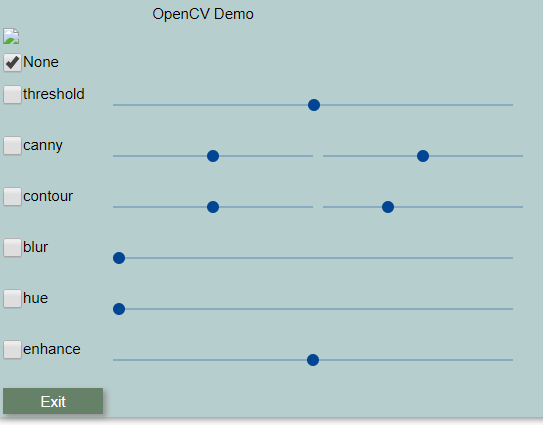
There should be an image of me at the top where the small graphic is located.
It seems like the major difference in the 2 classes is the refresh method.
The new one as I have it:
    def refresh(self):
        i = int(time.time() * 1e6)
        # self.app_instance.execute_javascript("""
        if Window.App is not None:
            Window.App.execute_javascript("""
                var url = '/%(id)s/get_image_data?update_index=%(frame_index)s';
                var xhr = new XMLHttpRequest();
                xhr.open('GET', url, true);
                xhr.responseType = 'blob'
                xhr.onload = function(e){
                    var urlCreator = window.URL || window.webkitURL;
                    var imageUrl = urlCreator.createObjectURL(this.response);
                    document.getElementById('%(id)s').src = imageUrl;
                }
                xhr.send();
                """ % {'id': id(self), 'frame_index':i})
This is the old way the refresh worked:
    def refresh(self):
        i = int(time.time() * 1e6)
        self.attributes['src'] = "/%s/get_image_data?update_index=%d" % (id(self), i)
Somewhere between the two it broke.
Note that I needed to add an extra check to your function to make sure the application has been fully formed and thus the widget is valid for interacting with.
Hello @MikeTheWatchGuy , excuse me for the late reply. Can you please show me the console output?
I'll get back to you on this one quickly as I was working on OpenCV demos over the weekend. I have a short, ~ 25 line, program that will display the webcam stream that I can perhaps use that will be a lot easier.
Wow, this was easy! I changed the import to PySimpleGUIWeb and it just worked. Just like if I change it to PySimpleGUI or PySimpleGUIQt. This is AWESOME. It demonstrates the flickering well.
import PySimpleGUIWeb as sg
import cv2

def main():

    sg.ChangeLookAndFeel('Black')

    # define the window layout
    layout = [[sg.Image(filename='', key='image')],]

    # create the window and show it without the plot
    window = sg.Window('Demo Application - OpenCV Integration', layout,
                       location=(800,400), no_titlebar=True, grab_anywhere=True,)
                       # right_click_menu=['&Right', ['E&xit']],)

    # ---===--- Event LOOP Read and display frames, operate the GUI --- #
    cap = cv2.VideoCapture(0)
    while True:
        event, values = window.Read(timeout=20, timeout_key='timeout')
        if event in ('Exit', None):
            break
        ret, frame = cap.read()
        imgbytes=cv2.imencode('.png', frame)[1].tobytes()
        window.FindElement('image').Update(data=imgbytes)

    window.Close()

main()
Here is the console output as it still has the prints you added:
C:\Python\Anaconda3\python.exe C:/Users/mike/.PyCharmCE2019.1/config/scratches/scratch_458.py new App instance 2112609170880 new App instance 2112623505984 new App instance 2112623505984 new App instance 2112623575504 new App instance 2112623575504 new App instance 2112623575504 new App instance 2112623576456 new App instance 2112623576456 new App instance 2112623576456 new App instance 2112623576456 new App instance 2112623576456 new App instance 2112623576456 new App instance 2112623576456 new App instance 2112623576456 new App instance 2112623576456 new App instance 2112623576456 new App instance 2112623576456 new App instance 2112623576456 new App instance 2112623576456 new App instance 2112623576456 new App instance 2112623576456 new App instance 2112623576456 new App instance 2112623576456 new App instance 2112623576456 new App instance 2112623576456 new App instance 2112623508560 new App instance 2112623508560 new App instance 2112623508560 new App instance 2112623508560 new App instance 2112623508560 new App instance 2112623508560 new App instance 2112623508560 new App instance 2112623508560 new App instance 2112623508560 new App instance 2112623508560 new App instance 2112623508560 new App instance 2112623508560 new App instance 2112623508560 new App instance 2112623508560 new App instance 2112623508560 new App instance 2112623508560 new App instance 2112623508560 new App instance 2112623508560 new App instance 2112623508560 new App instance 2112623508560 new App instance 2112623509008 new App instance 2112623509008 new App instance 2112623509008 new App instance 2112623509008 new App instance 2112623509008 new App instance 2112623509008 new App instance 2112623509008 new App instance 2112623509008 new App instance 2112623509008 new App instance 2112623509008 new App instance 2112623509008 new App instance 2112623509008 new App instance 2112623509008 new App instance 2112623509008 new App instance 2112623509008 new App instance 2112623509008 new App instance 2112623509008 new App instance 2112623509008 new App instance 2112623509008 new App instance 2112623509008 new App instance 2112623508560 new App instance 2112623508560 new App instance 2112623508560 new App instance 2112623508560 new App instance 2112623508560 new App instance 2112623508560 new App instance 2112623508560 new App instance 2112623508560 new App instance 2112623508560 new App instance 2112623508560 new App instance 2112623508560 new App instance 2112623508560 new App instance 2112623508560 new App instance 2112623508560 new App instance 2112623508560 new App instance 2112623508560 new App instance 2112623508560 new App instance 2112623508560 new App instance 2112623508560 new App instance 2112623508560 new App instance 2112623509008 new App instance 2112623509008 new App instance 2112623509008 new App instance 2112623509008 new App instance 2112623509008 new App instance 2112623509008 new App instance 2112623509008 new App instance 2112623509008 new App instance 2112623509008 new App instance 2112623509008
Process finished with exit code -1
It may not have some of the above changes if they were temp. You've got the latest code and I'll check it too today.
Any movement on this one?
It's particularly a good time because I'm showing off a 7-line OpenCV Webcam program now on Reddit. It took off for some reason!
https://www.reddit.com/r/Python/comments/cpymni/7_lines_of_python_code_to_show_your_webcam_in_a/
It flickers on Remi unfortunately.
However, I did take on a challenge when someone posted an ASCII converter app thing. I created this FUN, ALL Python, only numpy used program:
from PIL import Image; import numpy as np
import PySimpleGUIWeb as sg
import cv2

# The magic bits that make the ASCII stuff work shamelessly taken from https://gist.github.com/cdiener/10491632
chars = np.asarray(list(' .,:;irsXA253hMHGS#9B&@'))
SC, GCF, WCF = .1, 1, 7/4

sg.ChangeLookAndFeel('Black')   # make it look cool

# define the window layout
NUM_LINES = 48  # number of lines of text elements. Depends on cameras image size and the variable SC (scaller)
layout =  [*[[sg.T(i, size=(115,1), font=('Courier', 12), key='_OUT_'+str(i))] for i in range(NUM_LINES)],
          [ sg.Button('Exit')]]

# create the window and show it without the plot
window = sg.Window('Demo Application - OpenCV Integration', layout, location=(800,400),
                   no_titlebar=True, grab_anywhere=True, element_padding=(0,0))

# ---===--- Event LOOP Read and display frames, operate the GUI --- #
cap = cv2.VideoCapture(0)                               # Setup the OpenCV capture device (webcam)
while True:
    event, values = window.Read(timeout=0)
    if event in ('Exit', None):
        break
    ret, frame = cap.read()                             # Read image from capture device (camera)

    img = Image.fromarray(frame)  # create PIL image from frame
    # More magic that coverts the image to ascii
    S = (round(img.size[0] * SC * WCF), round(img.size[1] * SC))
    img = np.sum(np.asarray(img.resize(S)), axis=2)
    img -= img.min()
    img = (1.0 - img / img.max()) ** GCF * (chars.size - 1)

    # "Draw" the image in the window, one line of text at a time!
    for i, r in enumerate(chars[img.astype(int)]):
        window.Element('_OUT_'+str(i)).Update("".join(r))
window.Close()
I know you're busy, but you have to marvel at the speed of Remi.
This program converts the webcam video frames into ASCII characters.
The way I display them is that I created a series of 48 Text Elements down the window and every time through my event loop, I get the video, transcode to ASCII and then Update each text line in the window with new ASCII text. In other words, I'm drawing one line at a time.
And it's keeping up perfectly!
It's AMAZING that it runs on tkinter and Remi. Working on a Qt version.
Hello @MikeTheWatchGuy, please excuse me for the late reply. I planned this activity for tomorrow evening. That's a cool script, I will try it tomorrow, I'm curious to see the result :-D
Hello @MikeTheWatchGuy the problem should be fixed now. Use this modified version of SuperImagenew class:
class SuperImagenew(remi.gui.Image):
    def __init__(self, file_path_name=None, **kwargs):
        """
        This new app_instance variable is causing lots of problems.  I do not know the value of the App
        when I create this image.
        :param app_instance:
        :param file_path_name:
        :param kwargs:
        """
        # self.app_instance = app_instance
        image = file_path_name
        super(SuperImagenew, self).__init__(image, **kwargs)

        self.imagedata = None
        self.mimetype = None
        self.encoding = None
        if not image: return
        self.load(image)

    def load(self, file_path_name):
        if type(file_path_name) is bytes or len(file_path_name) > 200:
            print("image data")
            self.mimetype = 'image/png'
            self.imagedata = file_path_name #base64.b64decode(file_path_name)
        else:
            self.mimetype, self.encoding = mimetypes.guess_type(file_path_name)
            with open(file_path_name, 'rb') as f:
                self.imagedata = f.read()
        self.refresh()

    def refresh(self):
        print("refresh")
        i = int(time.time() * 1e6)
        # self.app_instance.execute_javascript("""
        if Window.App is not None:
            Window.App.execute_javascript("""
                var url = '/%(id)s/get_image_data?update_index=%(frame_index)s';
                var xhr = new XMLHttpRequest();
                xhr.open('GET', url, true);
                xhr.responseType = 'blob'
                xhr.onload = function(e){
                    var urlCreator = window.URL || window.webkitURL;
                    var imageUrl = urlCreator.createObjectURL(this.response);
                    document.getElementById('%(id)s').src = imageUrl;
                }
                xhr.send();
                """ % {'id': id(self), 'frame_index':i})

    def get_image_data(self, update_index):
        print("get image data")
        headers = {'Content-type': self.mimetype if self.mimetype else 'application/octet-stream'}
        return [self.imagedata, headers]
Furthermore, delete the existing SuperImage class and replace SuperImage with SuperImagenew where required (you should find 3 occurrences).
Please let me know if this works for you. I tried this fix with the last version on PySimpleGuiWeb on github master branch and the example above.
OMG! It works! It works! It works! It works! It works! It works! It works! It works! It works! It works! It works! It works! It works! It works! It works! It works! It works! It works! It works! It works! It works! It works! It works! It works! It works! It works! It works! It works!
There is no more flicker!
That means demos like this one run in a browser. It's STUNNING!!!
import cv2, PySimpleGUIWeb as g
window, cap = g.Window('4 Line Cam', [[g.Image(filename='', key='image')], ], location=(800,400)), cv2.VideoCapture(0)
while window(timeout=0)[0] is not None:
    window['image'](data=cv2.imencode('.png', cap.read()[1])[1].tobytes())
4 lines of code to get your webcam shown in a browser!!
Thank you SO VERY MUCH for giving me the complete code like this.
I've GOT to release this to PyPI very soon!

Dang!
It's working great when the image is being "updated", but it's no longer working when the initial image is provided and not changed using an update method. It's the case where the image is specified inside the layout, the normal ways of using Image, that's broken.
Hello @MikeTheWatchGuy , do you mean that it flickers with a static image? Can you provide an example about this?
FYI: I don't think any of the ways you are currently doing it will be flicker free.
It is my experience that you should rather make the 'image' a MJPEG stream and mange that stream/stream-server outside of REMI (remi just shows the image mjpeg), or replace the actual image with a new one - not via data, but change the url to a new image, while attaching a ?time=xxx cache buster, and take care to serve that image again, outside of remi. What browsers do with data images and refreshing is in my experience wildly inconsistent.

@nzjrs thank you so much for the advice. The solution I wrote above worked really well for a project I'm working on. It is a project about live camera image processing. However I trust you, maybe it could fail on some browsers. I tested it with Chrome and Edge. Do you have an example about your suggested solution? I don't know how to send an image as an MPJEG stream
It was flicker free for sure running the webcam program.
Try out the 4 line program using PySimpleGUIWeb.py from the GitHub (http://www.PySimpleGUI.com) and you'll see it appears to be flicker free. Looks great to me.
@dddomodossola To see the new problem, if you run this you'll see 2 spots for images at the top of the page that show the image is missing:
import PySimpleGUIWeb as sg
sg.main()
@MikeTheWatchGuy So the problem we are getting now is not related to flickering. It is instead that the image is not shown. Is this correct?
Right!!
This is absolutely correct.
The flickering has been FIXED according the the code on my GitHub that is using the SuperImageNew above.
But it seems to have broken the basic display image.
Your statement is correct.
By the way, this is the location of the latest PySimpleGUIWeb.py file: https://github.com/PySimpleGUI/PySimpleGUI/blob/master/PySimpleGUIWeb/PySimpleGUIWeb.py
Any update on this.
This specific issue is holding up the release to PyPI. This delayed release is an important one as it contains the PEP8 bindings that are available in the released versions of the other 3 ports. It's been a while since a PySimpleGUIWeb release so I've been anxious to get it out the door.
This animation feature is an AWESOME one because with it the 4-line webcam program will run on tkinter, Qt, and on Remi by only changing the import. So, not only is the code super-short, it'll run cross-platform, a really cool thing.
Any help on getting the basic Image working again would be very very appreciated.
@MikeTheWatchGuy I did some tests Yesterday. The problem seems to be not related to the widget SuperImage itself. It seems to be the default base64 icon that is used. It seems to be a wrong base64 data. I will fix this this nightand inform you quickly ;-)