
vuetable-2

vuetable-2 copied to clipboard
 ratiw
ratiw
VuetablePagination not working properly
I use vuetable-2 with laravel and pagination component is not being displayed on frontend.
Version: vuetable-2 2.0.0-beta.4
This is my code.
<vuetable ref="vuetable"
                     api-url="{{ route('admin.companies') }}"
                     :fields="fields_config"
                     data-path=""
                     pagination-path=""
                     :css="css_config"
                     :show-sort-icons="true"
                     :sort-order="initial_sort"
                     :append-params="additionalParams"
                     :per-page="3"
                     @vuetable:pagination-data="onPaginationData"
                     @vuetable:loading="onLoading"
                     @vuetable:loaded="onLoaded"
                   >
                   </vuetable>
                   <div class="p-3" >
                       <vuetable-pagination ref="pagination"
                           :css="pagination"
                           @vuetable-pagination:change-page="onChangePage"
                       ></vuetable-pagination>
                   </div>
I tried Inspect Element and there's not any console error log and the pagination component was hidden by inline style display:none
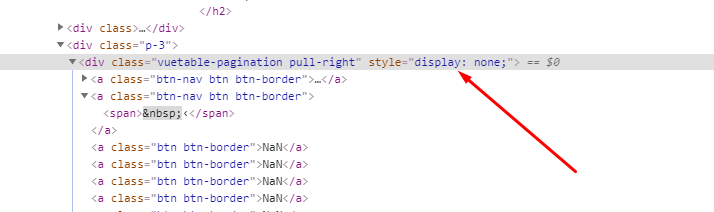
Looking for help from someone. Thanks.


removing data-path, does not help in my case data doesn't display after removing
