

 rapi-doc
Light Border Color Not Changing
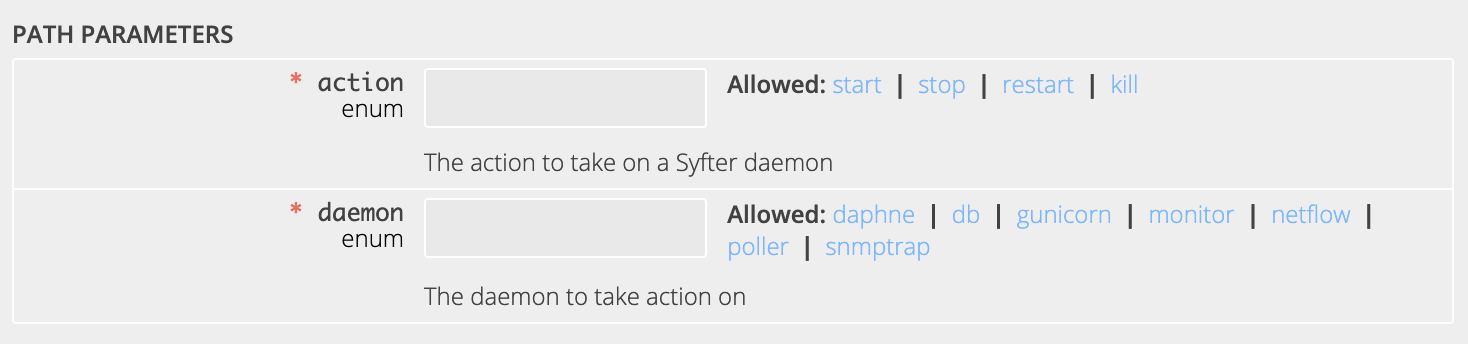
I am trying to change the light border color (the white lines that surround the table and the text box) to something darker. I tried changing the light-border-color variable in the rapi-doc spec-url, however, this is not changing anything. Any ideas on how to fix this?

provide the code/config of the rapidoc element including the style changes if any

Rapidoc Element:
<rapi-doc spec-url = "/api-doc/syfter_oas.yaml" render-style = "read" primary-color= "#848484" bg-color= "#eeeeee" text-color = "#424242" show-header = "false" nav-text-color = "#eeeeee" nav-hover-text-color = "#cccccc" allow-server-selection = "false" allow-authentication = "false" border-color = "#555555" nav-hover-bg-color = "#485F77" light-border-color = "#000000" >
Style Changes:
<style> rapi-doc::part(section-navbar) { background: #424242 } rapi-doc::part(operation-divider) { border-top: 2px solid #888888; } rapi-doc::part(textbox-nav-filter) { background-color: #eeeeee; } table.m-table td { border: 1px solid #888888; } </style>
sorry to reply late on this.
you should first set the theme = light or dark default is dark setting the theme will automatically update few other colors such as border-color
since it appears that you are using a light color theme set theme='light' should take care of this issue