
Rapee Suveeranont



Rapee Suveeranont

Homepage: Visualization showing all 500 MPs as dots. Users can filter dots by their gender, age range, education, occupation group. When filter changes, it rearranges so that selected dots ordered...
# What To Do - Add Google Analytics event tracking: - Page `/senate/score` - กดดูวิวแบบไหนบ้าง? event = `senate_score_mode`, action = "View", value = `"1,1,0"` when first 2 buttons are toggled...
# What To Do - Create vote log detail pop over - To be toggled by senator vote log chart in #195. 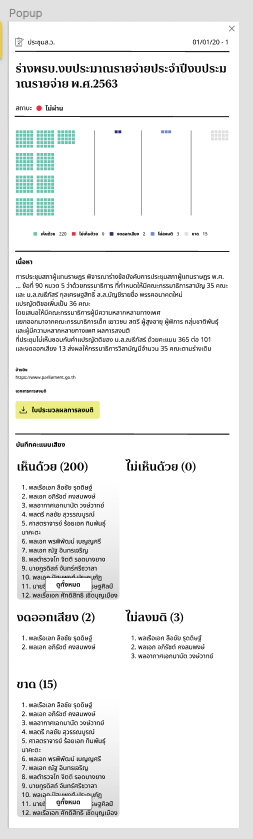
# What To Do - Add dropdown search box for senators # References - [Design references](https://www.figma.com/file/D1rusJwN1TyzFVM4518svt/Elect-Senate-Checklist?node-id=0%3A1) 
# What To Do - Create senator's vote log page (`/senator/votelog`) - Create a vote log summary (Passed / Not Passed) on top right - Add a view mode toggle...
# What To Do - On first visit, show pop over to introduce senate score page - After that it should not be shown on landing. - Add button to...
# What To Do - Add senator's vote log bar charts to `/senate/votelog` page. - The chart supports: - Display voting result bars by vote logs - Each bar stacked...
# What To Do - Create a new senate score page (`/senate/score`). - Support toggle by his/her `senator_method` (การได้มาซึ่ง ส.ว.). - Display chart ranked by their grades (A-F) - Chart...
We want to search across dataset (people / zipcode / party / vote logs). Can we do offline e.g. not loading external API? ``` const results = searchByKeyword("ประชา") ``` Response...
1. Click magnifier glass to start search popup UI 2. Type for word suggestions 3. Click words your want to search, redirect to search result page 