

 ranger
Image Preview in Alacritty on macOS
I am now using Alacritty on macOS and I cannot make the Image Preview feature work. This feature works on both my kitty and iTerm2.
I installed w3m by brew install w3m successfully. Then I found that w3mimgdisplay was not included in this installation. I have done many investigations and research for this but I still don't know how to bring w3mimgdisplay to macOS.
Please help! Thank you very much.

Ueberzug works fine with my alacritty, I think you should try it instead of w3m.

Yes. I installed it successfully before but when I use it as the preview method and tried to preview an image, I got this:
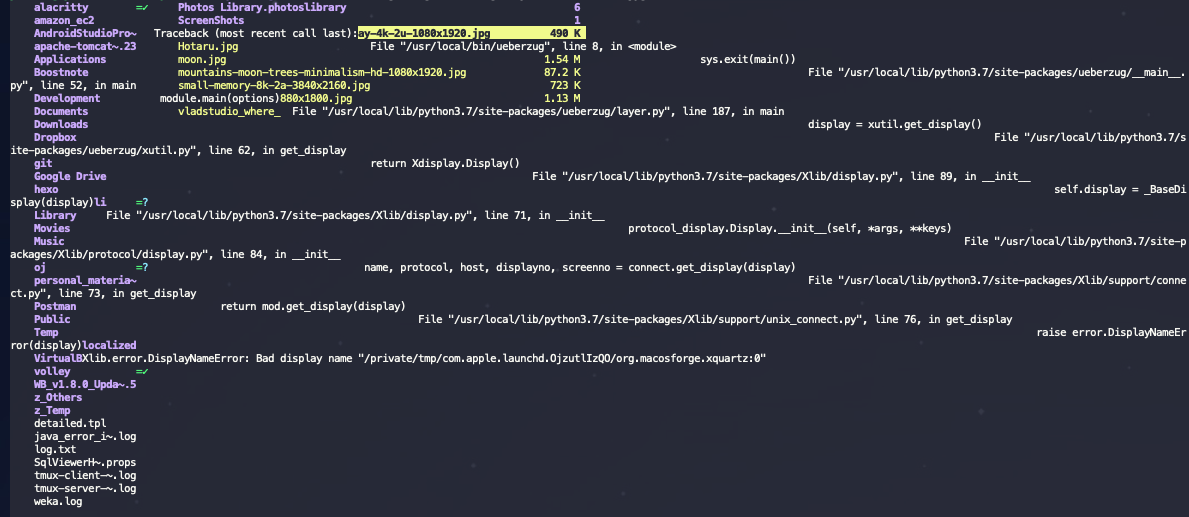
So see, it doesn't work. Also, when I checked alacritty doc, it showed ueberzug is only for uses who run X11 in GNU/Linux. So macOS is not supported.
BTW, my macOS is 10.15.3
Do you use ueberzug under macOS?
Only preview method I'd kinda expect to work in alacritty on macOS is the mpv method. The other alternatives are the native iTerm2 or Kitty previews.

@toonn Hi, I just tried mpv method, but based on the wiki:
Edit $ranger/core/fm.py then search for ImageDisplayer() and make the following changes
ImageDisplayer() does not exist in ranger/core/fm.py. Probably the source code has been changed. Then next, I used rg command to search for this piece of code but it cannot be found.
Thanks.
It's in ranger/ext/img_display.py, has been for as long as I remember. I'd base my patch on the mpv preview PR not the wiki, it's probably more recent.
I'm trying to move from kitty. and as I see on the source code, you don't need to edit fm.py anymore. but, I think you have to do something with @register_image_displayer on img_display.py? i will try doing something on img_display.py. I'm not sure what to do because i'm new to python or any programming language. I'm trying to figure out now. the problem I have now is I get error No module named pathlib even through I did pip3 install pathlib. I think this problem I have maybe it has nothing to do with ranger lol maybe it's issue with my enviroment. also, looks like other preview method uses def clear() and calls on quit or something? so I think I have to do something with this cleanup() that it's unused. edit: looks like I was using python2. I will try more one time. edit2: I edited shebang to make sure it uses python3 to be able to use pathlib. and looks like pathlib is default included on python3. and I got this :( I think I can't do this being noob. I would need to study some python.
ranger version: ranger 1.9.3
Python version: 3.7.3 (default, Apr 24 2020, 18:51:23) [Clang 11.0.3 (clang-1103.0.32.62)]
Locale: en_US.UTF-8
Current file: '/Users/minecraft/Pictures/meiying-ng-OrwkD-iWgqg-unsplash.jpg'

Traceback (most recent call last):
  File "/usr/local/Cellar/ranger/1.9.3/libexec/ranger/ext/img_display.py", line 832, in draw
    self._send_command(path, sock)
  File "/usr/local/Cellar/ranger/1.9.3/libexec/ranger/ext/img_display.py", line 795, in _send_command
    s.connect(str(sock))
FileNotFoundError: [Errno 2] No such file or directory

During handling of the above exception, another exception occurred:

Traceback (most recent call last):
  File "/usr/local/Cellar/ranger/1.9.3/libexec/ranger/core/main.py", line 201, in main
    fm.loop()
  File "/usr/local/Cellar/ranger/1.9.3/libexec/ranger/core/fm.py", line 381, in loop
    ui.draw_images()
  File "/usr/local/Cellar/ranger/1.9.3/libexec/ranger/gui/ui.py", line 401, in draw_images
    self.browser.columns[-1].draw_image()
  File "/usr/local/Cellar/ranger/1.9.3/libexec/ranger/gui/widgets/pager.py", line 124, in draw_image
    self.fm.notify(ex, bad=True)
  File "/usr/local/Cellar/ranger/1.9.3/libexec/ranger/core/actions.py", line 173, in notify
    raise obj
  File "/usr/local/Cellar/ranger/1.9.3/libexec/ranger/gui/widgets/pager.py", line 119, in draw_image
    self.wid, self.hei)
  File "/usr/local/Cellar/ranger/1.9.3/libexec/ranger/ext/img_display.py", line 835, in draw
    self._launch_mpv(path, sock)
  File "/usr/local/Cellar/ranger/1.9.3/libexec/ranger/ext/img_display.py", line 815, in _launch_mpv
    path,
  File "/Library/Developer/CommandLineTools/Library/Frameworks/Python3.framework/Versions/3.7/lib/python3.7/subprocess.py", line 775, in __init__
    restore_signals, start_new_session)
  File "/Library/Developer/CommandLineTools/Library/Frameworks/Python3.framework/Versions/3.7/lib/python3.7/subprocess.py", line 1436, in _execute_child
    executable = os.fsencode(executable)
  File "/Library/Developer/CommandLineTools/Library/Frameworks/Python3.framework/Versions/3.7/lib/python3.7/os.py", line 809, in fsencode
    filename = fspath(filename)  # Does type-checking of `filename`.
TypeError: expected str, bytes or os.PathLike object, not list

ranger crashed. Please report this traceback at:
https://github.com/ranger/ranger/issues

@btwiusegentoo, if you're on linux the easiest preview method for alacritty should be ueberzug, unless you're running wayland.
Ranger shouldn't depend on anything outside of the standard library so I'm not sure where that error's coming from.
@toonn sorry for confusing name. I went to Hackintosh from Gentoo now. I was happy using Kitty on Wayland but it is laggy on mac so I'm trying Alacritty that looks snappier. looks like that pathlib error was because mac uses python2 for default if specify only python on shebang. so in conclusion, I couldn't figure how to preview anyway. I think I need to learn python.
Ranger works fine with python 2. And kitty doesn't lag at all on my ~10yo imac, just fyi.
So probably my 2700X Ryzentosh that it's problematic? or my Gentoo it was too fast because compiles all from source so it hasn't slow to launch kitty or slow to launch htop? lol thanks, anyway I think I can't figure because I can't understand python so I will temporary go back to kitty. If I forgive launch time and that sometimes starts lagging to launch htop, I think it will be better for now.
I am now using Alacritty on macOS and I cannot make the Image Preview feature work. This feature works on both my kitty and iTerm2.
I installed w3m by
brew install w3msuccessfully. Then I found that w3mimgdisplay was not included in this installation. I have done many investigations and research for this but I still don't know how to bring w3mimgdisplay to macOS.Please help! Thank you very much.
Same issue. I do not know how to display image in ranger since I do not use iTerm2 because it's too slow. I've tried compile w3m with --with-imagelib=imlib2 as mentioned in https://github.com/tats/w3m/issues/95. But it needs X11 library. So have you found a good way to achieve the image displaying?

The only preview methods I know work on macOS are iterm2 and kitty. Both require using a specific terminal.
The only preview methods I know work on macOS are iterm2 and kitty. Both require using a specific terminal.
Thanks. I'll try kitty.
https://github.com/alacritty/alacritty/issues/910 https://github.com/alacritty/alacritty/pull/4763


Since Alacritty does not support KIP nor SIXEL, your best bet is one of the external preview methods like ueberzug (with one of the various forks) or Mpv. Getting it working might take some doing though.