

 rancher
[BUG] Cattle-cleanup job for imported clusters not pulling from configured private registry
Rancher Server Setup
- Rancher version: 2.6.9
- Installation option (Docker install/Helm Chart): Helm Chart
- If Helm Chart, Kubernetes Cluster and version (RKE1, RKE2, k3s, EKS, etc): Generic, 1.21
- Proxy/Cert Details: n/a
Information about the Cluster
- Kubernetes version: 1.21
- Cluster Type (Local/Downstream): Downstream
- If downstream, what type of cluster? (Custom/Imported or specify provider for Hosted/Infrastructure Provider): Imported
User Information
- What is the role of the user logged in? (Admin/Cluster Owner/Cluster Member/Project Owner/Project Member/Custom)
- If custom, define the set of permissions:
Describe the bug
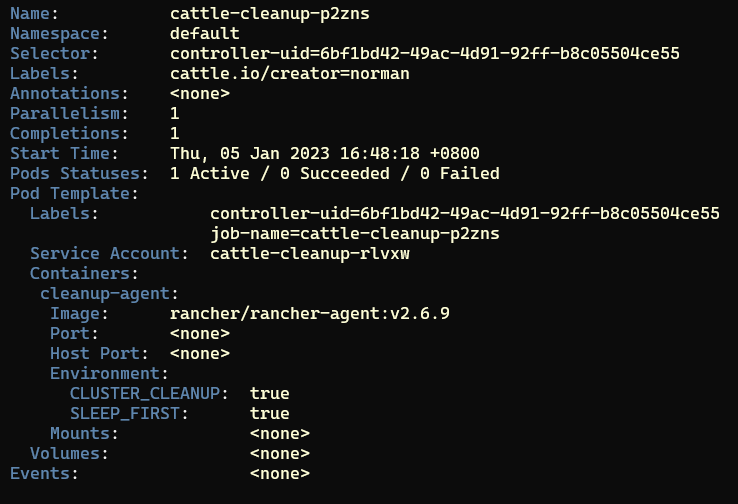
When deleting an imported cluster from Rancher Dashboard UI, the cattle-cleanup job that is created in the downstream cluster pulls from Dockerhub instead of the configured private registry.
To Reproduce
- Import a generic cluster
- Delete the generic cluster
Result
A cattle-cleanup job is created, but it pulls its image from Dockerhub and not the configured private registry for the cluster.
Expected Result
cattle-cleanup job should pull from the configured private registry
Screenshots

Additional context
SURE-8712

This issue is reproducible even in rancher-v2.9.0-rc3 and comes from https://github.com/rancher/rancher/blob/release/v2.9/pkg/controllers/management/usercontrollers/controller.go#L305
Internal ref: SURE-8712


Ticket #40068 - Test Results - ✅
Verified on Rancher v2.9.1-rc1:
| Scenario | Test Case | Result |
|---|---|---|
| 1. | Import downstream RKE1 cluster => delete imported cluster via Rancher => verify cattle-cleanup job |
✅ |
| 2. | Import downstream RKE2 cluster => delete imported cluster via Rancher => verify cattle-cleanup job |
✅ |
Scenario 1 - ✅
- Fresh install of Rancher
v2.9.1-rc1 - Provision a standalone cluster - ( I used RKE
v1.6.1w/ k8sv1.29.7-rancher1-1) - Once
active, import the cluster into Rancher - Wait for cluster to come up
activein Rancher UI, then delete the imported cluster - Verified - cluster successfully deletes from Rancher UI
- Using
kubectl, describe thecattle-cleanupjob and verify wherecleanup-agentis pulled, using the following command:
kubectl describe job <job_name_here> -n default
- Verified -
cleanup-agentimage points to globally configured private registry; as expected
Scenario 2 - ✅
- Fresh install of Rancher
v2.9.1-rc1 - Provision a standalone cluster - ( I used RKE2 w/ k8s
v1.30.2+rke2r1) - Once
active, import the cluster into Rancher - Wait for cluster to come up
activein Rancher UI, then delete the imported cluster - Verified - cluster successfully deletes from Rancher UI
- Using
kubectl, describe thecattle-cleanupjob and verify wherecleanup-agentis pulled, using the following command:
kubectl describe job <job_name_here> -n default
- Verified -
cleanup-agentimage points to globally configured private registry; as expected