

 rancher
Lag/Delay displaying Related Resources Tab
Setup
| Component | Version / Type |
|---|---|
| Rancher version | v2.6-9670628a4813d43a8410fe27c745c79a4b566c3a-head |
| Rancher commit link | https://github.com/rancher/rancher/commit/9670628a4813d43a8410fe27c745c79a4b566c3a |
| Installation option | Helm High Availability |
| RKE binary version used | v1.3.11 |
| If Helm Chart k8s cluster | v1.23.6 |
| Cert Details | Let's Encrypt |
| Helm version | v2.16.8-rancher2 |
| Downstream cluster type | RKE1 Linode |
| Downstream K8s version | v1.24.2 |
| Logged in user role | Administrator & Standard User as downstream cluster owner |
| Browser type | Google chrome |
| Browser version | 103.0.5060.134 (Official Build) (x86_64) |
Describe the bug
When navigating to Cluster Management, then selecting a downstream cluster (not explore). The Related Resource tab has a delay in appearing. See the video below.
To Reproduce
- Create a downstream cluster as an administrator
- Set up a standard user named
tuser1 - Assign
tuser1to the downstream cluster as a cluster owner - As an administrator, log out and log in as
tuser1 - Logged in as
tuser1, and starting from the default Rancher homepage/dashboard/home- Click
hamburger menu==>Cluster Management==> click the link of the name of the downstream cluster (not explore) - Observe the tabs, you'll notice
Related Resourcesis delayed
- Click
Result
The related resource tab has a noticeable delay when loading in compared to the other tabs
Expected Result
For there to be no noticeable lag when tab links are rendered on the page
Screenshots / Video
https://user-images.githubusercontent.com/40877149/184005292-b884e590-098d-4061-ac87-370a3a7520b9.mp4
Additional context
The tab / link appears at the same time this line in the console is triggered
Noticed this lag/delay while opening this issue: https://github.com/rancher/rancher/issues/38583
Wait for set provisioner done
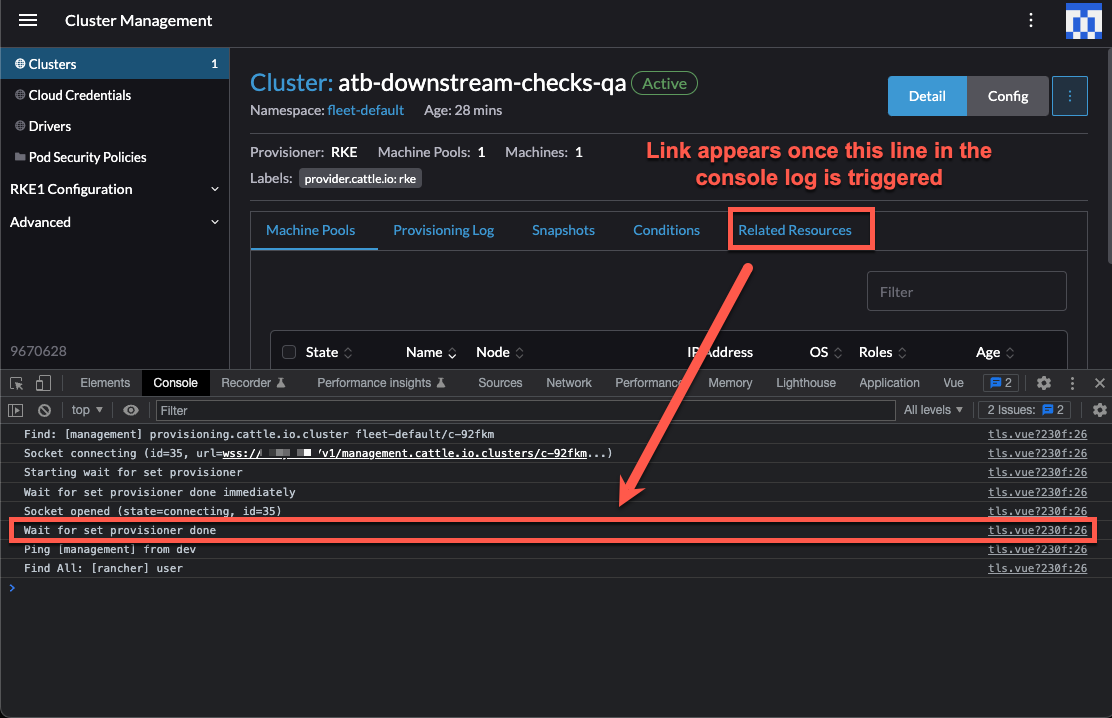

Both event and related resource tabs will load asynchronously when they've received certain resources. We shouldn't block the page loading until we receive those resources.
It looks like though we block related resources on loading events (which determines if the event tab shows). To improve things we just need to not block $fetch when requesting events in shell/components/form/ResourceTabs/index.vue

✅ PASSED
Reproduction Environment
Not required.
Validation Environment
| Component | Version / Type |
|---|---|
| Rancher version | v2.6-48b6bc6b4a6adb4fd4c623984862494cd0b70a5f-head |
| Rancher commit link | https://github.com/rancher/rancher/commit/48b6bc6b4a6adb4fd4c623984862494cd0b70a5f |
| Installation option | Helm |
| RKE binary version used | v1.3.13 |
| If Helm Chart k8s cluster | v1.24.2 |
| Cert Details | Let's Encrypt |
| Docker version | 20.10.7, build f0df350 |
| Helm version | v2.16.8-rancher2 |
| Downstream cluster type | RKE1 Linode |
| Downstream K8s version | v1.24.4 |
| Authentication providers enabled | local, GitHub OAuth |
| Browser type | Opera GX |
| Logged in user role | GitHub OAuth Admin for Setup / GitHub OAuth standard user with cluster owner for test |
| Browser type | Opera GX |
| Browser version | LVL4 (core: 90.0.4480.117) (x86_64) |
ADDITIONAL VALIDATION SETUP
kubectl apply -f https://github.com/cert-manager/cert-manager/releases/download/v1.7.1/cert-manager.crds.yaml
helm install cert-manager jetstack/cert-manager \
  --namespace cert-manager \
  --create-namespace \
  --version v1.7.1
helm install rancher rancher-latest/rancher \
  --namespace cattle-system \
  --set hostname=$URL_VAR \
  --set bootstrapPassword=$PW_VAR \
  --set ingress.tls.source=letsEncrypt \
  --set letsEncrypt.email=$EMAIL_VAR \
  --set letsEncrypt.ingress.class=nginx \
  --set rancherImageTag=v2.6-head
Validation steps
- Create a downstream cluster as a GitHub OAuth administrator
- Add a different GitHub user under Authorized Users & Groups
- Assign the
GitHub OAuth standard userto the downstream cluster as a cluster owner - As an administrator, log out and log in as the standard user
- Logged in as the standard user, and starting from the default Rancher homepage
/dashboard/home - Click hamburger menu ==> Cluster Management ==> click the link of the name of the downstream cluster (not explore)
Observe the tabs,
Related Resourcesare displayed instantly without delay, even on subsequent visits to the cluster dashboard
Additional Info
RESULTS
✅ Expected
For there to be no delay on the Related Resources tab
✅ Actual
There was no delay on the Related Resources tab