

 rancher
pnap machine driver implementation
Summary
phoenixNAP (pnap) is Rancher node driver which has its own cloud credential type in Rancher. Node provisioning and cluster creation works as expected when RKE1 is used as provisioner. This PR should solve issue to provision new node (through phoenixNAP node driver) and create cluster using RKE2/K3s. Additionally, implementation to dynamically pull locations, types, os is added as part of this PR.
Occurred changes and/or fixed issues
Technical notes summary
Added cloud credentials, machine config, model, store components for pnap machine driver.
Areas or cases that should be tested
Steps to reproduce: Go to Cluster Management, Clusters -> Create, Provision new nodes and create a cluster using RKE2/K3s -> select phoenixNAP, Select pnap cloud credentials. Verify that there is custom UI for pnap which dynamically populates Location Type and OS drop downs, and shows details about selected type. Click on create button to verify that cluster is successfully created if valid credentials are entered.
Areas which could experience regressions
Screenshot/Video

@pajuga Please can you fill out the PR template below. Could you include some background on what pnap is and how we can validate these changes?
<!-- This template is for Devs to give QA details before moving the issue To-Test -->
### Summary
Fixes #
<!-- Define findings related to the feature or bug issue. -->

### Occurred changes and/or fixed issues
<!-- Include information of the changes, including collateral areas which have been affected by this PR as requirement or for convenience. -->

### Technical notes summary
<!-- Outline technical changes which may pass unobserved or may help to understand the process of solving the issue -->

### Areas or cases that should be tested
<!-- Areas that should be tested can include Airgap checks, Rancher upgrades, K8s upgrade, etc. -->
<!-- Add missing steps or rewrite them if have been missed or to complement existing information. This should define a clear way to reproduce it and not an approximation. -->

### Areas which could experience regressions
<!-- Create a detailed list of areas to be analyzed which may be affected by the changes, which would require a prior research to avoid regressions. -->

### Screenshot/Video
<!-- Attach screenshot or video of the changes and eventual comparison if you find it necessary -->

@pajuga Please can you fill out the PR template below. Could you include some background on what pnap is and how we can validate these changes?
<!-- This template is for Devs to give QA details before moving the issue To-Test -->
### Summary
Fixes #
<!-- Define findings related to the feature or bug issue. -->

### Occurred changes and/or fixed issues
<!-- Include information of the changes, including collateral areas which have been affected by this PR as requirement or for convenience. -->

### Technical notes summary
<!-- Outline technical changes which may pass unobserved or may help to understand the process of solving the issue -->

### Areas or cases that should be tested
<!-- Areas that should be tested can include Airgap checks, Rancher upgrades, K8s upgrade, etc. -->
<!-- Add missing steps or rewrite them if have been missed or to complement existing information. This should define a clear way to reproduce it and not an approximation. -->

### Areas which could experience regressions
<!-- Create a detailed list of areas to be analyzed which may be affected by the changes, which would require a prior research to avoid regressions. -->

### Screenshot/Video
<!-- Attach screenshot or video of the changes and eventual comparison if you find it necessary -->
@richard-cox I have added some background about this PR, please let me know if you need more details. Also, wanted to check something about sending cloud credentials over to node driver. Cloud credentials get created with new UI successfully and can be used by rke1 provisioner without any issues. Pnap driver data have public credential field clientIdentifier and private credential field clientSecret.
Thing is that clientSecret is sent to node driver (docker-machine-driver) from new UI (from machine pools) with RKE2 provisioner without any additional customization, but only way I found to send clientIdentifier from selected cloud credentials to node driver was to set this line in UI code. I am not happy with this implementation mostly because if Client ID gets updated, change will not be recognized in node driver (docker-machine-driver) until machine pool gets updated too. This problem does not happen in case of Client Secret, when secret gets updated change is sent to node driver without any additional actions.
@richard-cox Thank you for reviewing and attaching patch. Your patch is applied and I believe I resolved all other things. Could you please review. In regards to your question about comment I was in communication with @snasovich about rancher/rancher repo. Sergey was not sure if problem is on UI or backend so I asked this here.
In regards to your question about comment I was in communication with @snasovich about rancher/rancher repo. Sergey was not sure if problem is on UI or backend so I asked this here.
Can you provide some more detail, what is currently happening and what you expect to happen? Is the information being sent correctly? Please contain as much detail about the http requests, resource types you're modifying, and what you would expect to see when fetching them
Can you provide some more detail, what is currently happening and what you expect to happen? Is the information being sent correctly? Please contain as much detail about the http requests, resource types you're modifying, and what you would expect to see when fetching them.
Scenario A 1 Create pnap (rke2) cluster with selected cloud credentials and one pool. 2 Change/update client id and client secret of cloud credentials that are used for cluster. 3 Scale pool up Current behavior: New client secret and old client id are used for provisioning of new node. Provisioning of new node fails with authentication error. Expected behavior: New client secret and new client id are used for provisioning of new node. Provisioning works.
Scenario B 1 Create pnap (rke2) cluster with selected cloud credentials and one pool. 2 Change/update client id and client secret of cloud credentials that are used for cluster. 4 Click on Edit cluster config and just save it without any changes. 3 Scale pool up Actual and expected behavior: New client secret and new client id are used for provisioning of new node. Provisioning works.
Is this supposed to work this way or there is some issue, it seems information about client id is not properly sent from dashboard ui to the rancher backend and pnap node driver in case of scenario A.
Thank you for the clarification
Is this supposed to work this way or there is some issue, it seems information about client id is not properly sent from dashboard ui to the rancher backend and pnap node driver in case of scenario A.
Could you confirm that the request's that the browser makes (via DevTools network tab) contains the correct information?
After i edit cloud credentials and click on save button i see two requests:
- http request to check credentials against Identity provider. Contains correct information and passed successfully.
- http PUT request v3/cloudCredentials/cattle-global-data:cc-zzfc5 contains payload with pnapcredentialConfig and correct information about clientIdentifier and clientSecret
After i click scale pool up button I see following http PUT request v1/provisioning.cattle.io.clusters/fleet-default/b b is name of the pool and request payload has spec with cloudCredentialSecretName: "cattle-global-data:cc-zzfc5".
At some point node driver will start to provision new node for the pool and credentials that are received by node driver are clientIdentifier before cloud credentials update and proper value of cloudSecret (value after update).
So it seems to me all requests send correct information to the backend, but somehow node pool does not pull value of clientIdentifier from the cloud credentials that are saved on backend. Node pool has correct cloud credentials ID but when it comes to the part to take value of clientIdentifier and send it to node driver, that value is not properly read from cloud credentials saved on backend. Interesting, this happens only for clientIdentifier, clientSecret works as expected.
Thanks for the update @pajuga . It looks like that isn't a UI/dashboard issue though, so someone from outside of our team will need to take a look. Did you say you had another contact within Rancher or I could find someone to help?
@snasovich from my understanding
- Cluster is provisioned with cloud credentials
- Cloud credentials are successfully updated
- Scaling of nodes in cluster fail due to incorrect cloud credentials
- Is this a valid use case, can cloud credentials be updated and used by an existing cluster?
- It looks like the correct requests are made to update the credentials with the correct content, are those the right one's to make?
@pajuga @richard-cox , apologies for late response here.
On cluster YAML, is the only value that refers to cloud credentials cloudCredentialSecretName which then has the value like cattle-global-data:cc-xxxxx which is a k8s secret that contains both Client ID and Client Secret values for pnap account access?
Or is there some other field on cluster spec that refers to the Client ID?
If it's the former, this is something that will require a deeper investigation as it would be really strange why of 2 values contained on cloud credential secret only one is updated on the scale up request. If there was some sort of caching, I would expect both to have old values.

@snasovich @richard-cox Apologies, I just realized I have never replied back. I think cloudCredentialSecretName is the only field that refers to cloud credentials in cluster configuration.
Guys does it make sense to merge this PR and create separate issue for this specific scenario. Other good things are blocked with this scenario which seems to happen rarely.
@thaneunsoo I contacted you on slack as @richard-cox suggested. Could you please check if you got the message.
I am getting a sha256 checksum error. The cluster is unable to download the driver correctly because of the checksum not matching up.
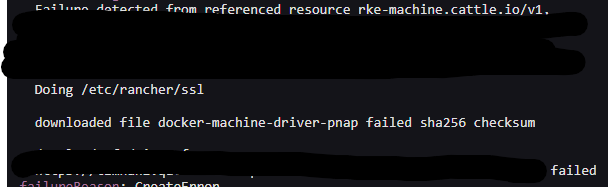

@thaneunsoo This hasn't merged yet, just trying to get all ducks aligned before proceeding.
@pajuga could you confirm that with this PR the flow in https://github.com/rancher/dashboard/pull/6569#pullrequestreview-1221130265 works as expected? We're approaching code complete for the next release at the end of this week and it would be good to get this in by then.
I am getting a sha256 checksum error. The cluster is unable to download the driver correctly because of the checksum not matching up.
@pajuga Does the Download URL / Checksum of the pnap node driver need updating?
I'm my 2.7-next1 system it's down as
- https://github.com/phoenixnap/docker-machine-driver-pnap/releases/download/v0.4.0/docker-machine-driver-pnap_0.4.0_linux_amd64.zip
- 0bc81bdc80ab258fa0db67918f3b04435ed2c81f84c942c9123a0729f884190b
I am getting a sha256 checksum error. The cluster is unable to download the driver correctly because of the checksum not matching up.
@pajuga Does the
Download URL/Checksumof the pnap node driver need updating?I'm my 2.7-next1 system it's down as
- https://github.com/phoenixnap/docker-machine-driver-pnap/releases/download/v0.4.0/docker-machine-driver-pnap_0.4.0_linux_amd64.zip
- 0bc81bdc80ab258fa0db67918f3b04435ed2c81f84c942c9123a0729f884190b
Hi @richard-cox, I tested this with Rancher 2.6.0, and found no issues. That is the most recent version of driver and checksum. Also i confirmed workflow works as expected. I will try 2.7.0 too
@richard-cox @thaneunsoo I tested on 2.7.0 and 2.7-head versions and did not notice any problem with pnap driver download and checksums. I managed to activate and use pnap node driver without any issues. Could you please write me steps to reproduce the problem. We can use Slack for details.
@pajuga No specific bug, just wanted to confirm that there was no bit rot and the successful case worked before we pass to QA
@pajuga There's been some billing issues with the account used to test this. I think we set it up after chatting in rancher-users.slack.com slack, could you ping me there?