
figtree
 figtree copied to clipboard
 rambaut
Grid lines out of field after clicking reverse axis
I'm almost certain this bug was introduced with v1.4 and it has persisted for a while, probably unnoticed. The problem is simple. The default behavior after clicking "scale axis" is to show grid bars and a time axis that shows lower to higher integers from left to right. This probably works fabulously for time-stamped data in calendar years (such as viral phylogenies) as older years will be lower integers than years closer to the present (i.e. 1960 vs 2019). However, a lot of phylogenies are projected in millions of years, where typically the present (right side) is time 0 and the root is > 0. This requires that the axis be reversed. Take the example below:
You add grid lines and a time axis by clicking "scale axis".
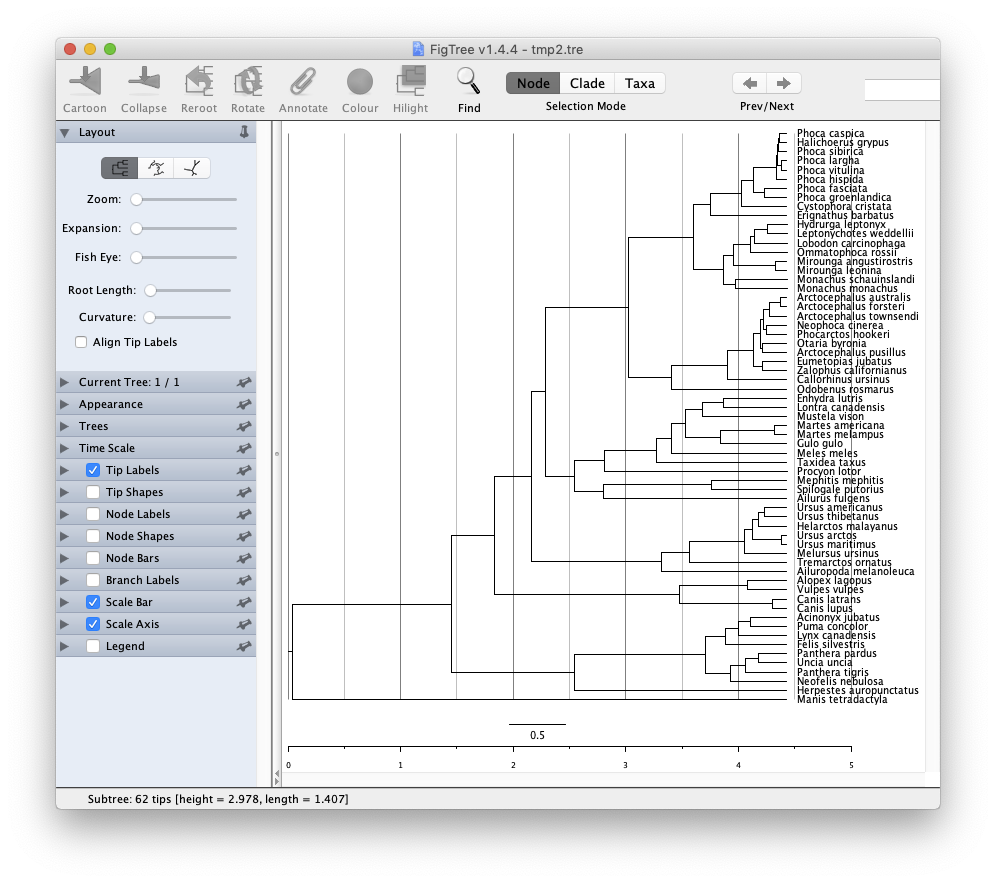 You can note that after reversing the axis the grid lines disappear and the axis becomes negative. This is all fine.
 The problem is that the grid lines are really not disappearing. They are shifted to the left and become out of the tree field. You can check this by exporting the tree as PDF and opening it in Adobe Illustrator or Inkscape and releasing all clipping masks.
 This clearly shows this is a bug, as I recall previous versions of FigTree did not behave like this. It would be great to have this functionality restored. Thanks.

Same here. This bug has been present for a while. When you reverse the axis, the grid lines always teleport to the left, somewhere outside the screen.

I use this option in almost every coalescence tree, it is annoying that the grid lines are misplaced. Please fix it! Thank you

