

 radiantearth
Deprecated collections showing at the same time as non deprecated ones
It would be useful to "hide" deprecated collections from the list and tiles view and have a button to show /hide them (in case there are some).
t the moment for example I've got a list of many collections, each with version 1,2,3,4 and I would prefer to see at a glance all the ones that are not deprecated, rather than seeing all together deprecated and non deprecated ones.

Interesting idea, but gets complicated once you are having pagination in place. The UX then gets messy as collections first appear (for a link) and then disappear once the full data is loaded and it is including a deprecated flag. Also, I then don't known whether I need to show a deprecated show/hide component or not. It is a similar issues with sorting, which is not available for paginated lists. So I've tagged this as 3.1.0 as I see this as advanced functionality that we can tackle once we have this in a more stable state, but I'm always happy to accept PRs.
Still, this let me come to the conclusion that it would be useful already to simply show a badge so that users can at least understand more easily what is deprecated. Here's a screenshot:
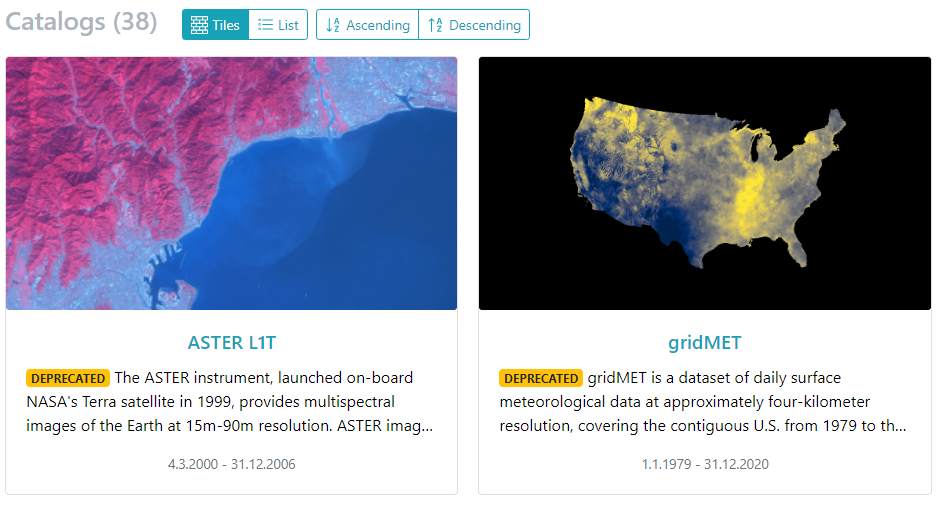
This has been implemented for collections, catalogs, items, and assets. What do you think?

Thanks for the modif you've done. I think a badge is already good.(For pagination you would have to reload the list every time you click the button, to recreate the pages correctly)
I'm though not too sure about the word "deprecated" itself. I know that it is what comes out from the "deprecated" field of the STAC standard, but many Geo collections, just have newer versions and this doesn't mean that the old ones are deprecated. They might just be "older" versions. Let's take the example of Administrative Boundaries collections, or Elevation collections. It is true that every year we will have a new version (e.g. Europe Countries 2019, 2020, 2021 ... Europe elevation model 2020, 2021 etc.) but if I want to compare data from 2020 with data from 2022 I need to use older collections too. So those collections are not "deprecated" meaning: data that will soon be removed. They are more older versions that won't be removed.
Any thoughts about this?
Yeah, that is reasonable, but it seems that these are different use cases.
Deprecated originally was really meant to indicate that it is going to be removed or something should be transitioned out of usage. Your use case is more "superseded" (or "outdated"? not 100% sure about the terminology). Thus, I'm wondering whether this should result in a new flag/field in the versioning extension? https://github.com/stac-extensions/version
Are you using the link relations types defined by the extension to link to the next or latest version? https://github.com/stac-extensions/version#relation-types In this case we could also drop the use of the deprecated field and just add a badge in case a corresponding link is given.
Yes I'm using the links "latest-version" and "successor-version".
That would be nice to have a "superseded" badge (or a better term that at the moment I can't come up with) in case at least "latest-version" link exists and the collection is not deprecated. In this case, no need to add a new flag/field extension.
The same should happen in the collection itself. I would keep the yellow box that you created for "deprecated" collections but I would just change the text in case of "superseded" collection. Something like: "Please note that this Collection has newer versions available."
Yeah, also not sure about the terminology.
Ideas:
- outdated
- old version
- superseded
I like outdated most. If you have any ideas or preferences, please let me know.
I'll also have another look at the deprecated box with the links...
I'm not sure... all these terms put the enphasis on the fact that the collection is "old", it seems that it shouldn't be used. This though is not the purpose. Elevation data from 2020 can be as important as the one from 2022 or even more important in case a specific phenomenon could me highlighted only in 2020.
In my opinion I would look more for something like "newer version available" even though I know it is kind of long. So something that could give this idea.
But if a newer version is available, aren't people then implicitly thinking that the version they are looking at is "old" anyway? At least I'd think it is old because a newer version is available. I'm not sure we can really get around this... "newer version available" is indeed a bit long.
Edit: Found "past version" through a synonym search. But we also need to take care that this works for other use cases, too. For others, the terms above may work fine. That's the drawback with "off the shelf" software ;-) But I assume once we have support for #123 , you can easily adopt it in your deployment.
Actually "past version" sounds good to me! I would say that in my opinion it is the best to fit term until now.
But you can implement it as it is better for you.
Closing. "Deprecated" fits to the official description of the extension and it can now be customized pretty easily via the custom.json that is available for each locale. Just add for each language where you'd like to change it:
{
  "deprecated": "Past Version",
  "fields": {
    "Deprecated": "Past Version"
  }
}