
DXcam
 DXcam copied to clipboard
 ra1nty
_ctypes.COMError: (-2005270524, 'The specified device interface or feature level is not supported on this system.', (None, None, None, 0, None)) (might be a Windows 11 error?)
Hello, i've been trying to use this library but i am getting the following error:
_ctypes.COMError: (-2005270524, 'The specified device interface or feature level is not supported on this system.', (None, None, None, 0, None))
Traceback (most recent call last):
  File "C:\Users\hamza\OneDrive\Documents\GitHub\obj-det\main_tensorrt_gpu.py", line 204, in <module>
    main()
  File "C:\Users\hamza\OneDrive\Documents\GitHub\obj-det\main_tensorrt_gpu.py", line 74, in main
    camera = dxcam.create(region=region)
  File "C:\Users\hamza\AppData\Roaming\Python\Python310\site-packages\dxcam\__init__.py", line 112, in create
    return __factory.create(
  File "C:\Users\hamza\AppData\Roaming\Python\Python310\site-packages\dxcam\__init__.py", line 71, in create
    camera = DXCamera(
  File "C:\Users\hamza\AppData\Roaming\Python\Python310\site-packages\dxcam\dxcam.py", line 33, in __init__
    self._duplicator: Duplicator = Duplicator(
  File "<string>", line 6, in __init__
  File "C:\Users\hamza\AppData\Roaming\Python\Python310\site-packages\dxcam\core\duplicator.py", line 20, in __post_init__
    output.output.DuplicateOutput(device.device, ctypes.byref(self.duplicator))
_ctypes.COMError: (-2005270524, 'The specified device interface or feature level is not supported on this system.', (None, None, None, 0, None))
Exception ignored in: <function DXCamera.__del__ at 0x000001E667B139A0>
Traceback (most recent call last):
  File "C:\Users\hamza\AppData\Roaming\Python\Python310\site-packages\dxcam\dxcam.py", line 243, in __del__
    self.release()
  File "C:\Users\hamza\AppData\Roaming\Python\Python310\site-packages\dxcam\dxcam.py", line 238, in release
    self.stop()
  File "C:\Users\hamza\AppData\Roaming\Python\Python310\site-packages\dxcam\dxcam.py", line 138, in stop
    if self.is_capturing:
AttributeError: 'DXCamera' object has no attribute 'is_capturing'
I've seen a similar issue here: https://github.com/ra1nty/DXcam/issues/18 but it was closed?
I think it might be because i am on windows 11 so it might be some directx issue? here is a dxdiag dump
---------------
Display Devices
---------------
           Card name: AMD Radeon(TM) Graphics
        Manufacturer: Advanced Micro Devices, Inc.
           Chip type: AMD Radeon Graphics Processor (0x1638)
            DAC type: Internal DAC(400MHz)
         Device Type: Full Device (POST)
          Device Key: Enum\PCI\VEN_1002&DEV_1638&SUBSYS_10FC1043&REV_C6
       Device Status: 0180200A [DN_DRIVER_LOADED|DN_STARTED|DN_DISABLEABLE|DN_NT_ENUMERATOR|DN_NT_DRIVER]
 Device Problem Code: No Problem
 Driver Problem Code: Unknown
      Display Memory: 8384 MB
    Dedicated Memory: 496 MB
       Shared Memory: 7888 MB
        Current Mode: 1920 x 1080 (32 bit) (144Hz)
         HDR Support: Not Supported
    Display Topology: Internal
 Display Color Space: DXGI_COLOR_SPACE_RGB_FULL_G22_NONE_P709
     Color Primaries: Red(0.639648,0.330078), Green(0.299805,0.599609), Blue(0.149414,0.059570), White Point(0.312500,0.329102)
   Display Luminance: Min Luminance = 0.500000, Max Luminance = 270.000000, MaxFullFrameLuminance = 270.000000
        Monitor Name: Generic PnP Monitor
       Monitor Model: unknown
          Monitor Id: AUO8294
         Native Mode: 1920 x 1080(p) (144.028Hz)
         Output Type: Internal
Monitor Capabilities: HDR Not Supported
Display Pixel Format: DISPLAYCONFIG_PIXELFORMAT_32BPP
      Advanced Color: Not Supported
         Driver Name: C:\WINDOWS\System32\DriverStore\FileRepository\u0376545.inf_amd64_87c724e1cb953643\B376543\aticfx64.dll,C:\WINDOWS\System32\DriverStore\FileRepository\u0376545.inf_amd64_87c724e1cb953643\B376543\aticfx64.dll,C:\WINDOWS\System32\DriverStore\FileRepository\u0376545.inf_amd64_87c724e1cb953643\B376543\aticfx64.dll,C:\WINDOWS\System32\DriverStore\FileRepository\u0376545.inf_amd64_87c724e1cb953643\B376543\amdxc64.dll
 Driver File Version: 30.00.13002.15001 (English)
      Driver Version: 30.0.13002.15001
         DDI Version: 12
      Feature Levels: 12_1,12_0,11_1,11_0,10_1,10_0,9_3,9_2,9_1
        Driver Model: WDDM 3.0
 Hardware Scheduling: DriverSupportState:AlwaysOff Enabled:False
 Graphics Preemption: DMA
  Compute Preemption: DMA
            Miracast: Not Supported by Graphics driver
      Detachable GPU: No
 Hybrid Graphics GPU: Integrated
      Power P-states: Not Supported
      Virtualization: Paravirtualization
          Block List: DISABLE_HWSCH
  Catalog Attributes: Universal:False Declarative:True
   Driver Attributes: Final Retail
    Driver Date/Size: 2/9/2022 3:00:00 AM, 1838752 bytes
         WHQL Logo'd: Yes
     WHQL Date Stamp: Unknown
   Device Identifier: {D7B71EE2-5578-11CF-6A49-360269C2D335}
           Vendor ID: 0x1002
           Device ID: 0x1638
           SubSys ID: 0x10FC1043
         Revision ID: 0x00C6
  Driver Strong Name: oem32.inf:cb0ae4147b406b52:ati2mtag_Cezanne:30.0.13002.15001:PCI\VEN_1002&DEV_1638&SUBSYS_10FC1043&REV_C6
      Rank Of Driver: 00CF0000
         Video Accel: Unknown
         DXVA2 Modes: DXVA2_ModeMPEG2_VLD  {86695F12-340E-4F04-9FD3-9253DD327460}  DXVA2_ModeH264_VLD_NoFGT  {4245F676-2BBC-4166-A0BB-54E7B849C380}  {6719B6FB-5CAD-4ACB-B00A-F3BFDEC38727}  {9901CCD3-CA12-4B7E-867A-E2223D9255C3}  DXVA2_ModeHEVC_VLD_Main  {EA72396A-67EC-4781-BEDE-56F498F04EF2}  {C152CA8F-738C-461B-AD89-FC292CF8F162}  {514A356C-7027-4AFF-8A60-AFD2C1F672F1}  DXVA2_ModeH264_VLD_Stereo_Progressive_NoFGT  DXVA2_ModeH264_VLD_Stereo_NoFGT  DXVA2_ModeVC1_VLD  {CA15D19A-2B48-43D6-979E-7A6E9C802FF8}  {D1C20509-AE7B-4E72-AE3B-49F88D58992F}  {84AD67F6-4C21-419A-9F0B-24F0578906C1}  {725AD240-786C-471E-AD3C-38F739936517}  {95664FF5-9E03-4C74-BB4F-9178D6035E58}  {5EF7D40D-5B96-49E7-B419-23342094A4CF}  DXVA2_ModeHEVC_VLD_Main10  {65D1FA41-58AF-453A-9CAB-5D981156DA9F}  {2DB154B6-DBB2-4079-A3FF-60D7A898A6AB}  {C74A3FD0-D713-4581-A02E-8EDFB112ACE3}  DXVA2_ModeVP9_VLD_Profile0  DXVA2_ModeVP9_VLD_10bit_Profile2  {603A4756-A864-4F91-BB62-2C935B7A1391}  {C58B9A06-7E89-11E1-BB00-70B34824019B}
      Deinterlace Caps: n/a
        D3D9 Overlay: Not Supported
             DXVA-HD: Not Supported
        DDraw Status: Enabled
          D3D Status: Enabled
          AGP Status: Enabled
       MPO MaxPlanes: 2
            MPO Caps: ROTATION,VERTICAL_FLIP,HORIZONTAL_FLIP,YUV,BILINEAR,STRETCH_YUV,HDR (MPO3)
         MPO Stretch: 16.000X - 0.250X
     MPO Media Hints: rotation, resizing, colorspace Conversion
         MPO Formats: NV12,420_OPAQUE,R16G16B16A16_FLOAT,R10G10B10A2_UNORM,R8G8B8A8_UNORM,B8G8R8A8_UNORM
    PanelFitter Caps: ROTATION,VERTICAL_FLIP,HORIZONTAL_FLIP,YUV,BILINEAR,STRETCH_YUV,HDR (MPO3)
 PanelFitter Stretch: 16.000X - 0.250X
   Component Drivers:
             Driver Name: Unknown
          Driver Version: Unknown
             Driver Date: Unknown
         Driver Provider: Unknown
      Catalog Attributes: N/A

           Card name: NVIDIA GeForce RTX 3050 Ti Laptop GPU
        Manufacturer: NVIDIA
           Chip type: NVIDIA GeForce RTX 3050 Ti Laptop GPU
            DAC type: Integrated RAMDAC
         Device Type: Full Device
          Device Key: Enum\PCI\VEN_10DE&DEV_25A0&SUBSYS_10FC1043&REV_A1
       Device Status: 0180600A [DN_DRIVER_LOADED|DN_STARTED|DN_DISABLEABLE|DN_REMOVABLE|DN_NT_ENUMERATOR|DN_NT_DRIVER]
 Device Problem Code: No Problem
 Driver Problem Code: Unknown
      Display Memory: 11864 MB
    Dedicated Memory: 3976 MB
       Shared Memory: 7888 MB
        Current Mode: Unknown
         HDR Support: Unknown
    Display Topology: Unknown
 Display Color Space: Unknown
     Color Primaries: Unknown
   Display Luminance: Unknown
         Driver Name: C:\WINDOWS\System32\DriverStore\FileRepository\nvami.inf_amd64_57378df08e27c128\nvldumdx.dll,C:\WINDOWS\System32\DriverStore\FileRepository\nvami.inf_amd64_57378df08e27c128\nvldumdx.dll,C:\WINDOWS\System32\DriverStore\FileRepository\nvami.inf_amd64_57378df08e27c128\nvldumdx.dll,C:\WINDOWS\System32\DriverStore\FileRepository\nvami.inf_amd64_57378df08e27c128\nvldumdx.dll
 Driver File Version: 31.00.0015.2647 (English)
      Driver Version: 31.0.15.2647
         DDI Version: 12
      Feature Levels: 12_2,12_1,12_0,11_1,11_0,10_1,10_0,9_3,9_2,9_1
        Driver Model: WDDM 3.0
 Hardware Scheduling: DriverSupportState:Stable Enabled:True
 Graphics Preemption: Pixel
  Compute Preemption: Dispatch
            Miracast: Not Supported by Graphics driver
      Detachable GPU: No
 Hybrid Graphics GPU: Discrete
      Power P-states: Not Supported
      Virtualization: Paravirtualization
          Block List: No Blocks
  Catalog Attributes: Universal:False Declarative:True
   Driver Attributes: Final Retail
    Driver Date/Size: 10/25/2022 3:00:00 AM, 772488 bytes
         WHQL Logo'd: Yes
     WHQL Date Stamp: Unknown
   Device Identifier: Unknown
           Vendor ID: 0x10DE
           Device ID: 0x25A0
           SubSys ID: 0x10FC1043
         Revision ID: 0x00A1
  Driver Strong Name: oem110.inf:0f066de3172354d9:Section192:31.0.15.2647:pci\ven_10de&dev_25a0&subsys_10fc1043
      Rank Of Driver: 00CF0001
         Video Accel: Unknown
         DXVA2 Modes: {86695F12-340E-4F04-9FD3-9253DD327460}  DXVA2_ModeMPEG2_VLD  {6F3EC719-3735-42CC-8063-65CC3CB36616}  DXVA2_ModeVC1_D2010  DXVA2_ModeVC1_VLD  {32FCFE3F-DE46-4A49-861B-AC71110649D5}  DXVA2_ModeH264_VLD_Stereo_Progressive_NoFGT  DXVA2_ModeH264_VLD_Stereo_NoFGT  DXVA2_ModeH264_VLD_NoFGT  DXVA2_ModeHEVC_VLD_Main  DXVA2_ModeHEVC_VLD_Main10  {20BB8B0A-97AA-4571-8E99-64E60606C1A6}  {15DF9B21-06C4-47F1-841E-A67C97D7F312}  DXVA2_ModeMPEG4pt2_VLD_Simple  DXVA2_ModeMPEG4pt2_VLD_AdvSimple_NoGMC  {9947EC6F-689B-11DC-A320-0019DBBC4184}  {33FCFE41-DE46-4A49-861B-AC71110649D5}  DXVA2_ModeVP9_VLD_Profile0  DXVA2_ModeVP9_VLD_10bit_Profile2  {DDA19DC7-93B5-49F5-A9B3-2BDA28A2CE6E}  {B8BE4CCB-CF53-46BA-8D59-D6B8A6DA5D2A}  {6AFFD11E-1D96-42B1-A215-93A31F09A53D}  {914C84A3-4078-4FA9-984C-E2F262CB5C9C}  {8A1A1031-29BC-46D0-A007-E9B092CA6767}
      Deinterlace Caps: n/a
        D3D9 Overlay: Unknown
             DXVA-HD: Unknown
        DDraw Status: Enabled
          D3D Status: Enabled
          AGP Status: Enabled
       MPO MaxPlanes: 0
            MPO Caps: Not Supported
         MPO Stretch: Not Supported
     MPO Media Hints: Not Supported
         MPO Formats: Not Supported
    PanelFitter Caps: Not Supported
 PanelFitter Stretch: Not Supported

I will suggest you properly set your process to run on GPU which displays
Sorry about my language if you cannot understand me
In my case i do the following settings
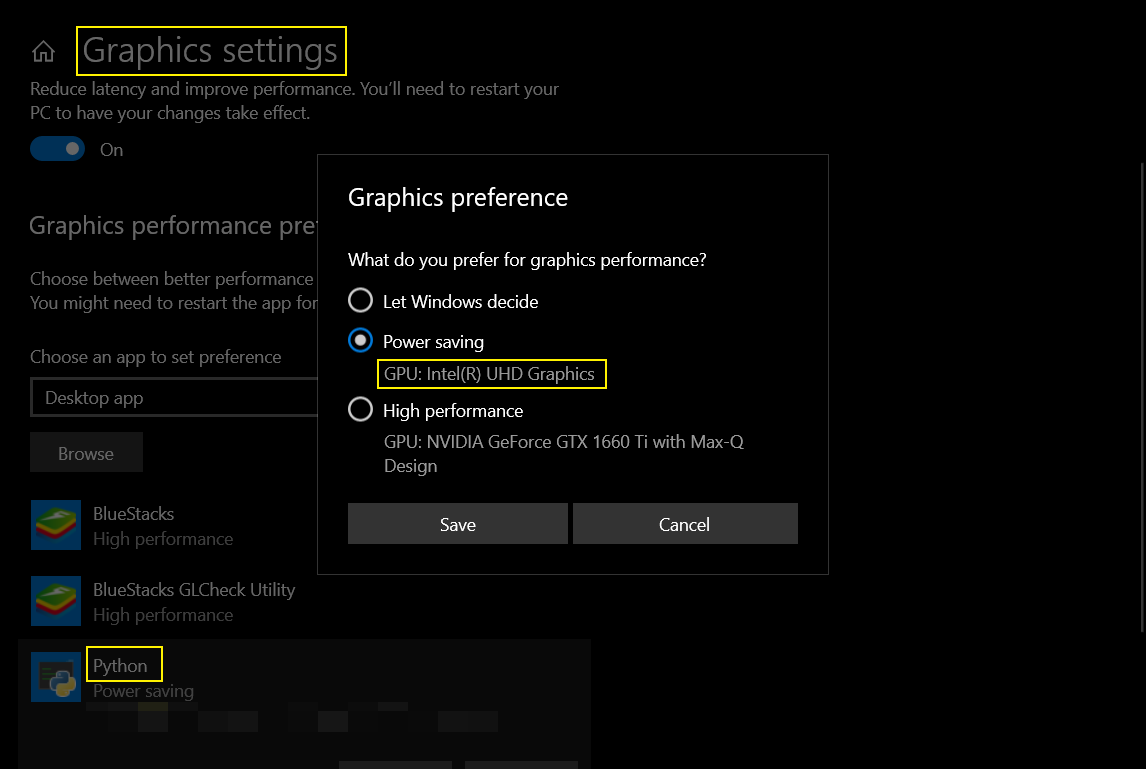 There should be similar options in Windows 11 too

On Wed, 2 Nov 2022 at 10:33 PM AI-M-BOT @.***> wrote:
I will suggest you properly set your process to run on GPU which displays Sorry about my language if you cannot understand me In my case i do the following settings [image: image] https://user-images.githubusercontent.com/93147937/199585781-a1ec316d-c6dd-48e8-bf35-1dec1b725071.png There should be similar options in Windows 11 too
— Reply to this email directly, view it on GitHub https://github.com/ra1nty/DXcam/issues/38#issuecomment-1301117338, or unsubscribe https://github.com/notifications/unsubscribe-auth/APM6BZK2VRFXHL4YZPVAAFLWGK6X7ANCNFSM6AAAAAARVHQLJQ . You are receiving this because you authored the thread.Message ID: @.***>
ive already tried doing this and it hasn’t helped.

On Wed, 2 Nov 2022 at 10:33 PM AI-M-BOT @.> wrote: I will suggest you properly set your process to run on GPU which displays Sorry about my language if you cannot understand me In my case i do the following settings [image: image] https://user-images.githubusercontent.com/93147937/199585781-a1ec316d-c6dd-48e8-bf35-1dec1b725071.png There should be similar options in Windows 11 too — Reply to this email directly, view it on GitHub <#38 (comment)>, or unsubscribe https://github.com/notifications/unsubscribe-auth/APM6BZK2VRFXHL4YZPVAAFLWGK6X7ANCNFSM6AAAAAARVHQLJQ . You are receiving this because you authored the thread.Message ID: @.> ive already tried doing this and it hasn’t helped.
didn't work, please help

On Wed, 2 Nov 2022 at 10:33 PM AI-M-BOT @.> wrote: I will suggest you properly set your process to run on GPU which displays Sorry about my language if you cannot understand me In my case i do the following settings [image: image] https://user-images.githubusercontent.com/93147937/199585781-a1ec316d-c6dd-48e8-bf35-1dec1b725071.png There should be similar options in Windows 11 too — Reply to this email directly, view it on GitHub <#38 (comment)>, or unsubscribe https://github.com/notifications/unsubscribe-auth/APM6BZK2VRFXHL4YZPVAAFLWGK6X7ANCNFSM6AAAAAARVHQLJQ . You are receiving this because you authored the thread.Message ID: @.> ive already tried doing this and it hasn’t helped.
i found it, you have to use nvidia control panel to change the preferred gpu. you can find how to do that in youtube
hello, I'm having problems like this, I'm using windows 7, any solution?

hello, I'm having problems like this, I'm using windows 7, any solution?
use the nvidia control panel to change python 3.10 to integrated graphics. there are tutoriald online on how to do that

it's fixed my ctypes.COMError: (-2005270524] Try change GPU for python, as it's recomended @AI-M-BOT Try run .py or Pycharm as adminstrator. If you are going to use pyautogui, you will need this anyway. Use camera.get_latest_frame() instead camera.grab()
camera.grab() quite often but randomly causes an errors in both dxcam and dxshot.
- Sometimes return None
- ctypes.COMError: (-2005270524]
- RuntimeError: cannot join current thread
box = (100,100,300,300)
camera = dxcam.create(output_color="BGR")
# You can use region here instead .grab()
camera.start(target_fps=30, region=box)

# Sometimes camera return None.
# Stupid function to avoid this
def get_screen():
    screen = None
    while screen is None:
        screen = camera.get_latest_frame()
    return screen

get_screen()

Had the same problem.
My solution was changing
this:
frame = camera.grab()
to this:
frame = camera.get_latest_frame()
Im also thinking about putting this function into a try exept wrapper, at the same time i know you should avoid try wrappers,
for now it works.

I am on Windows 10 and have tried updating graphics settings, NVidia Control panel, and now using camera.get_latest_frame() instead of camera.grab. None of these seem to fix the error which happens in my case when dxcam.create() is called.
import dxcam
print(dxcam.device_info()) print(dxcam.output_info())
Device[0]:'(Device Name:NVIDIA RTX A4000 Dedicated VRAM:15172Mb VendorId:4318)'
Device[0] Output[0]: Res:(1920, 1080) Rot:0 Primary:True
