

 r-tmap
tmap output and withspinner()
Hi,
I'm building a shiny app that has a lot of tmap objects. Since some maps are slow to laod I decided to use a spinner from {shinycssloaders}. If I use the default spinner, everything works like a charm, but if I use a custom image (an animated gif in the www folder) something weird is shown. I have a code like this:
withSpinner(tmapOutput("mappa2"), image = "www/running_olive.gif")
The spinner works and also the gif is correctly shown, but the tmap legend is distorted if I use the custom image. Look at this picture. In the upper map I've used the default spinner, while in the lower map I've used the custom gif. Look at that legend!
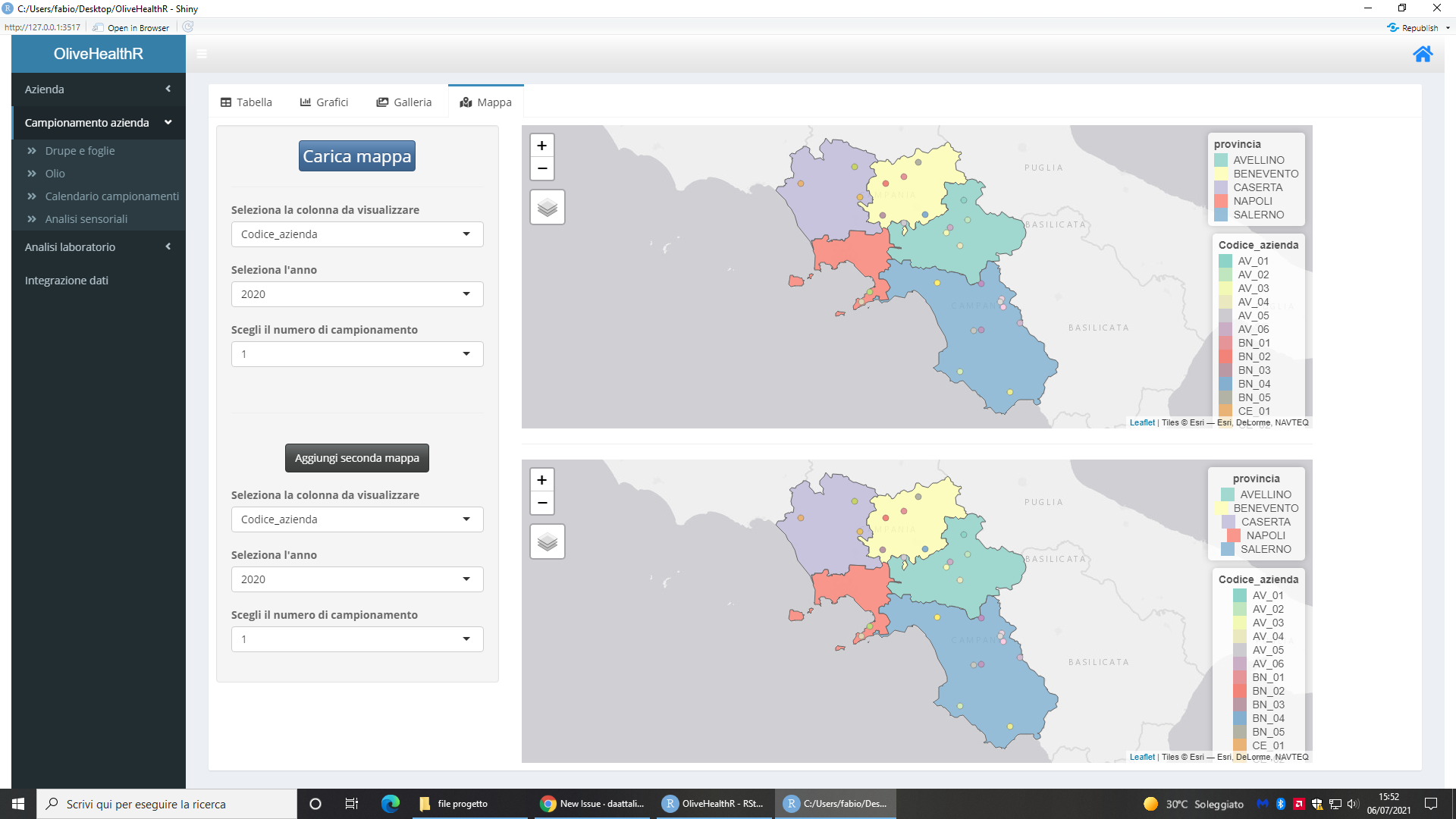
And if I change the variables it gets worse! I tested also on Chrome but I have the same problem. From what I understood, the problem is with the length of the single elements of the legend. I think that tmap instead of aligning the legend on the left (having the cubes aligned), it centers the legend so if the text is the same length no problems, but if a text is longer than another one is not aligned anymore. I tested also with plotly and ggplot but it doesn't seem to have this bug. Only with the tmap output. Maybe a conflict? I've already opened an issue in the shinycssloaders github page but it's not a bug of their package since with other outputs it works perfectly.
EDIT: I've found the problem digging up in the html code. The guilty was this line:
.shiny-spinner-custom {
    text-align: center;
}
that is checked only with the custom image. If I uncheck it, the bug disappears. So I think it's a bug from the {shinycssloaders} package. I've reopened the issue in the spinner github. I'll update this post if I have some news.

I will reopen because that's not only that package problem but both. So I've found an half solution removing this line from a css file (spinner.css file in the assets folder) of that package.
.shiny-spinner-custom {
    text-align: center;
}
Removing this code, the legend is correctly shown but the spinner is not centered anymore (it's on the left). So far I think that the css code of the spinner overrides the tmap css and puts everything centered. I need a solution where the tmap css is not modified by the spinner css. I've found in tmap options the text.align option, but doesn't work. My code is this:
#data2 is a data.frame with two coordinates column: "UTM_33T_E" and "UTM_33T_N"

  utmcoord23 = sf::st_as_sf(data2, coords = c("UTM_33T_E", "UTM_33T_N"), crs = 32633)

  sf::st_crs(shp) = 32633     #"shp" is a shapefile

  tm_shape(shp)+ tm_polygons(col= "provincia", alpha = 0.8) + tm_shape(utmcoord23) +
      tm_dots(col = colnames(dotlegend), scale = 1.5, palette = palette, id= colnames(dotlegend), popup.vars = TRUE,
legend.format = list(text.align = "left"))

#"dotlegend" is a column from the dataframe used for the dots
I have zero experience with shiny spinners, but the problem reminds me of issues we had with markdown documents (see #398 and #483 and https://github.com/r-spatial/mapview/issues/146). For some reason some maps are placed in different div classes, and hence inherit different values of css properties.

I looked at the #398 and it seems more or less the same problem. Probably the solution will be the same. I saw that for now there is no solution, is there? I'm not css or html expert but if I can provide you more info I'll give you.
In case anyone is still looking for a solution, I was able to work around this problem with this CSS styling:
  .shiny-spinner-custom {
    text-align: initial;
  }
  .load-container {
    text-align: center;
  }
attached via shiny::tags$style(type = "text/css", ...) into the UI definition.
The first one prevents setting the unfortunate text-align: center for all children tags of any element with .shiny-spinner-custom class.
The second one "restores" the centered alignment for the custom spinner itself (it is wrapped in the div with class .load-container).
Thought this will be helpful for someone. Cheers!
