

 r-spatial
ee_Initialize() fails, previous Issues not solving issue
- rgee version: 1.1.3
- R version: R-3.6.2
- Operating System: Windows 10
At submit an issue, please attached the following information of your rgee session:
- [ Yes] You have the Python API installed (from terminal):
earthengine -h
- [No ] You can find the credentials file on your system:
library(rgee)
ee_path <- path.expand("~/.config/earthengine/credentials")
file.exists(ee_path)
- [No ] You can run a simple EE command from R:
library(rgee)

# Initialize the Earth Engine module.
ee_Initialize()

# Print metadata for a DEM dataset.
print(ee$Image('USGS/SRTMGL1_003')$getInfo())
Attach your Python (reticulate) configuration:
library(reticulate)
py_config()
python: C:/Users/Patricia/AppData/Local/r-miniconda/envs/r-reticulate/python.exe libpython: C:/Users/Patricia/AppData/Local/r-miniconda/envs/r-reticulate/python36.dll pythonhome: C:/Users/Patricia/AppData/Local/r-miniconda/envs/r-reticulate version: 3.6.11 (default, Aug 5 2020, 19:41:03) [MSC v.1916 64 bit (AMD64)] Architecture: 64bit numpy: C:/Users/Patricia/AppData/Local/r-miniconda/envs/r-reticulate/Lib/site-packages/numpy numpy_version: 1.19.1
Description
ee_Initialize is failing, with a bad request error. I've attempted to follow the instructions of numerous other Issues posted, but have failed to solve my issue. ee_check() is now OK after much hours of following previous issues. But now I believe my issue might be stemming back to my credentials. I get warnings from ee_check_credentials() and ee$Authenticate() opens my browser to Sign in but Google is giving an Authorization Error (Error 400: invalid_request), and a corresponding error in R. The browser error states: The version of the app you're using doesn't include the latest security features to keep you protected. Please make sure to download from a trusted source and update to the latest, most secure version. I have successfully used rgee on this computer previously, and I'd really appreciate some help getting it up and running again!
What I Did
> library(rgee)
> library(reticulate)
> ee_Initialize(drive=TRUE, display=TRUE)
-- rgee 1.1.3 -------------------------------------------------------------------------------- earthengine-api 0.1.302 --
 √ user: not_defined
 √ Google Drive credentials:  FOUND
 √ Initializing Google Earth Engine:Error in py_call_impl(callable, dots$args, dots$keywords) :
  google.auth.exceptions.RefreshError: ('invalid_grant: Bad Request', {'error': 'invalid_grant', 'error_description': 'Bad Request'})

> ee_check_credentials()
(*)  Credentials neccesaries for rgee:
√ [Ok] Earth Engine Credentials found.
NOTE: This user does not present a Google Drive credential. The following functions will not work:
- ee_drive_to_local()
- ee_as_raster(via = "drive")
- ee_as_stars(via = "drive")
- ee_as_sf(via = "drive")
Try rgee::ee_Initialize(drive = TRUE) to fix.

NOTE: This user does not present a GCS credential. The following functions will not work:
- rgee::ee_gcs_to_local()
- ee_as_raster(via = "gcs")
- ee_as_stars(via = "gcs")
- ee_as_sf(via = "gcs")
- sf_as_ee(via = "gcs_to_asset")
- gcs_to_ee_image
- raster_as_ee
- local_to_gcs- stars_as_ee
Try rgee::ee_Initialize(gcs = TRUE) to fix

> ee$Authenticate()
Enter verification code:
To authorize access needed by Earth Engine, open the following URL in a web browser and follow the instructions. If the web browser does not start automatically, please manually browse the URL below.

    https://accounts.google.com/o/oauth2/auth?client_id=517222506229-vsmmajv00ul0bs7p89v5m89qs8eb9359.apps.googleusercontent.com&scope=https%3A%2F%2Fwww.googleapis.com%2Fauth%2Fearthengine+https%3A%2F%2Fwww.googleapis.com%2Fauth%2Fdevstorage.full_control&redirect_uri=urn%3Aietf%3Awg%3Aoauth%3A2.0%3Aoob&response_type=code&code_challenge=sxAq7N09jscl40GUqu55pgXSJwJ6xVGKSy9FtMXYKB4&code_challenge_method=S256

The authorization workflow will generate a code, which you should paste in the box below.
Error in py_call_impl(callable, dots$args, dots$keywords) :
  Exception: Problem requesting tokens. Please try again.  HTTP Error 400: Bad Request b'{\n  "error": "invalid_request",\n  "error_description": "Missing required parameter: code"\n}'

Apologies, I forgot to include that if I do > ee_Initialize() without drive=TRUE I get the error still: -- rgee 1.1.3 -------------------------------------------------------------------------------- earthengine-api 0.1.302 -- √ user: not_defined √ Initializing Google Earth Engine:Error in py_call_impl(callable, dots$args, dots$keywords) : google.auth.exceptions.RefreshError: ('invalid_grant: Bad Request', {'error': 'invalid_grant', 'error_description': 'Bad Request'})
Thank you for this package!
I am having a similar issue. ee_Initialize() opens a tab in chrome for the authorization process that reads:
Error 400: invalid_request
The version of the app you're using doesn't include the latest security features to keep you protected. Please make sure to download from a trusted source and update to the latest, most secure version.
also running (in terminal)
earthengine authenticate or earthengine -h
returns zsh: command not found: earthengine
Which I suppose is to be expected as my ee environment requires conda activate ee to access earthengine. My understanding is that this shouldn't be the cause of the problem's I'm experiencing with rgee:ee_Initialize() though?
(in terminal):
conda activate ee
earthengine authenticate
works just fine

I am also having this issue - Google doesn't seem to want to let me in! Any help would be appreciated.

Hi @MelanieDickie upgrading your earthengine-api Python package should solve the problem.
library(rgee)
rgee::ee_install_upgrade()

Thanks @csaybar. Unfortunately I can't even library(rgee) now? See below and my comments on issue 272 (https://github.com/r-spatial/rgee/issues/272). Apologies for making two Issue posts - I thought I had made progress, and run into a separate issue, but I think they're linked.
library(rgee) Error: package or namespace load failed for ‘rgee’: .onLoad failed in loadNamespace() for 'rgee', details: call: py_module_import(module, convert = convert) error: ModuleNotFoundError: No module named 'ee' rgee::ee_install_upgrade() Error: .onLoad failed in loadNamespace() for 'rgee', details: call: py_module_import(module, convert = convert) error: ModuleNotFoundError: No module named 'ee'
I've tried completely uninstalling rgee, restrating my computer, and installing the package again (from both CRAN and git, in separate attempts), with no change to the error.
Hi Melanie and Cesar,
Thank you, Cesar, for helping us with this issue. I can load the rgee package but can't authenticate through Google (Error 400), even after updating the rgee package. I am using a slightly older version of R (4.1.3) because of issues with running R2jags on the latest R update, but I had the same issue with ee_Initialize() when I was using the latest R version. Melanie and I are both at the University of Alberta (hi, Melanie! I'm one of Erin's students), but I think that's not relevant to our issue because I am not on the University wifi and I have the same issue when I try to use ee_Initialize() to authenticate a GEE account that uses my personal gmail.
Melanie, have you updated to Windows 11? Maybe it's our version of Windows that is the problem. I will update over the weekend and see if that fixes it.
best, Carrie Ann
On Fri, Jul 15, 2022 at 8:15 AM MelanieDickie @.***> wrote:
Thanks @csaybar https://github.com/csaybar. Unfortunately I can't even library(rgee) now? See below and my comments on issue 272 (#272 https://github.com/r-spatial/rgee/issues/272). Apologies for making two Issue posts - I thought I had made progress, and run into a separate issue, but I think they're linked.
library(rgee) Error: package or namespace load failed for ‘rgee’: .onLoad failed in loadNamespace() for 'rgee', details: call: py_module_import(module, convert = convert) error: ModuleNotFoundError: No module named 'ee' rgee::ee_install_upgrade() Error: .onLoad failed in loadNamespace() for 'rgee', details: call: py_module_import(module, convert = convert) error: ModuleNotFoundError: No module named 'ee'
I've tried completely uninstalling rgee, restrating my computer, and installing the package again (from both CRAN and git, in separate attempts), with no change to the error.
— Reply to this email directly, view it on GitHub https://github.com/r-spatial/rgee/issues/271#issuecomment-1185644094, or unsubscribe https://github.com/notifications/unsubscribe-auth/AIO5XQQLXPHYZPNCBE5EM2DVUF6CDANCNFSM53A6NTWA . You are receiving this because you commented.Message ID: @.***>
The problem with @MelanieDickie was:
-
Please do not save NULL pointer in your Global environments.
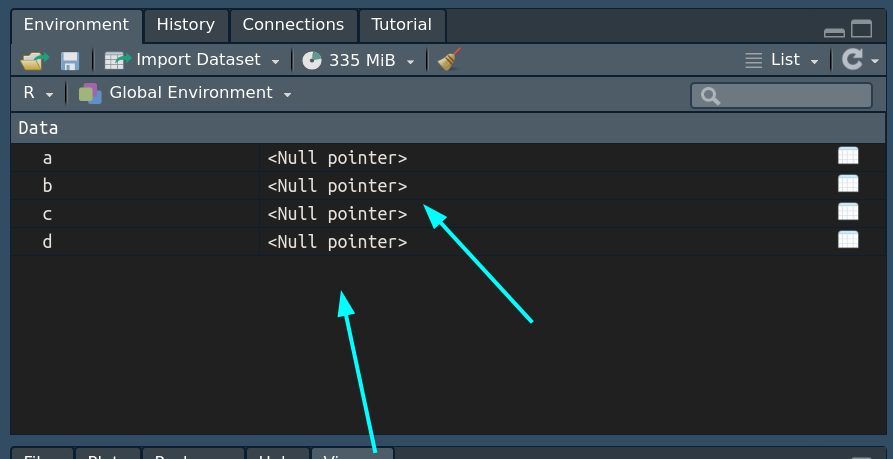
-
To solve the google.auth.exceptions.RefreshError, delete your user credentials!

- ee_clean_credentials("ndef")
- Restart your Rsession.
- library(rgee)
- ee_Initialize()
Hi @caadams can you give us more info about your system?
library(rgee)
reticulate::import("ee")$`__version__`

sessionInfo()
Thank you for your help! Is this the info you are looking for?
R version 4.1.3 (2022-03-10) Platform: x86_64-w64-mingw32/x64 (64-bit) Running under: Windows 10 x64 (build 19043)
On Fri, Jul 15, 2022 at 11:07 AM Cesar Aybar @.***> wrote:
Hi @caadams https://github.com/caadams can you give us more info about your system?
library(rgee)reticulate::import("ee")$
__version__sessionInfo()
— Reply to this email directly, view it on GitHub https://github.com/r-spatial/rgee/issues/271#issuecomment-1185780330, or unsubscribe https://github.com/notifications/unsubscribe-auth/AIO5XQSHCSZUJRIKOSLKID3VUGSF3ANCNFSM53A6NTWA . You are receiving this because you were mentioned.Message ID: @.***>
Unfortunately I have the same issue but the proposed solutions above, didn't solve it. I would be very thankful for any help.
- rgee version: 1.1.3
- R version: 4.1.1
- Operating System: windows 10
- [yes] You have the Python API installed (from terminal):
earthengine -h
- [no] You can find the credentials file on your system:
library(rgee)
ee_path <- path.expand("~/.config/earthengine/credentials")
file.exists(ee_path)
- [ no] You can run a simple EE command from R:
library(rgee)

# Initialize the Earth Engine module.
ee_Initialize()

# Print metadata for a DEM dataset.
print(ee$Image('USGS/SRTMGL1_003')$getInfo())
Attach your Python (reticulate) configuration:
library(reticulate)
py_config()
python: C:/Users/[myusername]/AppData/Local/r-miniconda/envs/rgee/python.exe libpython: C:/Users/[myusername]/AppData/Local/r-miniconda/envs/rgee/python38.dll pythonhome: C:/Users/[myusername]/AppData/Local/r-miniconda/envs/rgee version: 3.8.13 | packaged by conda-forge | (default, Mar 25 2022, 05:59:00) [MSC v.1929 64 bit (AMD64)] Architecture: 64bit numpy: C:/Users/[myusername]/AppData/Local/r-miniconda/envs/rgee/Lib/site-packages/numpy numpy_version: 1.23.1 ee: C:\Users[myusername]\AppData\Local\R-MINI~1\envs\rgee\lib\site-packages\ee_init_.p
NOTE: Python version was forced by RETICULATE_PYTHON
Description
I followed the instrutions. When initializing with ee_Initialize(drive=T, display =T) I get past the first step where I tick the google drive box and set the google credentials. After that I get the "400: invalid_request"-Error when I try to proceed.
What I Did
`ee_Initialize(drive=T, display =T)`

` -- rgee 1.1.3 ------------------------------- earthengine-api 0.1.302 --
 v user: not_defined
 v Google Drive credentials:Auto-refreshing stale OAuth token.
 v Google Drive credentials:  FOUND
 v Initializing Google Earth Engine:
 To authorize access needed by Earth Engine, open the following URL in a web browser and follow the instructions:

https://accounts.google.com/o/oauth2/auth?client_id=517222506229-vsmmajv00ul0bs7p89v5m89qs8eb9359.apps.googleusercontent.com&scope=https%3A%2F%2Fwww.googleapis.com%2Fauth%2Fearthengine+https%3A%2F%2Fwww.googleapis.com%2Fauth%2Fdevstorage.full_control&redirect_uri=urn%3Aietf%3Awg%3Aoauth%3A2.0%3Aoob&response_type=code&code_challenge=l5Zh5tbq7hmg2Px0xJmvmiI2QdNOqYxB87hvywH86GA&code_challenge_method=S256

 The authorization workflow will generate a code, which you should paste in the box below
Enter Earth Engine Authentication: `
Entering the URL in the browser leads to a Google notice, stating: "Fehler 400: invalid_request The version of the app you're using doesn't include the latest security features to keep you protected. Please make sure to download from a trusted source and update to the latest, most secure version."
> rgee::ee_check()
(*)  Python version
v [Ok] C:/Users/[myusername]/AppData/Local/r-miniconda/envs/rgee/python.exe v3.8
(*)  Python packages:
v [Ok] numpy
v [Ok] earthengine-api
> rgee::ee_install_upgrade()
Upgrading did not help unfortunately.
Any help would be appreciated, I am struggeling for some days now.

Hi Cesar,
I ended up going back to the javascript API since I just needed to get the analysis done, but it would be great to be able to use rgee. When I run ee_Initialize(drive = TRUE), I'm able to get to this page and login: [image: image.png] click the box to give the permissions: [image: image.png] but when I click Continue I get this error: [image: image.png] I made sure to update Tidyverse, clean my credentials using ee_clean_credentials, and start a new R session before trying to login. Do you have any ideas for other things I could try?
Thanks for your help!
best, Carrie Ann
On Fri, Jul 15, 2022 at 11:33 AM Carrie Ann Adams @.***> wrote:
Thank you for your help! Is this the info you are looking for?
R version 4.1.3 (2022-03-10) Platform: x86_64-w64-mingw32/x64 (64-bit) Running under: Windows 10 x64 (build 19043)
On Fri, Jul 15, 2022 at 11:07 AM Cesar Aybar @.***> wrote:
Hi @caadams https://github.com/caadams can you give us more info about your system?
library(rgee)reticulate::import("ee")$
__version__sessionInfo()
— Reply to this email directly, view it on GitHub https://github.com/r-spatial/rgee/issues/271#issuecomment-1185780330, or unsubscribe https://github.com/notifications/unsubscribe-auth/AIO5XQSHCSZUJRIKOSLKID3VUGSF3ANCNFSM53A6NTWA . You are receiving this because you were mentioned.Message ID: @.***>
The problem with @MelanieDickie was:
- Please do not save NULL pointer in your Global environments.
- To solve the google.auth.exceptions.RefreshError, delete your user credentials!
- ee_clean_credentials("ndef")
- Restart your Rsession.
- library(rgee)
- ee_Initialize()
Following these 4 steps solved this issue for me:
ee_Initialize()
── rgee 1.1.5 ──────────────────────────────────────────────────────────────── earthengine-api 0.1.323 ──
 ✔ user: not_defined
 ✔ Initializing Google Earth Engine:Error: google.auth.exceptions.RefreshError: ('invalid_grant: Bad Request', {'error': 'invalid_grant', 'error_description': 'Bad Request'})
Thank you very much!
