
rgee
 rgee copied to clipboard
 r-spatial
ee_Initialize() on ubuntu server fails
i have been trying to automatically run a script (rgee script) within a server, my idea is to make this automatic, running in the back to populate a database with extracted values from google earth engine.
The issue is,
the interactive part of ee_Initialize() to authenticate as google earth engine user.
I have several errors
-first, the server without a web browser installed. So i have installed chromium (it was one of the mentioned solutions)
-second, since root shouldn't run a browser, you need to do it with another user. And that user didn't have mkdir permissions, so it fails with:
Enter earth engine authentication: mkdir: cannot create directory 'run/user/1001'
and the error's go on and on, while one keeps solving the issues mentioned.
but the final error remains:
xdg-open: no method available for opening 'https://accounts.google.com/o/oauth2/auth?client_id=NUMBER.apps.googleusercontent.com&scope=https%3A%2F%2Fwww.googleapis.com%2Fauth%2Fearthengine+https%3A%2F%2Fwww.googleapis.com%2Fauth%2Fdevstorage.full_control&redirect_uri=urn%3Aietf%3Awg%3Aoauth%3A2.0%3Aoob&response_type=code&code_challenge=031FsfFdKG3Pc5zYn9zy_dvEf5p32n9h0FddXa3-5TA&code_challenge_method=S256'
So, do you have any help with this kind of scenario? many help as always!!

From this link (https://github.com/rstudio/cloudml/issues/191) I got the concept to use in terminal this command:
gcloud auth login --no-launch-browser
That should make a link that you can copy and paste into a browser, get a key back, and then paste into your terminal. I think this may create a link between the browser and the R session, so is unique for different setups, and wouldn't be a portable solution, but may help you test some thing. Good luck.

still not working for me.
I have used the code mentioned, i was able to login, and the response was:
You are now logged in as [[email protected]]. Your current project is [None]. You can change this setting by running: $ gcloud config set project PROJECT_ID
but then i try to execute my .R file with Rscript but, again the error. The commands and error are:
`> library(rgee)
ee_Initialize() ── rgee 1.1.3 ─────────────────────────────────────────────────────────────────────────────────────────────────── earthengine-api 0.1.302 ── ✔ user: not_defined ✔ Initializing Google Earth Engine:Enter Earth Engine Authentication: MoTTY X11 proxy: Unsupported authorisation protocol [2736337:2736337:0714/135907.409580:ERROR:ozone_platform_x11.cc(247)] Missing X server or $DISPLAY [2736337:2736337:0714/135907.409781:ERROR:env.cc(226)] The platform failed to initialize. Exiting. /usr/bin/xdg-open: 869: firefox: not found /usr/bin/xdg-open: 869: iceweasel: not found /usr/bin/xdg-open: 869: seamonkey: not found /usr/bin/xdg-open: 869: mozilla: not found /usr/bin/xdg-open: 869: epiphany: not found /usr/bin/xdg-open: 869: konqueror: not found MoTTY X11 proxy: Unsupported authorisation protocol [2736500:2736500:0714/135907.964510:ERROR:ozone_platform_x11.cc(247)] Missing X server or $DISPLAY [2736500:2736500:0714/135907.964683:ERROR:env.cc(226)] The platform failed to initialize. Exiting. MoTTY X11 proxy: Unsupported authorisation protocol [2736580:2736580:0714/135909.744511:ERROR:ozone_platform_x11.cc(247)] Missing X server or $DISPLAY [2736580:2736580:0714/135909.744677:ERROR:env.cc(226)] The platform failed to initialize. Exiting. /usr/bin/xdg-open: 869: google-chrome: not found /usr/bin/xdg-open: 869: www-browser: not found /usr/bin/xdg-open: 869: links2: not found /usr/bin/xdg-open: 869: elinks: not found /usr/bin/xdg-open: 869: links: not found /usr/bin/xdg-open: 869: lynx: not found /usr/bin/xdg-open: 869: w3m: not found xdg-open: no method available for opening 'https://accounts.google.com/o/oauth2/auth?client_id=517222506229-vsmmajv00ul0bs7p89v5m89qs8eb9359.apps.googleusercontent.com&scope=https%3A%2F%2Fwww.googleapis.com%2Fauth%2Fearthengine+https%3A%2F%2Fwww.googleapis.com%2Fauth%2Fdevstorage.full_control&redirect_uri=urn%3Aietf%3Awg%3Aoauth%3A2.0%3Aoob&response_type=code&code_challenge=Pr6BLJuH74aaezThx-Oe6t9ZMqRGzMvhmDsjYdjOp3I&code_challenge_method=S256' Error in py_call_impl(callable, dots$args, dots$keywords) : Exception: Problem requesting tokens. Please try again. HTTP Error 400: Bad Request b'{\n "error": "invalid_request",\n "error_description": "Missing required parameter: code"\n}'
`
I was reading and find this may be related since the proposed solution was from may 2019.
According to me (please let me know if I'm wrong :pray: ), this problem should occur only for new users.
@jimoreira are you trying to run rgee in a system without a GUI? It seems that you do not have a browser :thinking:

Update: Sorry I didn't read the part of ubuntu-server. In this case @jimoreira I think the easiest solution is to directly copy the credentials to the .config/earthengine folder. See https://github.com/csaybar/rgee-docker/blob/2aaf780c51ceec70ec42cda936cc7b7cbadaa3d5/Dockerfile#L97
Now i have `
library(rgee) ee_Initialize() Error in reticulate::py_discover_config() : Python specified in RETICULATE_PYTHON (/usr/bin/python3nEARTHENGINE_INIT_MESSAGE=True) does not exist ` a step back i think really messy
other option is:
library(rgee)
reticulate::use_python("/usr/bin/python3")
ee_Initialize()
what should i include in the .Renviron file?
with the second option you provide, i kind of get the idea:
is to change the use of
py_path="/home/javier/.virtualenvs/rgee/bin/python", py_env="rgee")
to use of python directly and not from virtualenv (miniconda installation)
am i right? i'm lost over here..
The .Renviron only has the Python path that will be used by rgee,
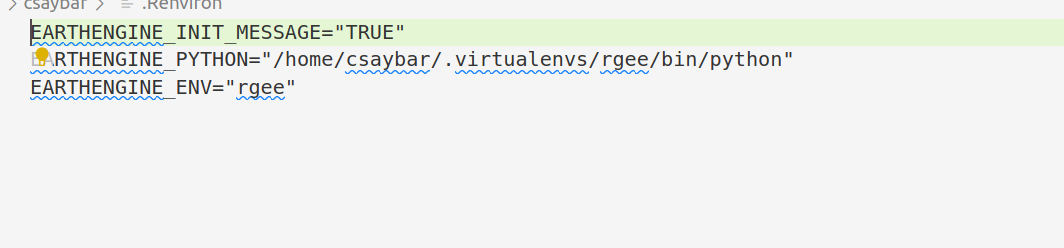
But if you don't want to set it up, you can use use_python always before calling ee_Initialize().
library(rgee)
reticulate::use_python("/usr/bin/python3")
ee_Initialize()
See https://rstudio.github.io/reticulate/reference/use_python.html#reticulate-python-1. The only requirement is that the Python Path you set in use_python must have installed earthengine-api and numpy
firts of all, let me thank you cesar for beeing there.
ok i have changed the .Renviron file to use /usr/bin/python3, and i also pip3 install numpy/ earthengine-api. when i run R, library(rgee) and ee_Initialize(), i get different results when working from root or from my user. Both use python3. From root, i run and a url is provided, so the error is 404 within the browser (server browser). Changing the user from root, its a different error. ` ── rgee 1.1.3 ─────────────────────────────────────────────────────────────────────────────────────────────────── earthengine-api 0.1.302 ── ✔ user: [email protected] ✔ Initializing Google Earth Engine:Enter Earth Engine Authentication: MoTTY X11 proxy: Unsupported authorisation protocol Unable to init server: Broadway display type not supported: localhost:11.0 Error: cannot open display: localhost:11.0 MoTTY X11 proxy: Unsupported authorisation protocol [2762110:2762110:0715/200120.515917:ERROR:ozone_platform_x11.cc(247)] Missing X server or $DISPLAY [2762110:2762110:0715/200120.516134:ERROR:env.cc(226)] The platform failed to initialize. Exiting. MoTTY X11 proxy: Unsupported authorisation protocol Unable to init server: Broadway display type not supported: localhost:11.0 Error: cannot open display: localhost:11.0 /usr/bin/xdg-open: 869: iceweasel: not found /usr/bin/xdg-open: 869: seamonkey: not found /usr/bin/xdg-open: 869: mozilla: not found /usr/bin/xdg-open: 869: epiphany: not found /usr/bin/xdg-open: 869: konqueror: not found MoTTY X11 proxy: Unsupported authorisation protocol [2762281:2762281:0715/200121.388845:ERROR:ozone_platform_x11.cc(247)] Missing X server or $DISPLAY [2762281:2762281:0715/200121.389015:ERROR:env.cc(226)] The platform failed to initialize. Exiting. MoTTY X11 proxy: Unsupported authorisation protocol [2762361:2762361:0715/200123.204149:ERROR:ozone_platform_x11.cc(247)] Missing X server or $DISPLAY [2762361:2762361:0715/200123.204343:ERROR:env.cc(226)] The platform failed to initialize. Exiting. /usr/bin/xdg-open: 869: google-chrome: not found /usr/bin/xdg-open: 869: www-browser: not found /usr/bin/xdg-open: 869: links2: not found /usr/bin/xdg-open: 869: elinks: not found /usr/bin/xdg-open: 869: links: not found /usr/bin/xdg-open: 869: lynx: not found /usr/bin/xdg-open: 869: w3m: not found xdg-open: no method available for opening 'https://accounts.google.com/o/oauth2/auth?client_id=517222506229-vsmmajv00ul0bs7p89v5m89qs8eb9359.apps.googleusercontent.com&scope=https%3A%2F%2Fwww.googleapis.com%2Fauth%2Fearthengine+https%3A%2F%2Fwww.googleapis.com%2Fauth%2Fdevstorage.full_control&redirect_uri=urn%3Aietf%3Awg%3Aoauth%3A2.0%3Aoob&response_type=code&code_challenge=tM0FZwOIc9fT7AcoxNOWXGwuRvYmdtqImwYYdS2Fb2Y&code_challenge_method=S256'
Error in py_call_impl(callable, dots$args, dots$keywords) : Exception: Problem requesting tokens. Please try again. HTTP Error 400: Bad Request b'{\n "error": "invalid_request",\n "error_description": "Missing required parameter: code"\n}' ` the same one i metioned allready.
i'm also not able to run earthengine authenticate within the cmd. it provides a url, but when copy into local browser, again, 404 error. I had a similar problem using rgee in colabe notebooks, and changing the gc project, it let me go forward. I guess there is some limit to use google projects, since now gee is using them. thanks
Hi
This problem sounds similar to the one I had encountered using earthengine authenticate in an Ubuntu server terminal. Basically, it seems like earthengine is trying to guess whether you are on a desktop or remote based on some heuristics that will fail if you have a browser on your server. The answer for now is to use earthengine authenticate --quiet, which will ask you to copy a line into a desktop machine for the authentication.
Maybe rgee could allow for passing the --quiet option?
Source: email titled Security upgrades to authentication in Python notebooks and command line on the google groups, answer by D Gib. on August 3 2022.

I think this has been solved in the latest version. Please open a new issue if you still have problems. ee_Initialize(auth_quiet = TRUE)