

 r-spatial
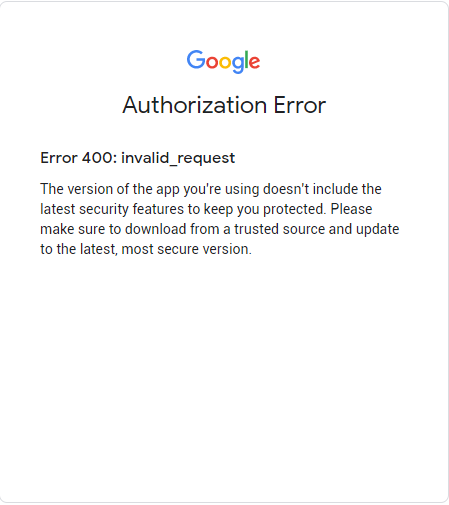
ee_Initialize returns invalid request
- rgee version: 1.1.3.9000
- R version: 4.2
- Operating System: win10
Python configuration:
library(reticulate)
py_config()

python:         C:/Users/***/AppData/Local/r-miniconda/envs/r-reticulate/python.exe
libpython:      C:/Users/***/AppData/Local/r-miniconda/envs/r-reticulate/python36.dll
pythonhome:     C:/Users/***/AppData/Local/r-miniconda/envs/r-reticulate
version:        3.6.13 (default, Sep 23 2021, 07:38:49) [MSC v.1916 64 bit (AMD64)]
Architecture:   64bit
numpy:          C:/Users/***/AppData/Local/r-miniconda/envs/r-reticulate/Lib/site-packages/numpy
numpy_version:  1.19.5
Description
Previous version works fine. After upgrading the R and packages, initializing the Google Earth Engine always returns invalid request. Any suggestions and help are greatly appreciated!
What I Did
library(rgee)
# Check non-R dependencies
ee_check()
(*) Python version
v [Ok] C:/Users/***/.conda/envs/rgee_py/python.exe v3.9
(*) Python packages:
v [Ok] numpy
v [Ok] earthengine-api
# Initialize the Earth Engine module.
rgee::ee_Initialize(drive = T)
-- rgee 1.1.3.9000 --------------------------- earthengine-api 0.1.315 --
v user: not_defined
v Google Drive credentials: FOUND
v Initializing Google Earth Engine:
Enter Earth Engine Authentication:

Hello,
Same problem here.
py_config() python: C:/Users//AppData/Local/r-miniconda/envs/rgee/python.exe libpython: C:/Users//AppData/Local/r-miniconda/envs/rgee/python38.dll pythonhome: C:/Users//AppData/Local/r-miniconda/envs/rgee version: 3.8.13 | packaged by conda-forge | (default, Mar 25 2022, 05:59:00) [MSC v.1929 64 bit (AMD64)] Architecture: 64bit numpy: C:/Users//AppData/Local/r-miniconda/envs/rgee/Lib/site-packages/numpy numpy_version: 1.22.4 ee: C:\Users***\AppData\Local\R-MINI~1\envs\rgee\lib\site-packages\ee_init_.p
NOTE: Python version was forced by use_python function
ee_check() ◉ Python version ✔ [Ok] C:/Users/juanm/AppData/Local/r-miniconda/envs/rgee/python.exe v3.8 ◉ Python packages: ✔ [Ok] numpy ✔ [Ok] earthengine-api NOTE: The Earth Engine Python API version 0.1.315 is installed correctly in the system but rgee was tested using the version 0.1.302. To avoid possible issues, we recommend install the version used by rgee (0.1.302). You might use:
- rgee::ee_install_upgrade()
- reticulate::py_install('earthengine-api==0.1.302', envname='PUT_HERE_YOUR_PYENV')
- pip install earthengine-api==0.1.302 (Linux and Mac0S)
- conda install earthengine-api==0.1.302 (Linux, Mac0S, and Windows)
ee_Initialize() ── rgee 1.1.3 ────────────────────── ✔ user: not_defined ✔ Initializing Google Earth Engine: Enter Earth Engine Authentication: Error in py_call_impl(callable, dots$args, dots$keywords) : Exception: Problem requesting tokens. Please try again. HTTP Error 400: Bad Request b'{\n "error": "invalid_request",\n "error_description": "Missing required parameter: code"\n}'
ANY HELP IS REALLY APPRECIATED. THANK YOU Juanmi

Hi, I got this response from the Google Earth Engine Developers forum:
rGEE is using an outdated client library (v0.1.302). The current version of the Earth Engine Python Client Library is v0.1.315
However, I installed the newest version, so, my guess is that rgee needs to be updated because while I updated it to an older version (0.1.302) as they recommend, the issue persists. Regards Juanmi
hi @jmrmcode yes sorry for the inconvenience, I will work on it this weekend. You can still use EE with rgee using:
library(rgee)
ee$Authenticate()
ee$Initialize()
However, integration with drive and GCS API will not work.

I'm also having this issue, but when I run ee$Initialize, I'm getting this error:
Error in py_call_impl(callable, dots$args, dots$keywords) : AttributeError: module 'collections' has no attribute 'Callable'

Hi :) it's solved now, deeply sorry for the inconvenience. If the problem persists just let me know.
remotes::install_github("r-spatial/rgee")
Hi @csaybar , I updated the rgee, and run the rgee::ee_Initialize(drive = T). I got the following issue:
 rgee::ee_Initialize(drive = T)
-- rgee 1.1.3.9000 --------------------------------------------------------------------------- earthengine-api 0.1.315 --
 v user: not_defined
 v Google Drive credentials:  FOUND
 v Initializing Google Earth Engine:'gcloud' is not recognized as an internal or external command,
operable program or batch file.
Fetching credentials using gcloud
gcloud failed. Please check for any errors above and install gcloud if needed.
 Error in py_call_impl(callable, dots$args, dots$keywords) :
ee.ee_exception.EEException: Please authorize access to your Earth Engine account by running

earthengine authenticate

in your command line, and then retry.
Any suggestions? Thanks!
Hi, @huangguacui I have already opened a request in EE issue tracker (https://issuetracker.google.com/issues/236861104), to inform/help, in a better way, R users with this new requirement. In short, you now also need to install gcloud in your system. This requirement comes from the new Earth Engine Python API, not R.
Follow this instruction to install gcloud and the issue should be solved.
https://cloud.google.com/sdk/docs/install#windows
PS: Windows users probably need to restart their computer after installing gcloud.
Let me know if the problem continues! Thanks!
Hi, @csaybar Thank you very much for your support and help! After installing gcloud and restarting my computer, the problem was gone.
Hi @csaybar , Im new to R and want to use GEE within Rstudio thru RGEE.
I have already installed gcloud but still encountered a problem when initializing as listed below:
"ERROR: (gcloud.auth.application-default.login) unrecognized arguments: User/.config/earthengine/credentials-client-id.json To search the help text of gcloud commands, run: gcloud help -- SEARCH_TERMS Fetching credentials using gcloud failed. Please check for any errors above and install gcloud if needed.
Error in py_call_impl(callable, dots$args, dots$keywords) : ee.ee_exception.EEException: Please authorize access to your Earth Engine account by running earthengine authenticate in your command line, and then retry."
Any suggestions to make things work? Looking forward to use RGEE!

Hi @kfcabigao1 can you please open a new issue with more information about your setup. Just need to run gcloud info!
Hello! @csaybar Have already opened a new issue with a more complete information and have run gcloud info too. Thanks!