

 qutebrowser
Do not show blinking cursor in an input field when not in insert mode
I've found that sometimes an input field will have the blinking bar cursor, which to me means "whatever you type will go in this box". In qutebrowser, you must also be in insert mode or else you will do lots of commands on accident.
Example: Go to duckduckgo.com. The search bar has a blinking cursor. Try to type as if you were trying to search something.
This happens with both backends.

I personally :-1: making this the only option, I love this behavior. For example, If I have a textbox focused and in insert mode, I can tab over to another tab (for referencing other material), and come back to the textbox focused (and I only need to press insert mode to type, rather than going through another hinting process).
If you don't want the cursor to be in textboxes, you should be able to just hit <esc> after you're in normal mode (which works for me). If you like that behaivor, you could add :search to the commands run when leaving a mode, which should (for me at least) clear any textboxes you might be in.
If it's possible to do this though, I guess it dosen't hurt to add an option...

I don't think the problem is that the text box is focused, but that it shows the vusual (blinking) cursor. It's great to have it focused, indicated by a blue border or something. But showing a blinking cursor suggests that you can start typing right away without first hitting 'i' to enter insert mode, which is currently not necessarily true.
I stumble over this all the time. My email address begins with an 'r', so I regularly reload a page by accident because I try to enter my email while not in insert mode.
I agree that it would be a good idea to tie the blinking cursor to insert mode. Insert mode off - no cursor. Insert mode on - blinking cursor, type away!

I agree it'd be nice if things worked that way, but I have no idea how to make them work that way :wink:

The visual aspect of the blinking cursor is not the only problem, more important is that it conflicts with scrolling. Right now, writing this post, when I leave insert mode and the cursor is blinking, the h/j/k/l keys don't navigate the page as expected, but the cursor in this input field. This is very similar to https://github.com/qutebrowser/qutebrowser/issues/218#issuecomment-176443564, except that was on webkit (and the behaviour is still the same there), but in webengine the workaround to press Esc one more time does not work :cry: (at least with Qt 5.9)

@lahwaacz a workaround for this behavior (which has been working for me, to the point where I haven't even noticed this), is to set your scroll keys to use :sroll-page instead of :scroll down. I (personally) like this behavior a lot more, since it gives me control over the amount of scrolling without using repeats. I find that a few (very rare) pages don't work with this method of scrolling (and to fix those, I bind <ctrl-j> to the default scrolling mechanism).
Here is a solution, which would hide the cursor: https://stackoverflow.com/a/23472096
I would like to have a steady cursor instead of it being hidden, if that is possible.

Thanks to @jgkamat's help we arrived at the following solution:
In the keys.conf, replace:
leave-mode
    <escape>
    <ctrl-[>
with:
leave-mode ;; jseval -q document.activeElement.blur()
    <escape>
    <ctrl-[>
This completely unfocuses the page when one enters the normal mode, which seems to be similar to what Vimperator does.

@rr- Note that this is a partial solution. When opening a web page that has an input field focused by default, say google or duckduckgo, or most login pages, I still have the blinking cursor but I'm not in input mode.
Yeah, I learned after using it for a few hours, but for me it removes 70% annoyance from the equation which is pretty good for starters.
A more general solution would be to hook the input focus event and check if it arrived through the hint mechanism, or if the page selected something on its own - in the latter case, cancel the event / blur the element. Unfortunately I'm not sure how to code it.
For a css fix: caret-color:transparent is simpler.
However I would still prefer a solution with a visible non-blinking caret when in normal mode. This way elements can stay focused and after going into insert mode you can immediatly insert text wherever you saw the caret before.
I tried QApplication::setCursorFlashTime(0) but it only had an effect on newly opened tabs, not my current one.

Vimperator has a focuscontent option for unfocusing within the onPageLoad event which triggers something along the lines of document.activeElement.blur() (it's not quite it because Firefox offers more APIs than Chrome) with setWindowTimeout twice (the first time with a timeout of zero and the second time in some other code with a timeout of 10). It doesn't have a separate option for unfocusing after mode changes, but I can imagine a customizable to opt-in to running document.activeElement.blur() when quitting insert state would make sense.

I switched from VimFx yesterday and this is the only problem I have with qutebrowser. It's quite bad because in Vim my normal cursor has been set to not blink for years, so for me this is really ingrained. Depending on what I type in my inbox, it closes the tab and forces me to restore it and do a 2-step login again. Quite frustrating.
Also, I don't understand the point of the normal mode when in an input. The only thing I've been able to do so far is hjkl. Most basic Vim bindings I use (0$, oO, aA, d) are either already taken to do something completely different, or do nothing. I'll look into tweaking the thing to my preferences but I thought I'd comment to share my new user experience. Everything else has been fantastic so far.

@maxime-michel You might want to take a look at the keybinding cheatsheet or the list of default keybindings.
As for this issue: As long as nobody finds out a good way to do this without introducing other side effects, not much will change about it.
The best way to do this would probably rewrite the focus code, so that when a text field is unfocused you leave insert mode and vice versa. From intiial glances at the source code it shouldn't be that hard to implement.

The one thing with Qutebrowser that drives me nuts is input focus.
Rather than just whine, I wanted to try and give an objective view of how I use it and what makes it so irksome. I am a long time Vi user and used Pentadactyl prior to jumping ship to Qutebrowser. So I am well accustomed to the modal input way of working.
I cannot count the number of times that I have inadvertently closed a window through touch-typing text and entering the the letter 'd' before realising my keystrokes were not being entered into the field that I thought was typing in.
I think there are three scenarios where this becomes a problem that Qutebrowser might be able to improve upon.
Loading a fresh page
When I open a page using o https://whatever... the page appears and a text entry field is displayed with a flashing cursor and the blue surround but the page is still loading and the field is in command mode. I start typing and... bam!
If I wait until the page has loaded then the focussed input field enters input mode. Note here that the fact the page is still loading can be quite subtle - the only indication is the less-than-100% tag in the window title - especially when the page looks visually complete.
What would help here is if an input field that is going to be given input mode that happens when it receives the input focus rather than when the page loads.
Returning to a page
If I am typing in a field (i.e. it's already in input mode) and I navigate away from that page (by selecting another tab) and then return to the page I find the field still has the input focus but has lost its input mode.
What would greatly help here is for the input mode state to be remembered per tab.
Clicking a button that opens an editable field
If I am on a page and click a button (e.g. reply to a forum post) and that modifies the page to add a focussed input field then that field does not have input mode.
What would help here is for a DOM update that gives a field input focus (i.e an ajax update to a page that adds a new focussed field) then that field should be given input mode as well.
Perhaps a user option to say "always enter input mode when receiving input focus' might allow people to choose their favoured behaviour ?

I think we're all on the same page on how things should work. The problem is that there's no easy way for qutebrowser to know when a field gets input focus (and no easy way for it to hide the cursor). As long as there's no reliable (and secure) two-way communication channel between JavaScript and Python (probably using QtWebChannel), that's probably not possible.
I'm not saying they weren't there, but I don't recall having these problems with Pentadactyl. Given that no longer works on my copy of Firefox 57, I can't go back and test it :(
It's good this is an issue being tracked, hopefully one day we can find a solution to it.
@wasamasa @johnlane this problem definitely didn't exist with Firefox+Pentadactyl/Vimperator; however the problem is that Firefox (before the 57 version anyway :Ь) have had much richer API than Chromium (whose engine Qutebrowser is using). This is why we need some sort of hack to implement this.
edit: s/there/we need

So, this issue blew up quite a bit, since many people are suffering from it, and it's a bit overloaded in what we can actually accomplish. I wanted to try to take a stab at fixing as much of this as I can, and I wanted to ask what you're opinions were before I did it. I want to say thanks to @johnlane for explaining some of the use cases from a user point of view, it really helped!
I'm going to put the 'enable/disable cursor blinking' suggestion aside for now, because the implementation seems like a hack, and could break if chromium changes in the wrong way. In addition, it wouldn't help the scrolling issues which are by-products of this.
Problem
Currently, focus and insert mode are mostly disconnected (except on user-interaction). Entering or leaving focus in a textbox (via js) has no effect on insert mode and vice versa. Because of the way qutebrowser is structured, there are two parts to this issue.
- Ensuring that we have no focus when we are not in insert mode
- Ensuring we are in insert mode when we enter focus on a web-page
To complicate things further, in order to implement half these features, we need to use webchannels, which we have avoided before as they used to be fairly buggy. This situation might have changed, however.
Proposal
In order to help solve (1), we can easily (set an option to):
a. blur the page when exiting insert mode (config shown above) b. blur the page on page load, so that no element is focused (terrible hack).
However, this won't handle cases where we loose focus due to js changes, as that would require webchannels. In practice, I don't think I've ever seen a case where this happened, though.
Solving (2) is harder. We do as much as possible of this by entering insert mode when we hint/click an editable element. I don't think there's much we can do here without webchannels. Once we get webchannels, we can add a JS hook to enter insert mode when an element gets focus.
I do think that we can implement webchannels, but to keep things simple, I think we should try to implement the non-webchannel bits first, as they are much easier.
Discussion
My main question for users would be: would you like to see a blur-on-load and blur-on-leave-insert setting added to qutebrowser? Using such a setting would solve 2 of the issues, by preventing focus from applying on page-load, and preventing focus from persisting when you leave insert mode. I think that this brings qb's capabilities more in line with the default behavior of pentadactyl/vimperator (to block input focus on page load, as loosing your keybinds only on some sites is very frustrating).
If you have this option on, you would not be able to press 'esc' and then 'i' to return to the same input field, and you would not be able to enter insert mode on a page load to go to the 'recommended' element.
Config
This being qutebrowser, we would want to provide a way to configure these settings. I couldn't come up with simple way to divide all the settings, short of adding a config option for every feature. I think there are two types of people:
- People who prefer to have the web page control the browser. These people want insert mode when text-areas are focused and insert mode when pages are initially loaded. These people would benefit from webchannel input focusing.
- People who prefer to have the browser control the web page. These people want to have explicit control over when they change modes, and mode changes must be as part of a user interaction (which is the current state of things).
Some of the people in (2) also prefer to have the web page be unable to change states (have a blinking cursor), while some people (such as me) prefer to let the web page do whatever it wants in the background, and enter/exit insert mode themselves.
Would you like to see individual settings for every possible option, or two settings, one which blocks the page from getting focus (unless user-driven) whenever possible, and another for trying to track the page's focus whenever possible?
Also, I'm always on #qutebrowser if anyone wants to do any more in-depth discussion :smile:
My main question for users would be: would you like to see a blur-on-load and blur-on-leave-insert setting added to qutebrowser?
Yes, please!
I am perfectly happy with blur-on-leave-insert, but I think blur-on-load has two problems one of which relates to some kind of racing conditions:
- Problem A: On websites that have some slowly loading bits, the user may see an auto-focused input field for a prolonged time. Only when the page fully loads, then the focus is gone. IMO this is an inconvenience specially that the delay is variable based on how slow the remote server, or the connection, are.
- Problem B: On websites that have some slowly loading bits, the user may manually go to
insertmode, and start typing into some input field while the page is still loading. Imagine what would happen when the page fully loads while the user is still typing? I expect that the user will be blurred midways! Major inconvenience IMO.
To solve the problems A and B, I propose blur-on-progress with the following behaviour:
- If
blur-on-progressis enabled, then qb blurs the page at every progress event (this shouldn't be expensive on CPU since progress updates are few; e.g. 0%, 25%, 80%, 100%) --- this solves problem A, - Unless the user goes to
insertmode manually, thenblur-on-progressstops blurring the page at every subsequent progress event --- this solves problem B.
I couldn't understand what "every possible option" means in:
Would you like to see individual settings for every possible option
Other than that, I think these options blur-on-leave-insert and blur-on-progress (or blur-on-load) are going to be useful even after WebChannel's implementation as they address unique needs that might always find people that want them.
Update: I think blur-on-load is better as a name since most users won't care whether it's blur on load or on per-progress basis, but I suggest that the implementation is blurring as per my suggested behaviour (blurring at each progress event, unless user has manually gone to insert mode).

It's been a bit of a while on this, so I wanted to give a quick update on this, since I've actually added a couple of features (that @cryzed suggested, I think).
I would like the default install to have the following behavior:
- (same as before) Clear focus on load.
- (same as before) Clear focus on exiting insert mode.
- (new) Restore last-focused element on entering insert mode.
I think the last point makes it much more useful, and actually effectively solves this issue (in my opinion). The only edge case remaining (I think) where insert-mode and page focus can go out of sync is if the page grabs focus non-interactively (ie: not triggered by focus or a click).
Here are some demo gifs:
Simple "good behavior":

Example of bad behavior:
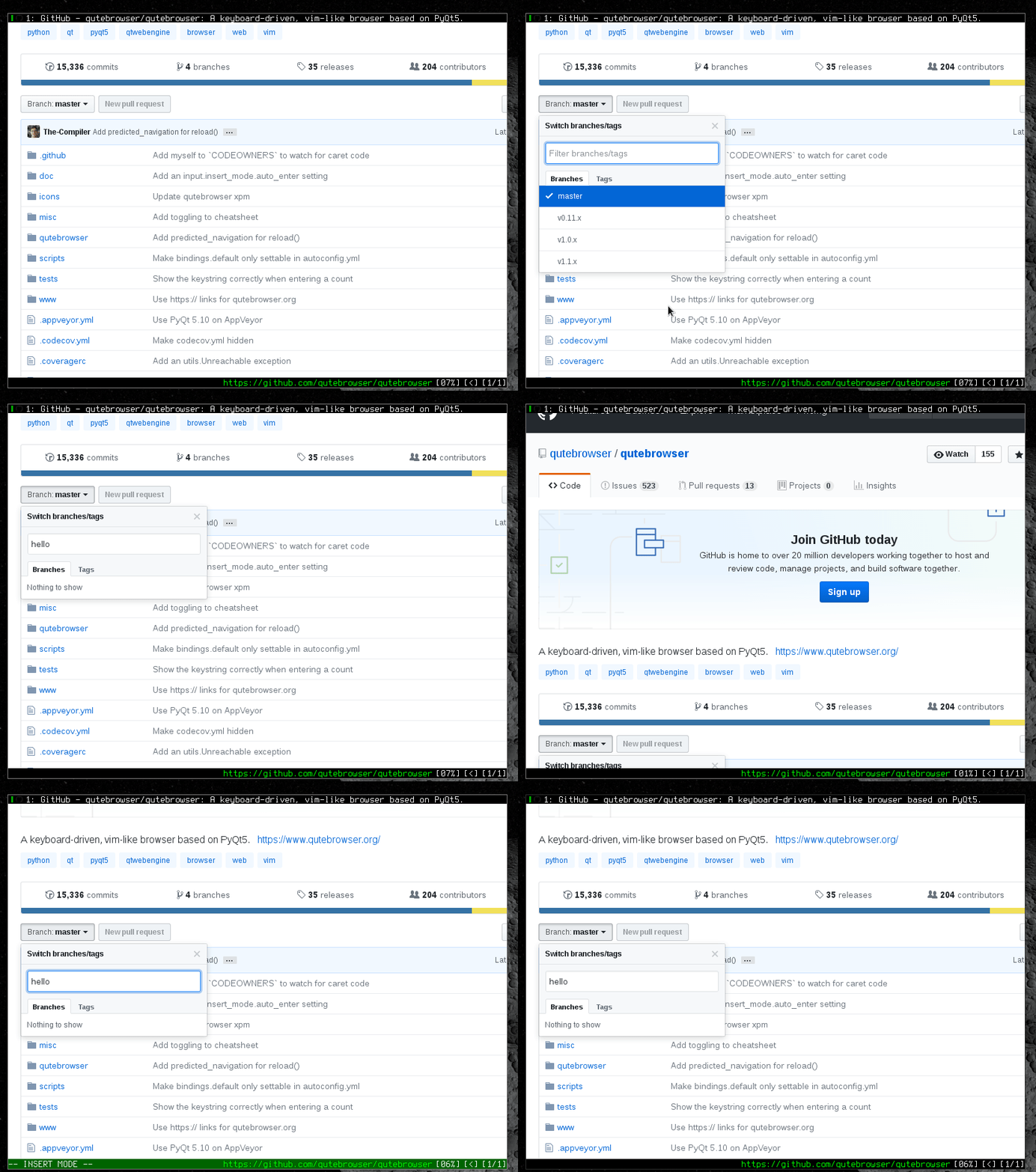
Some more "good behavior" in js text elements

Here's a case where I can see this beahvior becoming annoying, if the element you want to type to isn't focusable at all, like google docs.

Of course, this is all customizable, with:
input.blur_on_load.enabledinput.blur_on_load.delayinput.blur_on_mode_leaveinput.focus_on_mode_enter
And if you can get back to the old behavior by turning all these settings off (but I'd like to make something most people would like by default!)
Please let me know if you like this, I think it's a good-enough solution for now, but I'm a bit worried it might break on some websites in some corner cases. Let me know on IRC if you don't like any of the changes, or if you have comments (and feel free to try out the PR if you're interested in testing it for yourself!).
@rr- Cool, this seems to work fine 😃 Adapted for new config:
config.bind('<Escape>', 'leave-mode ;; jseval -q document.activeElement.blur()', mode='insert')

@jgkamat I know it has been a while but as I don't see these config options in the latest release I was wondering what happened. I like this browser but the default behavior of seeing a test field in focus while not in insert mode is driving me nuts, when you start typing out of insert mode anything can happen xD

Julien Ammous writes:
@jgkamat I know it has been a while but as I don't see these config options in the latest release I was wondering what happened. I like this browser but the default behavior of seeing a test field in focus while not in insert mode is driving me nuts, when you start typing out of insert mode anything can happen xD
Those options are part of https://github.com/qutebrowser/qutebrowser/pull/3433. I'm not really interested in pushing that particular one forward myself (in favor of other bugs like scrolling), but it shouldn't be too difficult to lift it to master and use it if you would find it useful.
@rr- Cool, this seems to work fine smiley Adapted for new config:
config.bind('<Escape>', 'leave-mode ;; jseval -q document.activeElement.blur()', mode='insert')
I believe leave-mode has changed to mode-leave, in case someone wants to use this binding today.

i use v<esc> to get out of the textfield area so i can use the cursor to move within the textfield and also loop through suggestions
