

 quran
quran
Error when run - npm run dev command
Hi All,
I am facing some issue in while running npm run dev command. I removed node_modules folder and rerun the install command, but still issue exist.
Please find the attached screen shot and can someone help here.
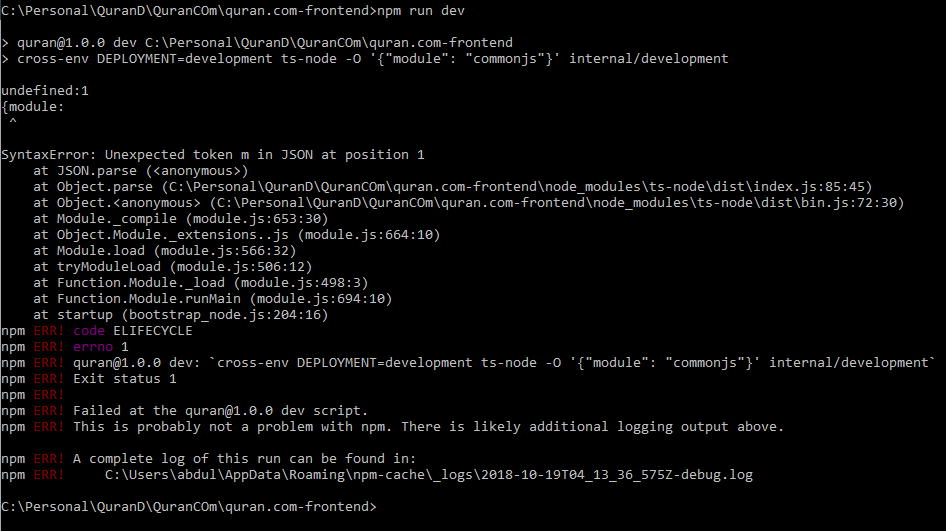
Regards Abdul


I was getting same error when I pulled the latest changes. Removed node_modules directly and npm install again. Worked for me.
@mmahalwy can help more inshAllah.

I was getting same error when I pulled the latest changes. Removed node_modules directly and
npm installagain. Worked for me.@mmahalwy can help more inshAllah.
Thanks @naveed-ahmad for you comment. I Removed node_modules but issue still exists.
Yeah, I did this us the first step,and I removed than npm install I get the same result. So any other suggestions ? Thank you
Salam alykom guys I have a different issue, npm run dev works good but this error message TypeError: Invalid value used as weak map key appear in the console when I try to enter the app in the browser. it is a server error.
the entire log : `SERVER: Error in server execution, check the console for more info. [ TypeError: Invalid value used as weak map key
-
WeakMap.set
-
index.js:23 mapObj [quran.com-frontend]/[camelcase-keys]/[map-obj]/index.js:23:7
-
index.js:16 camelCaseConvert [quran.com-frontend]/[camelcase-keys]/index.js:16:9
-
index.js:39 module.exports [quran.com-frontend]/[camelcase-keys]/index.js:39:9
-
juzs.ts:36 success /home/mxd/workspace/quran.com-frontend/build/server/webpack:/src/redux/reduc ers/juzs.ts:36:35
-
handle.js:25 safeMap [quran.com-frontend]/[redux-pack]/lib/handle.js:25:12
-
handle.js:65 handle [quran.com-frontend]/[redux-pack]/lib/handle.js:65:7
-
juzs.ts:23 module.exports../src/redux/reducers/juzs.ts.webpack_exports.d efault /home/mxd/workspace/quran.com-frontend/build/server/webpack:/src/redux/reduc ers/juzs.ts:23:20
-
redux.js:441 combination [quran.com-frontend]/[redux]/lib/redux.js:441:29
-
redux.js:219 dispatch [quran.com-frontend]/[redux]/lib/redux.js:219:22
-
middleware.js:94 [quran.com-frontend]/[redux-pack]/lib/middleware.js:94:8
-
index.js:14 [quran.com-frontend]/[redux-thunk]/lib/index.js:14:16
-
redux.js:569 dispatch [quran.com-frontend]/[redux]/lib/redux.js:569:28
-
middleware.js:40 success [quran.com-frontend]/[redux-pack]/lib/middleware.js:40:1
-
next_tick.js:68 process._tickCallback internal/process/next_tick.js:68:7 `

@Hartha-aloufi for your issue, the offending line is proabably redux/reduc ers/juzs.ts:23:20. I had the issue and nabeel from the Slack group pointed me to this line (link to Slack thread: https://quran.slack.com/archives/C026LT009/p1541963828020900)
In case you don't have access to it, you can request for it (see README). Or if you somehow can't do it, let me provide the explanation:
At some point in time, action.payload.juzs from the juzs reducer
success: prevState => ({
          ...prevState,
          entities: {
            ...state.entities,
            ...keyBy(camelcaseKeys(action.payload.juzs, { deep: true }), 'id'),
          },
        })
will be null and camelcaseKeys doesn't know how to handle that. For a quick fix, you can do something like action.payload.juzs || {} to unbreak it.
This PR by @nabeel- is attempting to solve this issue: #1049

@abduldm Have you tried npm cache clear after removing node_modules/ folder? That usually works for me in such cases.