

 quickemu-project
Connect to SPICE
I used to run both my Linux & Windows VM smoothly using Quickqui, but now its asking for "Connect to SPICE" every time i'm going to run my Windows VM, and i tried "localhost" for hostname and use port "5930 & 5931 "but failed. please let me know how to solve it.thank you

I am having the same issue, except it's my first time using Quickgui or Quickemu. I'm on Manjaro and I downloaded the quickgui-bin package. I have only seen this message when trying to start both Windows 11 and Windows 10 virtual machines.

Could be related to https://github.com/quickemu-project/quickemu/issues/686.
Same issue. Manjaro as well. Trying this: https://wiki.archlinux.org/title/QEMU#Enabling_SPICE_support_on_the_guest

Got more info about the issue https://www.spice-space.org/spice-user-manual.html
Using QEMU
To enable Spice support to your virtual machine, you only need to append the following to your QEMU command line:
-spice port=3001,disable-ticketing
This will setup a Spice session listening on port 3001 exporting your virtual machine display.
But I don't know if I have to add this to the windows-10.conf or what. Also checking Manjaro instructions to setup VMs
https://wiki.manjaro.org/index.php?title=Virt-manager
-
This is what it looks like to successfully start a VM.

-
This is what it looks like to try to start Windows 10 or Windows 11. 2.1. First, the VM appears to be initiating like normal.
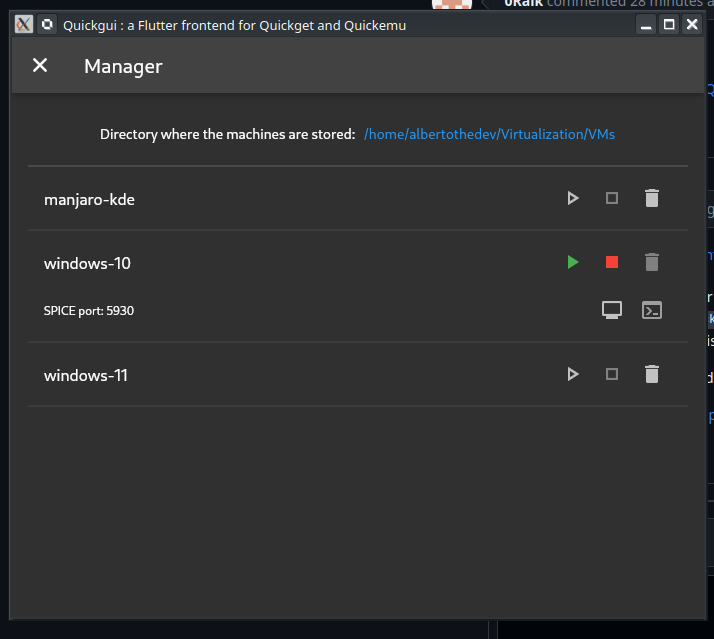 2.2. But just a bit later, a prompt to connect to SPICE appears. Clicking on connect just relaunches the prompt.

I joined the discord and this is something still being checked by the dev. Must wait and see.
Also tried win10 and win11. Same issue. We will have to do it the old fashioned way in the meantime https://wiki.manjaro.org/index.php?title=Virt-manager
i solved the issue by moving the windows iso image file to the windows folder, and make the iso file name the same as in the .conf file. But now the issue is windows keep asking "press any key to boot from dvd" during boot process, although i've press my enter key, it still doesnt boot.
trying to get windows manually with quickget gives
$ quickget windows 11
######################################################################
# Download a Windows 11 .iso image from:
#  - https://www.microsoft.com/software-download/windows11
# Put the .iso image in the windows-11 directory and rename
# it to windows-11.iso.
######################################################################
I haven't checked, but seems they don't ship windows iso anymore.
my suggestion: if windows iso no longer being delivered, GUI can inform user to get an iso and put into directory. ( in a pop windows probably)


Got more info about the issue https://www.spice-space.org/spice-user-manual.html Using QEMU To enable Spice support to your virtual machine, you only need to append the following to your QEMU command line:
-spice port=3001,disable-ticketingThis will setup a Spice session listening on port 3001 exporting your virtual machine display.But I don't know if I have to add this to the windows-10.conf or what. Also checking Manjaro instructions to setup VMs
https://wiki.manjaro.org/index.php?title=Virt-manager
I just started having this same issue with my MacOS vm. My windows, and linux vms are working fine. They were working fine up until about 2 weeks ago.

This is what it looks like to successfully start a VM.
- This is what it looks like to try to start Windows 10 or Windows 11. 2.1. First, the VM appears to be initiating like normal.
I am having this problem right now with MacOS in Catalina version.

This is due to a bug in quickemu which was fixed via https://github.com/quickemu-project/quickemu/pull/1264 in Quickemu 4.9.5

This is due to a bug in
quickemuwhich was fixed via quickemu-project/quickemu#1264 in Quickemu 4.9.5
Idk about that because I was using 4.9.5 at the time. And those fixes are talking about windows 10, I had this issue on Ubuntu 24.04
