
ngx-openlayers
 ngx-openlayers copied to clipboard
 quentin-ol
Integration of ol-cesium for 3D globe
Hello,
In order to use OpenLayers and Cesium in the same application, we are working on making ngx-openlayers to be able to use another map library (ol-cesium in our case). Here are the first changes that I have been testing: https://github.com/airbusgeo/ngx-openlayers/commit/abeb0f12d458ea5f5499eb5452ac65ecfcd1b8ce https://github.com/airbusgeo/ngx-openlayers/commit/a09be7ddc938d6b7b2d10485a22257c922df1379 So far, I can inject ol-cesium in AngularOpenlayersModule (thanks @davinkevin @Neonox31 ) and everything works well.
Steps to make it work:
- Install ol-cesium
- Config in .angular-cli.json to load Cesium:
{

  "apps": [
    {

      "assets": [

        { "glob": "**/*", "input": "../node_modules/ol-cesium/dist/Cesium", "output": "./" }
      ],

      "styles": [

        "../node_modules/ol-cesium/dist/ol.css"
      ],
      "scripts": [

        "../node_modules/ol-cesium/dist/Cesium/Cesium.js"
      ],

}
- Import aol module in my application, passing it the library I want to use (openlayers or, like here, ol-cesium):
[...]
import { ol } from 'ol-cesium';

@NgModule({
  [...]
  imports: [
    BrowserModule,
    AngularOpenlayersModule.forRoot(ol)
  ],
  [...]
})
export class AppModule { }
- Use ol-cesium API in my component to display Cesium globe instead of OpenLayers map:
import { olcs } from 'ol-cesium';

@Component({
  selector: 'app-map',
  templateUrl: './map.component.html',
  styleUrls: ['./map.component.css']
})
export class MapComponent implements AfterViewInit, OnInit {
  @ViewChildren(AolMapComponent) children: QueryList<AolMapComponent>;

  ngAfterViewInit() {
    this.ol3d = new olcs.OLCesium({map: this.children.first.instance});
    this.ol3d.setEnabled(true);
  }
}
Here is the list of tasks I can think of:
-
[x] update dependencies: set dependency to openlayers optional (peerDependency), and eventually add ol-cesium
-
[x] module setup: https://github.com/airbusgeo/ngx-openlayers/commit/abeb0f12d458ea5f5499eb5452ac65ecfcd1b8ce
-
[x] inject map object in the components: https://github.com/airbusgeo/ngx-openlayers/commit/a09be7ddc938d6b7b2d10485a22257c922df1379 This is the biggest change in ngx-openlayers: we cannot anymore call openlayers API directly from ol namespace, but we need to use the injected object (which will be either openlayers either ol-cesium depending on the application setup).
-
[x] update example project
-
[x] update ol-cesium: pending PR
-
[ ] lazy-loading of Cesium.js (2.8MB file...)
-
[ ] Cesium-specific components: having components specific to Cesium could be created in another module, depending on AngularOpenlayers. To be discussed...


We will try to do our modification on https://github.com/airbusgeo/ngx-openlayers/tree/feat-ol-cesium

Thanks @davinkevin Following along with the instructions above throws and error in my console. It appears that cesium is not injecting into the openlayers component. Any thoughts?
import { Component, AfterViewInit, QueryList, ViewChildren } from '@angular/core';
import { ol } from 'ol-cesium';
import { MapComponent } from 'ngx-openlayers';

@Component({
  selector: 'app-root',
  templateUrl: './app.component.html',
  styleUrls: ['./app.component.css']
})
export class AppComponent implements AfterViewInit {
  public zoom = 15;
  public opacity = 1.0;
  public width = 5;
  @ViewChildren(MapComponent) children: QueryList<MapComponent>;
  ol3d: any;

  ngAfterViewInit() {
    console.log('ol', ol);
    this.ol3d = new ol.OLCesium({ map: this.children.first.instance });
    this.ol3d.setEnabled(true);
  }
Here is the error I receive:
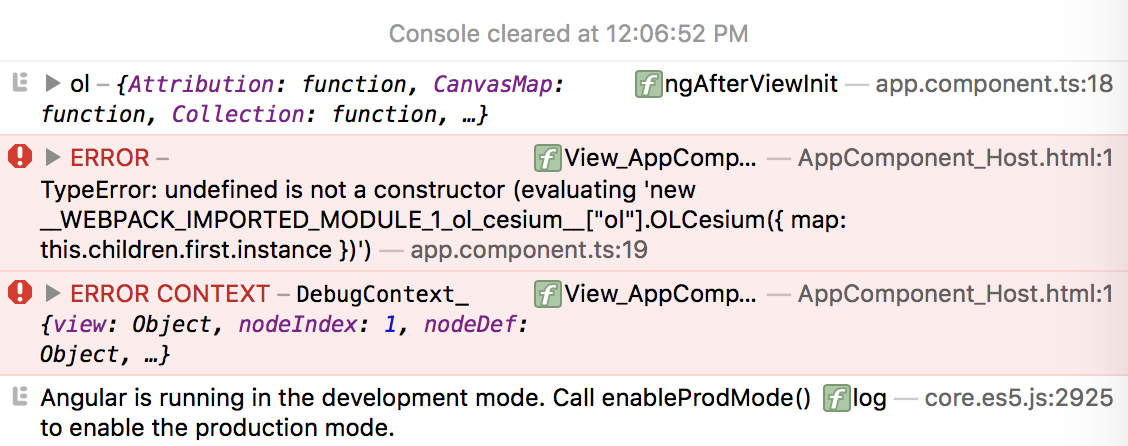
Hello,
OLCesium is in olcs module, which should be imported instead of ol. Try like this:
import { Component, AfterViewInit, QueryList, ViewChildren } from '@angular/core';
import { olcs } from 'ol-cesium';
import { MapComponent } from 'ngx-openlayers';

@Component({
  selector: 'app-root',
  templateUrl: './app.component.html',
  styleUrls: ['./app.component.css']
})
export class AppComponent implements AfterViewInit {
  public zoom = 15;
  public opacity = 1.0;
  public width = 5;
  @ViewChildren(MapComponent) children: QueryList<MapComponent>;
  ol3d: any;

  ngAfterViewInit() {
    console.log('olcs', olcs);
    this.ol3d = new olcs.OLCesium({ map: this.children.first.instance });
    this.ol3d.setEnabled(true);
  }
About your first question, I'm going to update soon (tomorrow?) the example project to have a ready-to-test code sample (I will tell you when it is).
Hi Samuel, I completely overlooked the import module typo. I recompiled the code, but the console threw an additional error. These console logs are a bit vague... And, thanks for the offer to update the example repo.
import { Component, AfterViewInit, QueryList, ViewChildren } from '@angular/core';
import { olcs } from 'ol-cesium';
import { MapComponent } from 'ngx-openlayers';
@Component({
  selector: 'app-root',
  templateUrl: './app.component.html',
  styleUrls: ['./app.component.css']
})
export class AppComponent implements AfterViewInit {
  public zoom = 15;
  public opacity = 1.0;
  public width = 5;
  @ViewChildren(MapComponent) children: QueryList<MapComponent>;
  ol3d: any;

  ngAfterViewInit() {
    console.log('ol', ol);
    console.log('olcs', olcs);
    this.ol3d = new olcs.OLCesium({ map: this.children.first.instance });
    this.ol3d.setEnabled(true);
  }
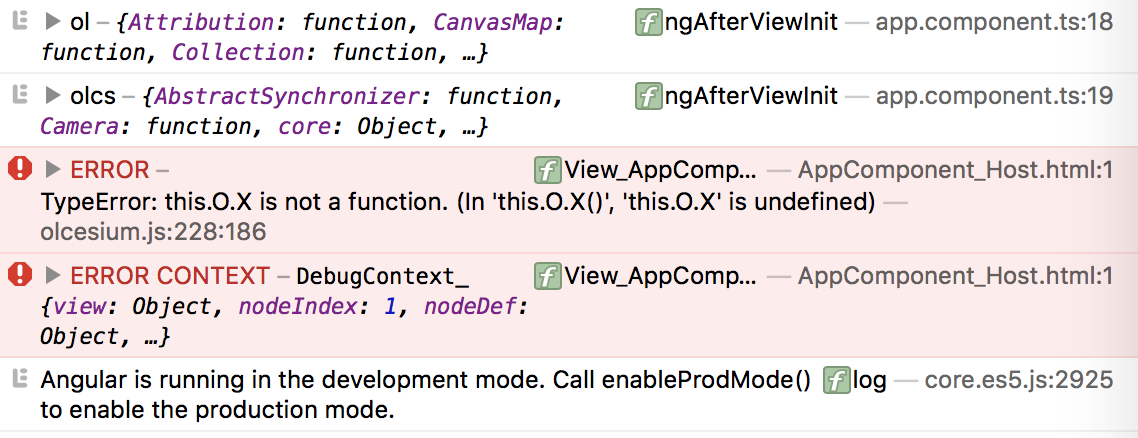
I looked through the ol-cesium source and found the function in question. However, it is not exactly clear what/where/if it needs to be defined.
/**
   * No change of the view projection.
   * @private
   */
  this.to4326Transform_ = ol.proj.getTransform(this.map_.getView().getProjection(), 'EPSG:4326');
Hello @jamesdeantv
I updated the example project. You can get it here: https://github.com/airbusgeo/ngx-openlayers/tree/feat-ol-cesium (take the branch feat-ol-cesium, not master). To run:
- from the example directory:
npm install - copy the content of dist/ inside example/node_modules/ngx-openlayers/dist/ (if anyone has an idea on how to automate this step)
- still from the example directory:
npm startand got to the usual http://localhost:4200
Regarding your error, have you included openlayers in your project dependencies? If yes, you should remove it as ol-cesium brings its own openlayers build.
@samuel-girard Did you have success loading cesium into the repo you provided? I continue to receive the previous error I posted. This is after removing openlayers from the node modules per your suggestion.
Hello @jamesdeantv , I cannot reproduce the error you got. I tried again from scratch on a different computer, and it works just fine. Which browser did you try with?
Hi @samuel-girard Ive created a repo which produces the error for me. Hopefully, you can take a quick look at it and determine if there are any differences. Thanks! BTW, I am running safari 11 on the latest macOS.
https://github.com/jamesdeantv/ngx-openlayers-cesium.git
@jamesdeantv I could reproduce the error from your repo, and I found some differences:
- your lib does not include my modifications to use ol-cesium instead of openlayers
- your example project is based on Angular 4 while I updated ours to Angular 5 to take profit of the InjectionToken
Have you tried to use the project I updated, following each step of the explanation here: https://github.com/quentin-ol/ngx-openlayers/issues/130#issuecomment-351528385? If not, please try it and let me know if you still meet the same error.
After cloning the feat-ol-cesium branch and running npm i & then npm start, I receive an error
ERROR in src/app/app.module.ts(18,29): error TS2339: Property 'forRoot' does not exist on type 'typeof AngularOpenlayersModule'.
My dev environment is as follows
Angular CLI: 1.6.1
Node: 6.9.2
OS: darwin x64
Angular: 5.1.1
... common, compiler, compiler-cli, core, forms, http
... platform-browser, platform-browser-dynamic, router
Did you make any adjustments from the feat-ol-cesium branch?
I think you forgot one step:
- copy the content of dist/ inside example/node_modules/ngx-openlayers/dist/ (if anyone has an idea on how to automate this step)
This is needed as the version of ngx-openlayers updated to work with ol-cesium is not published on npmjs, so you need to do this step manually, after npm install and before npm start
I've hit a bit of a snag. These are the steps I took to arrive at my error.
-
Clone repo https://github.com/airbusgeo/ngx-openlayers/tree/feat-ol-cesium
-
from the example directory:
npm install -
copy/paste the content of dist/ replacing all content of example/node_modules/ngx-openlayers/dist/
-
run
npm start
Here is console log
> [email protected] start /Users/ngx-openlayers/example
> ng serve

** NG Live Development Server is listening on localhost:4200, open your browser on http://localhost:4200/ **
Date: 2017-12-15T05:16:34.648Z
Hash: 30bf066ad1d9d5a57d72
Time: 9376ms
chunk {inline} inline.bundle.js (inline) 5.79 kB [entry] [rendered]
chunk {main} main.bundle.js (main) 2.93 kB [initial] [rendered]
chunk {polyfills} polyfills.bundle.js (polyfills) 636 bytes [initial] [rendered]
chunk {scripts} scripts.bundle.js (scripts) 2.86 MB [initial] [rendered]
chunk {styles} styles.bundle.js (styles) 54.2 kB [initial] [rendered]
chunk {vendor} vendor.bundle.js (vendor) 854 kB [initial] [rendered]

ERROR in node_modules/ngx-openlayers/dist/components/index.d.ts(13,15): error TS2307: Cannot find module './graticule.component'.
node_modules/ngx-openlayers/dist/components/index.d.ts(17,15): error TS2307: Cannot find module './tilegridwmts.component'.
node_modules/ngx-openlayers/dist/components/interactions/index.d.ts(12,15): error TS2307: Cannot find module './select.component'.
node_modules/ngx-openlayers/dist/components/interactions/index.d.ts(13,15): error TS2307: Cannot find module './translate.component'.
node_modules/ngx-openlayers/dist/components/interactions/index.d.ts(14,15): error TS2307: Cannot find module './modify.component'.
node_modules/ngx-openlayers/dist/components/layers/index.d.ts(2,15): error TS2307: Cannot find module './layergroup.component'.
node_modules/ngx-openlayers/dist/components/layers/index.d.ts(3,15): error TS2307: Cannot find module './layerimage.component'.
node_modules/ngx-openlayers/dist/components/layers/layer.component.d.ts(4,37): error TS2307: Cannot find module './layergroup.component'.
node_modules/ngx-openlayers/dist/components/layers/layertile.component.d.ts(5,37): error TS2307: Cannot find module './layergroup.component'.
node_modules/ngx-openlayers/dist/components/layers/layervector.component.d.ts(5,37): error TS2307: Cannot find module './layergroup.component'.
node_modules/ngx-openlayers/dist/components/layers/layervectortile.component.d.ts(5,37): error TS2307: Cannot find module './layergroup.component'.
node_modules/ngx-openlayers/dist/components/sources/index.d.ts(9,15): error TS2307: Cannot find module './tilewmts.component'.
node_modules/ngx-openlayers/dist/components/sources/index.d.ts(10,15): error TS2307: Cannot find module './imagewms.component'.


webpack: Failed to compile.
I noticed that the content of dist/ is missing modules from before the copy/paste hence the error messages above. Thoughts?
OK, I can see the problem for this error.
I didn't publish some files from the dist, so you need either to update your project with my last commit that correct this, either to build the dist your self (to do so, just run npm install in the project root.
Let me know if this solves the problem.