
Quelea
 Quelea copied to clipboard
 quelea-projection
Using Edit song in <order of service> does not overwrite the song in database , it created another same file name in the database
as i tested in 2019 and 2020 version ,
the edit song function from
if each time of minor edit we use this method of editing , the database will have alot of version of the same song title with the setting we no longer wanted .

I do not observe new versions of songs appearing in DB but instead that song is not saved at all to DB when editing song from order of service -> edit song.

Also, if editing song from db browser, if song is already in order of service, it is not updated there.
This is not a bug, it's a feature. I believe the scenario is that sometimes you don't want overwrite existing song version in your library, instead you would like to have new version for that particular service only. If you wish to change the song globaly, do it in library, if the change is connected to the service do it in the service list.

Weird , before i post this , i'm able to re-created the issue for both 2019 and 2020 version . but after both of yr comments , i try again , both version the issue is gone .
- No duplicate song name
- overwrite the db song
Let me monitor again , as this issue is been bugging us for 1 year .
@matejkobza are you sure is a feature ? i never know there is a feature that able to edit lyric for particular service only in the
I had found the problem . Today just realized.
When we newly key in a new song , there is an option of <Add to schedule> . When the option is selected and save , the schedule there will show a copy icon on the song at the
That type of song , if we right click to edit and save , instead updating the DB , it create another copy in DB instead . Hope this minor bug can be solved .
Should be option to sync to db then. Very unexpected feature. Has caused issues for many users in our church.
Hello, maybe someone from the quelea team could confirm, but I believe it's on purpose done like that. Actually we had the same issue today at the service and our technician got surprised by it. This was the way I explained and how it makes sense to me.
I can also confirm that this is occurring, whether it be a bug or feature. If a feature, there definitely needs to be a setting to control it, whether edits made from schedule sync with the DB or not.

The intended behaviour is as follows:
- For songs that are linked to the database directly (they just show the normal black icon in the schedule, not the copy icon) then they should update the existing item in the database when they're edited, not create a new one.
- For songs that are not linked to the database (copied to the schedule, you'll see the copy icon in place) then they shouldn't change the database at all. The edit should only be in the schedule.
It sounds like the second point there is where things are going awry, but I can't seem to reproduce that issue quickly - it behaves as expected on my copy. If there's any other specific steps you can get to reproduce the issue, that'd be useful...

The intended behaviour is as follows:
- For songs that are linked to the database directly (they just show the normal black icon in the schedule, not the copy icon) then they should update the existing item in the database when they're edited, not create a new one.
- For songs that are not linked to the database (copied to the schedule, you'll see the copy icon in place) then they shouldn't change the database at all. The edit should only be in the schedule.
It sounds like the second point there is where things are going awry, but I can't seem to reproduce that issue quickly - it behaves as expected on my copy. If there's any other specific steps you can get to reproduce the issue, that'd be useful...
@berry120 attached the clip for you as a reference
https://user-images.githubusercontent.com/76904806/107108331-0e469800-6872-11eb-92de-7ebf6ba5d326.mp4
Sounds like there are two separate issues here. @tuomas2, there is a setting for either synchronizing the song with the database or not. Options -> General -> User Options -> Copy song to schedule by default. This option should by default be set to false, however there was a bug in a previous release that cause this value to be inverted the first time the options dialog was opened. This should be resolved in the CI release and should be in place for the release of Quelea 2021.0.

@pbcmatthew Hmm, I see the issue but I can't reproduce it unfortunately. Would you be able to attach your quelea.proeprties file in case there's a set of properties that cause this issue?
Haven't got the time to investigate this further at the moment, but I can confirm this behavior on my end as well. Judging by the icon of the song, the song seems to be added as a copy to the schedule. Perhaps that could be a reason why it's treated as a new item each time you save the changes?
When a new song is added to the database and the schedule (as demonstrated in the clip by pbcmatthew), Quelea shows the copy icon of the song. But I wonder if this is the correct icon. The following example illustrates this:

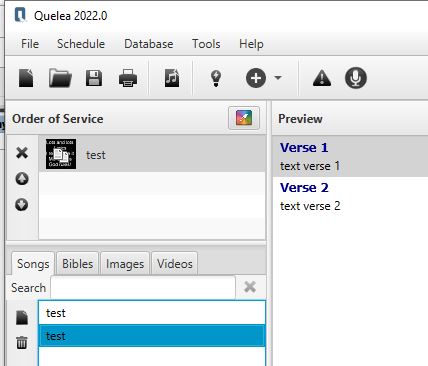
Now save the schedule and re-open it and notice that the song icon changes to the black icon. (meaning updateInDB=true)
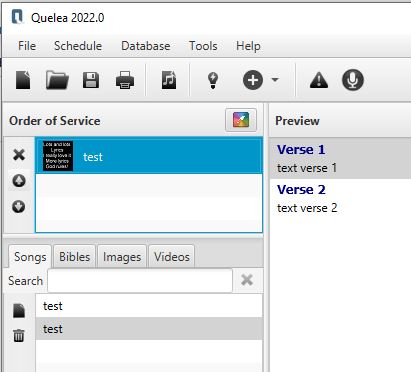
If you now edit the schedule song no new db song is created.
By the way, similar behaviour I see when using:

What I would expect (but I maybe wrong here):
- If the "Copy to schedule" option is set: show a copy icon for a new added to db and .schedule.
- If the "Copy to schedule" option is NOT set: show a black icon for a new added to db and .schedule.
