

 pywinauto
Getting IndexError while trying to reach element in combo box, where the first element is empty (absent)
Expected Behavior
Test should be able to select element in combo box, where the first element is not present (absent) by default
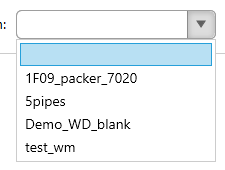
Actual Behavior
Attempt to reach element in the combo box with first element absent gives the error.
Steps to Reproduce the Problem
- Emulate combo box with several elements, the first element selected by default should be empty (absent)
- Write the test to reach one of the elements in this combo box (not the first one)
Short Example of Code to Demonstrate the Problem
studio_window.well_diagram_combobox.select('5pipes')
Traceback (most recent call last):
  File "C:\Python\Python38\lib\site-packages\pywinauto\controls\uia_controls.py", line 238, in select
    self._select(item)
  File "C:\Python\Python38\lib\site-packages\pywinauto\controls\uiawrapper.py", line 678, in _select
    raise IndexError("item '{0}' not found".format(item))
IndexError: item '5pipes' not found

During handling of the above exception, another exception occurred:
Traceback (most recent call last):
  File "<ipython-input-189-2dc54ad1ea74>", line 1, in <module>
    runfile('C:/Python/Projects/automation/index__.py', wdir='C:/Python/Projects/automation')
  File "C:\Python\Python38\lib\site-packages\spyder_kernels\customize\spydercustomize.py", line 827, in runfile
    execfile(filename, namespace)
  File "C:\Python\Python38\lib\site-packages\spyder_kernels\customize\spydercustomize.py", line 110, in execfile
    exec(compile(f.read(), filename, 'exec'), namespace)
  File "C:/Python/Projects/automation/index__.py", line 19, in <module>
    studio_window.well_diagram_combobox.select('5pipes')
  File "C:\Python\Python38\lib\site-packages\pywinauto\controls\uia_controls.py", line 263, in select
    raise IndexError("item '{0}' not found or can't be accessed".format(item))
IndexError: item '5pipes' not found or can't be accessed
Specifications
- Pywinauto version: 0.6.8
- Python version and bitness: 3.8.2 x64
- Platform and OS: Windows 10 x64

Observed the same issue even when first item is no blank. I have same specification as mentioned


It sounds the same as issue #876. Can someone try the fix from PR #1047 ?

Also any information on type of application (Qt5, UWP, WinForms?) would be very helpful.
Also any information on type of application (Qt5, UWP, WinForms?) would be very helpful.
WinForms. This is reproducible in MaterialDesign WPF demo app has this issue as well. Very similar to #916
For anyone reading this looking for a solution- one workaround is to use the type_keys() method to send '{DOWN}' or '{UP}' to navigate to the item you want to select. I'm doing this using the uia backend.
