
pyvistaqt
 pyvistaqt copied to clipboard
Published
20 hours ago •
 pyvista
pyvista
AttributeError: type object 'ItemDataRole' has no attribute 'UserRole'
~/opt/miniconda3/envs/gempy-tutorial/lib/python3.8/site-packages/pyvistaqt/editor.py in __init__(self, parent, renderers)
     48         self.setModal(True)
     49
---> 50         self.update()
     51
     52     def update(self) -> None:

~/opt/miniconda3/envs/gempy-tutorial/lib/python3.8/site-packages/pyvistaqt/editor.py in update(self)
     57             widget_idx = self.stacked_widget.addWidget(_get_renderer_widget(renderer))
     58             top_item = QTreeWidgetItem(self.tree_widget, ["Renderer {}".format(idx)])
---> 59             top_item.setData(0, Qt.ItemDataRole.UserRole, widget_idx)
     60             self.tree_widget.addTopLevelItem(top_item)
     61             for name, actor in actors.items():

AttributeError: type object 'ItemDataRole' has no attribute 'UserRole'
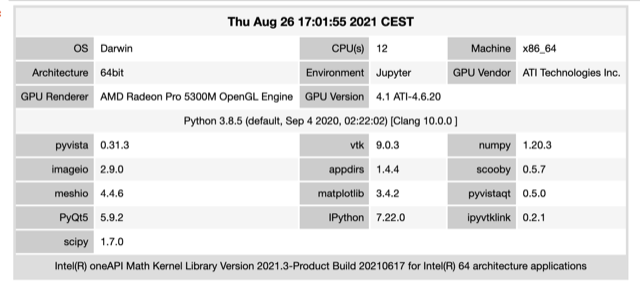


What version of pyqt5 do you use @ghost?
I checked locally and indeed UserRole is not available in the enum ItemDataRole for PyQt5 5.9.2 or 5.10. I think the easiest solution is to update PyQt5. I did not check all of the versions but I can confirm that UserRole is present from PyQt5>=5.12.
Feel free to let me know if it works for you @banesullivan, @ghost.
This item is necessary for the editor in pyvistaqt so you can also try disabling it if you do not need it:
BackgroundPlotter(editor=False)
but this is more a workaround to be honest.
