

 python-visualization
Vector tile does not render when zoom level greater than 14
Describe the bug The vector tile layer does not render when zoom level is great than 14. @iwpnd
To Reproduce https://nbviewer.org/github/python-visualization/folium/blob/main/examples/plugin-vector-tiles.ipynb
import folium
from folium.plugins import VectorGridProtobuf
url = "https://vectortiles3.geo.admin.ch/tiles/ch.swisstopo.leichte-basiskarte.vt/v1.0.0/{z}/{x}/{y}.pbf"
m = folium.Map(location=[46.8, 8.2], zoom_start=14)

options = {'maxNativeZoom': 20, 'maxZoom': 20}
# options = {'max_native_zoom': 20, 'max_zoom': 20} #not working either

vc = VectorGridProtobuf(url, "vector tile", options)
m.add_child(vc)
m
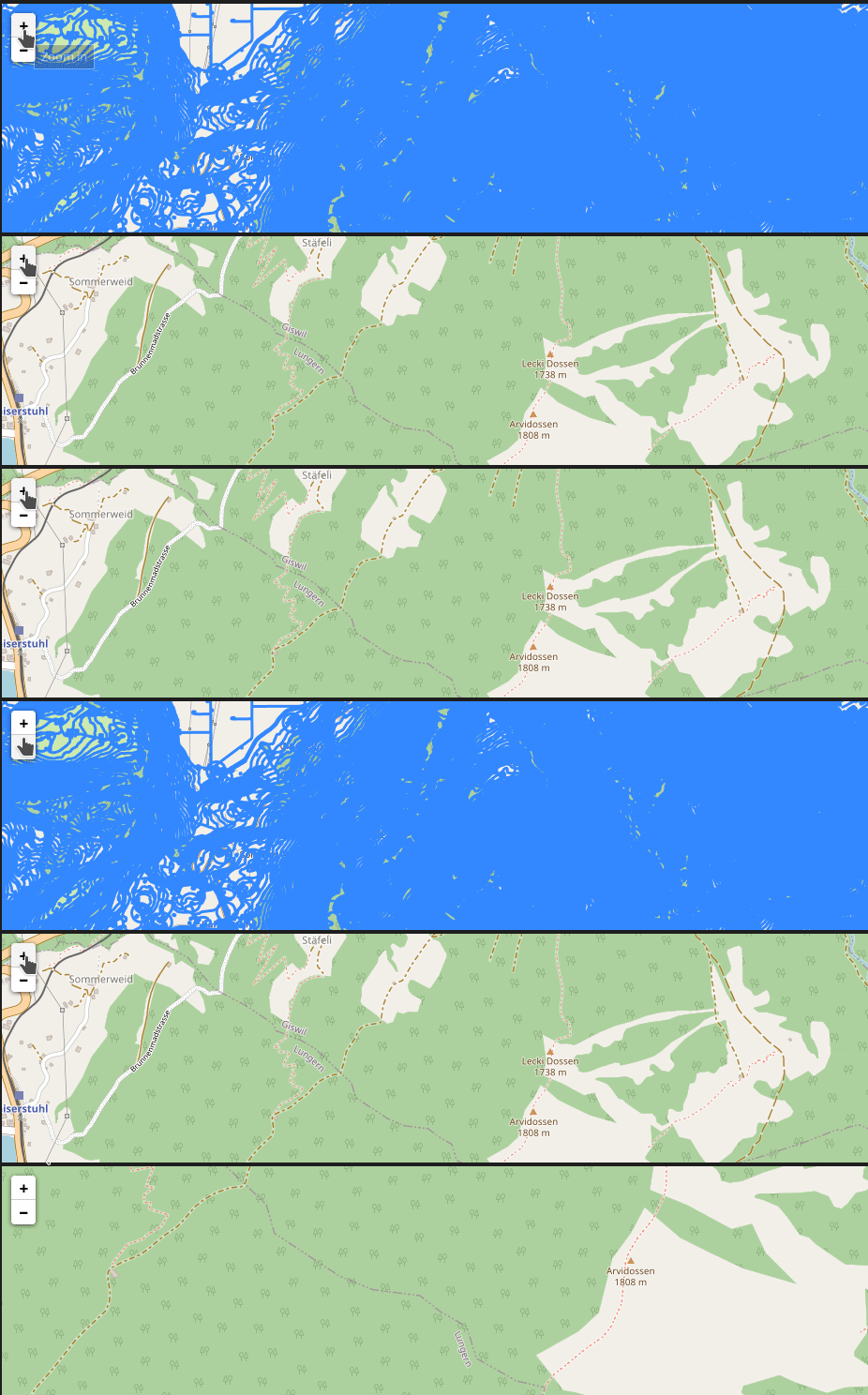
Expected behavior The vector tile layer should render in a zoom level much larger than 14 so that we can see the details of vector data.
Environment (please complete the following information):
- Python version: 3.9
- folium version: 0.13.0
Possible solutions
The leaflet VectorGrid.Protobuf example appears to have the maxNativeZoom parameter. I am not sure if the folium plugin can pass the maxNativeZoom and maxZoom parameters to VectorGrid.Protobuf.
https://leaflet.github.io/Leaflet.VectorGrid/vectorgrid-api-docs.html
L.vectorGrid.protobuf("https://free-{s}.tilehosting.com/data/v3/{z}/{x}/{y}.pbf.pict?key={key}", {
    vectorTileLayerStyles: { ... },
    subdomains: "0123",
    key: 'abcdefghi01234567890',
    maxNativeZoom: 14
}).addTo(map);
Relevant issues https://github.com/microsoft/PlanetaryComputer/discussions/175 @TomAugspurger

One quick note: I think we only provide vector tiles for certain zoom levels. Maybe @mmcfarland knows the maximum zoom level off the top of his head.
I believe in our explorer we render the tiles for the largest zoom level, even when the user zooms in past that.
Edit: reading a bit more closely, I think I just repeated exactly what Qiusheng wrote :)

@TomAugspurger Yeah, the issue occurs with all vector tile layers, not just the Planetary Computer vector tiles. So I guess the issue is with the plugin itself rather than the data.
Could you verify that folium adds the zoom option correctly in the html? If you save your map as html, check that it looks like in the Leaflet example. If that looks correct, then we know the issue is upstream. Otherwise, there's something wrong on how folium processes the options.

It appears that the zoom options can be found in the html, so this might be an upstream issue.

I found the maxNativeZoom issue in the upstream Leaflet.VectorGrid. Unfortunately, the repo is no longer being actively maintained and has no update since Sept 2021. It is unlikely that the issue will be resolved any time soon.
There is an alternative called Leaflet.VectorTileLayer, which is being actively developed by @jkuebart. It appears to support min/maxNativeZoom.
It would be great if folium can switch to use Leaflet.VectorTileLayer.
The beauty of vector tile is that you can zoom way in to see the details of the shapes. Without the maxNativeZoom and maxZoom, the vector tile rendering is not very useful.
Nothing I can do here as this is not a bug or an issue at all but a deliberate decision to not render more than the maximum zoom levels the provider offers.
I reckon using maxNativeZoom in the doc is a mistake rather than pointing to the feature you're expecting.
I chose VectorGrid because it was the supported plug-in for vector tiles under the umbrella of leaflet. The one you're providing now is, while actively maintained, a one man show.
The beauty of vector tile is that you can zoom way in to see the details of the shapes.
Depending on the configuration, zoom level and provider, features in a tile are simplified on creation, or even excluded entirely. As the client does not have access to this information it's best to stick to min/max provided. Everything after that is an approximation.
That said, I can see the appeal for the client to decide it. I'm discovering the plug-in you mentioned and am confident to provide it to folium as well. I would provide you with an external repository you can add to folium and test, and if it covers your use case would create a PR with folium. Whether to keep both or drop one is up to folium after that.

@iwpnd Thank you for your help. I am specifically interested in visualizing the Microsoft Building Footprint data on Planetary Computer. I think the provider does provide a maximum zoom level larger than 14, as you can zoom way in to see the details of the building footprints.
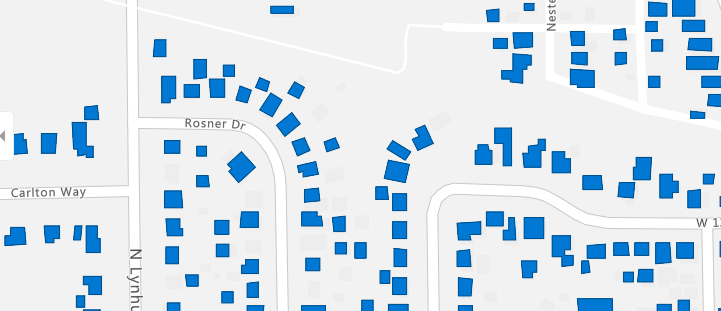
And this is what it renders in folium. If you further zoom in, the tile does not render and disappears.
import folium
from folium.plugins import VectorGridProtobuf
url = "https://planetarycomputer.microsoft.com/api/data/v1/vector/collections/ms-buildings/tilesets/global-footprints/tiles/{z}/{x}/{y}"
m = folium.Map(location=[40, -100], zoom_start=13)
options = {'maxNativeZoom': 20, 'maxZoom': 20}
vc = VectorGridProtobuf(url, "vector tile", options)
m.add_child(vc)
m
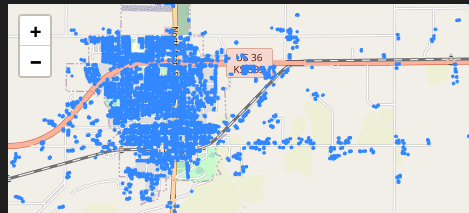
There is a difference as to the maximum zoom the provider offers, and the maximum zoom the client "stretches" the result of the last maximum zoom to the requested zoom.
Take for instance Milano:
While 12/2152/1465 returns a tile, 14/8610/5862 does not. But the viewer you provide takes care, that the features of the last real tile, are set to the clients requested zoom level.
L.VectorGrid does not have that capability, L.VectorTileLayer on the other hand seems to have that feature.
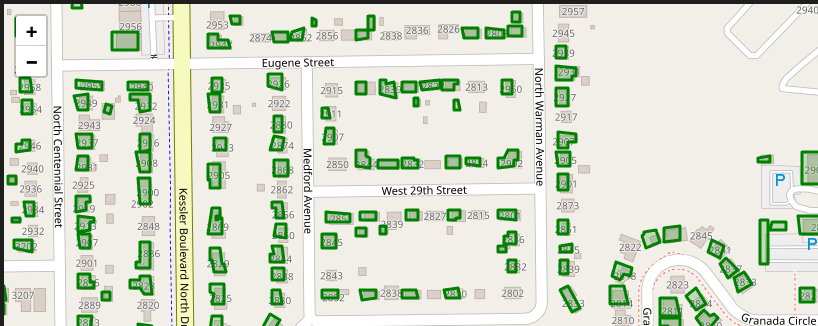
I created a first draft for you that covers your basic use-case. Feel free to try out @giswqs. If that works fine for you, I can draft a PR with folium to incorporate into the plugin ecosystem.
import folium
from folium_vectortilelayer import VectorTileLayer

url = "https://planetarycomputer.microsoft.com/api/data/v1/vector/collections/ms-buildings/tilesets/global-footprints/tiles/{z}/{x}/{y}"
m = folium.Map(location=[39.796584447688666, -86.16914904588675], zoom_start=15)
options = {
    'minDetailZoom': 5,
    'maxDetailZoom': 13,
    "style": { "weight": 3, "color": "green" }
}
vc = VectorTileLayer(url, "vector tile", options)
m.add_child(vc)
m
works as expected
@iwpnd Nice! It works now. How do you determine maxDetailZoom? When it is great than 13, the layer won't show up. I guess different vector tiles will have a different maxDetailZoom. Is there a way to set an optimal maxDetailZoom programmitcally by default so that users don't have to specify it? Imagine that a user sets maxDetailZoom to 20, and the layer does not render. The user might not necessary keep trying a smaller maxDetailZoom until the layer shows up.
A provider should offer the minimum and maximum bounds in their maps capabilities for the user to consider.
As for this leaflet plugin, the default undefined should be a good starting point and should render either way I suppose.
If the maxDetailZoom is not specified, the layer does not render. So probably users need to figure it out by checking the metadata
options = {
    'minDetailZoom': 5,
    # 'maxDetailZoom': 13,
    "style": { "weight": 3, "color": "green" }
}
Maybe this can be accounted for upstream in the plugin. The maintainer seems reactive on gitlab if you want to make your case.
It most certainly makes sense to render to the point of what is offered by the provider, despite what is being set as maxDetailZoom.
There's also a minZoom / maxZoom property that is undocumented in Leaflet.VectorTileLayer. With the config below the layer shows up either way.
ms_buildings = "https://planetarycomputer.microsoft.com/api/data/v1/vector/collections/ms-buildings/tilesets/global-footprints/tiles/{z}/{x}/{y}"

m = folium.Map(location=[40, -100], zoom_start=13)

options = {
    "minZoom": 5,
    "maxZoom": 18,
    'minDetailZoom': 10,
    'maxDetailZoom': 13,
    "style": { "weight": 3, "color": "green" }
}

vc = VectorTileLayer(ms_buildings,"world",options)

m.add_child(vc)
m
edit:
config = {
    # min zoom of your map,
    # if minZoom < minDetailZoom features in minDetailZoom level are used
    # for minDetailZoom to minZoom
    "minZoom": 8,
    # max zoom of your map,
    # if maxZoom > maxDetailZoom features in maxDetailZoom level are used
    # for maxDetailZoom to maxZoom
    "maxZoom": 18,
    # min zoom level provided by source
    "minDetailZoom": 10,
    # max zoom level provided by source
    "maxDetailZoom": 13
}
@iwpnd Yes, I tested it. I think the most critical parameter is maxDetailZoom. If it is larger than the max zoom level provided by source, the vector tile layer won't render. If it is smaller than the max zoom level provided by source, the polygons will be simplified. So users will have to do trial and error to figure out the optimal maxDetailZoom.
The maxZoom parameter controls the zoom in button of the Zoom Control. It disables the zoom-in button when the map zoom level is larger than maxZoom. It does not really affect the vector tile rendering.
What do you suggest we continue here? I can create a release for you, or submit this to folium - or both.
Ideally we have only one plugin that provides vector tile support. If both libraries have a lot of overlap I'd rather not include both. Is the assumption both plugins do basically the same correct?
If true, I see two scenarios:
- Provide support for Leaflet.VectorTileLayer in a separate repo hosted by @iwpnd, which we'll link to in Folium.
- In Folium, swap out Leaflet.VectorGrid for Leaflet.VectorTileLayer.
Ideally our upstream plugins are robust, mature and well maintained.
@iwpnd I hope you can advice on whether it's good to swap out Leaflet.VectorGrid for Leaflet.VectorTileLayer, since you worked with both now.
Is the assumption both plugins do basically the same correct?
This is correct. Leaflet.VectorTileLayer adds capability that Leaflet.VectorGrid is missing tho.
If true, I see two scenarios
There is (almost) no downside to either approach, yet ultimately Leaflet.VectorTileLayer appears to have the better features and seems to be maintained (for now). The only downside I can think of is a breaking change in folium because of a plugin if you we're to swap one for the other.
@iwpnd Yes, I tested it. I think the most critical parameter is
maxDetailZoom. If it is larger than the max zoom level provided by source, the vector tile layer won't render. If it is smaller than the max zoom level provided by source, the polygons will be simplified. So users will have to do trial and error to figure out the optimalmaxDetailZoom.The
maxZoomparameter controls the zoom in button of the Zoom Control. It disables the zoom-in button when the map zoom level is larger thanmaxZoom. It does not really affect the vector tile rendering.
I didn't follow this discussion too closely as I don't know about folium, but there shouldn't be much »trial and error« involved in setting the zoom parameters.
If the server serves tiles for the full range of max/minZoom levels, there's really no reason to use any of the other options. If the server lacks some zoom levels, Leaflet.VectorTileLayer offers two possible solutions:
- Using
max/minNativeZoom, the tiles on zoom levels outside the given range are loaded from the specified zoom level and scaled up or down including line widths and marker sizes. The result looks the same as it would with raster tiles without the obvious artifacts. - Using
max/minDetailZoom, the tiles on zoom levels outside the given range are loaded from the specified zoom level and drawn larger or smaller while keeping the same line widths and marker sizes. The result looks as if the tile with the target zoom level was available, but obviously the amount of detail remains the same.
max/minZoom and max/minNativeZoom work as documented for L.GridLayer, to quote:
-
maxZoomThe maximum zoom level up to which this layer will be displayed (inclusive). -
minZoomThe minimum zoom level down to which this layer will be displayed (inclusive). -
maxNativeZoomMaximum zoom number the tile source has available. If it is specified, the tiles on all zoom levels higher thanmaxNativeZoomwill be loaded frommaxNativeZoomlevel and auto-scaled. -
minNativeZoomMinimum zoom number the tile source has available. If it is specified, the tiles on all zoom levels lower thanminNativeZoomwill be loaded fromminNativeZoomlevel and auto-scaled.
Leaflet.VectorTileLayer adds max/minDetailZoom which is documented here.

https://pypi.org/project/folium-vectortilelayer/
for whoever is interested.
thank you @jkuebart for the plugin and your input here 🙏