

 pyscript
WIP: Add `PyScript.__version__` and `PyScript.version_info`
Addressing #546, this is a WIP to add the ability for users to check the current version of PyScript within their scripts or a REPL.
Syntax
# namedtuple, mimics sys.version_info
>>> pyscript.version_info
version_info(year=2023, month=2, patch=1, release_level='final', commit='d7c6d42')

# human-readable version, similar to what ipython and others do
>>> pyscript.__version__
'2023.02.1.final`
Fields
| parameter | CalVer equivalent field | example value | description |
|---|---|---|---|
year |
Full year (YYYY) | 2023 | The year of the release; when printed or represented as a string, always written with 4 digits |
month |
Short Month (MM) | 2 | The month of the release; when printed or represented as a string, written with 1 or 2 digits as necessary |
patch |
1 | The incremental number of the release for this month; when printed or represented as a string, written with 1 or two digits as necessary | |
release_level |
'final' | A string representing the qualifications of this build. See the table below for possible values | |
commit |
d7c6d42 | The latest commit at the time this build occurred. To be used to disambiguate potential (or accidental) duplicate builds or releases. |
Significant release_level values
| value | meaning | notes |
|---|---|---|
| 'final' | A full, pinned release of PyScript | Releases at /latest would always be tagged 'final' |
| 'unstable' | A build created upon merging new code into the main PyScript branch, but not a pinned release | Releases at /unstable would always be tagged 'unstable' |
| 'RC1', 'RC2', etc | Release candidates for a particular build of PyScript | To be used with the /snapshot mechanism for sharing release candidates |
| 'dev' | The default value for release_level in the codebase |
My thought is: release_value is always equal to dev in the codebase; the various CD pipelines set release_value to one of the above before building for release, but that change is not committed - it's only there for the build. This makes it easy to determine that a user is working within a modified/local copy of PyScript instead of one pulled from the CDN.
Of course, devs can modify the release_level manually if they need to for testing purposes, creating their own builds, etc, but that takes them outside of the scope of this versioning proposal.
The CD pipeline work is still very much a work in progress.
I had originally been working with storing the version info in a separate json file rather than hardcoded into pyscript.py, but then rollup would have to be aware of how to include that at build time. If anyone has thoughts on how to do that sensibly, that would make the CD-interactions significantly cleaner, I think.

Bonus note - since all the other attributes of the PyScript class are either @classmethod's or class attributes, I think both __version__ and version_info should be class attributes as well.
It would be nice to encapsulate both with @property or @cached_property, but from what I understand something can only be both a @classmethod and a @property in Python 3.9 and 3.10, and not in 3.11 and forward.
The plan was to stamp the version into Pyscript.js here
This then goes into <py-config> and is easily readable anywhere python or js.
If this PR works from that source of truth, then it will work seamlessly. And we still need to stamp it into the build at CICD time... A TODO.
Go Jeff Go!

Edit: See updated spec proposal below
Updates:
-
PyScript.__version__andPyScript.version_infonow work as described, and pull their data from runtime.ts.- I'm prosing this data be stored as a JSON object; since it's structured data, better to pass it around in a structured way rather than assembling and re-parsing strings
- We can still add a step to the CI/CD that either populates the relevant info from a git tag, or asks for the appropriate fields like the snapshot workflow currently does.
- As a byproduct of process, the information from AppConfig is also now available in Python, as an object called
APP_CONFIG - Added a test the version-setting method (
PyScript.set_version_info()) in the py-unit tests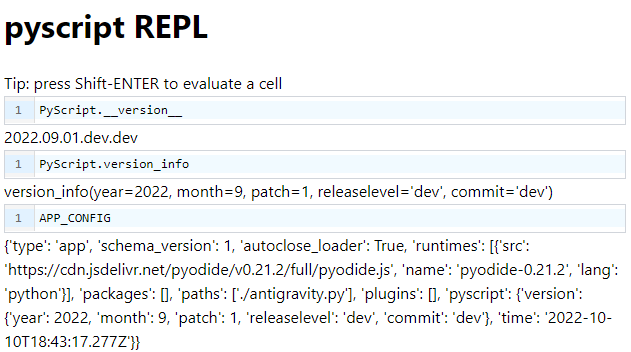
At long last, I think this is ready for review. Apologies for it taking so long, I had a lot to learn about GitHub Actions along the way.
There are some design and naming questions at the bottom that I'd love to get input on, even for those who aren't necessarily interested in reading through the explanations.
Usage
# namedtuple, mimics sys.version_info
>>> pyscript.version_info
version_info(year=2023, month=2, patch=1, releaselevel='final')

# human-readable version, similar to what ipython and others do
>>> pyscript.__version__
'2023.02.1.final'

# New APP_CONFIG object is data from AppConfig in Python Namespace
>>> APP_CONFIG
{'schema_version': 1, 'type': 'app', 'autoclose_loader': True, 'runtimes': [{'src': 'https://cdn.jsdelivr.net/pyodide/v0.21.3/full/pyodide.js', 'name': 'pyodide-0.21.3', 'lang': 'python'}], 'packages': [], 'paths': [], 'plugins': [], 'pyscript': {'version': {'year': 2023, 'month': 2, 'patch': 1, 'releaselevel': 'final'}, 'time': '2022-10-31T18:41:54.927Z'}}
Version Fields
| parameter | CalVer equivalent field | example value | description |
|---|---|---|---|
year |
Full year (YYYY) | 2023 | The year of the release; when printed or represented as a string, always written with 4 digits |
month |
Short Month (MM) | 2 | The month of the release; when printed or represented as a string, written with 1 or 2 digits as necessary |
patch |
1 | The incremental number of the release for this month; when printed or represented as a string, written with 1 or two digits as necessary | |
releaselevel |
'final' | A string representing the qualifications of this build. See the table below for possible values |
releaselevel values
| value | meaning | notes |
|---|---|---|
| 'dev' | The value for releaselevel in the codebase |
All changes to releaselevel happen via GitHub Workflows |
| 'final' | A full, pinned release of PyScript | Releases at /latest always be tagged 'final' |
| 'unstable' | A build created upon merging new code into the main PyScript branch, but not a pinned release | Releases at /unstable always be tagged 'unstable' |
| 'RC1', 'RC2', etc | Release candidates for a particular build of PyScript | To be used with the /snapshot mechanism for sharing release candidates |
Implementation/Dev Notes
In TypeScript
The current version of PyScript is stored in runtime.ts, in the JSON object on line 8. This is included in AppConfig as before:
export const version:JSON = <JSON><unknown>{"year": 2022, "month": 9, "patch": 1, "releaselevel": "dev"};
This line is modified by the new update_version command line tool (see below).
In Python
A new TypeScript method, Runtime.importAppConfig(), loads a JSON representation of the AppConfig object into the Python globals namespace of the runtime as APP_CONFIG.
A new method PyScript.set_version_info(), uses the data from APP_CONFIG to set the internal representation of the PyScript version data, which is accessible via PyScript.__version__ and PyScript.version_info as shown above.
How Versions Get Updated
For releasing a new pinned version of PyScript, the version can be updating using the new command line tool update_version locally and the changes committed. This should be the same commit tagged with the version name to trigger the prepare-release workflow.
For example, to create a pinned release called "2025.06.1", one would use:
>>> python tools/update_version.py --year 2025 --month 06 --patch 1
>>> git commit -am "This is the released version"
# Then, tag the commit as "2025.06.1"
>>> git push
All changes to the releaselevel parameter should be managed via GitHub actions, and not not need to be changed directly in the codebase. The mechanics for doing so are also in the update_version tool.
update_version.py command line tool
usage: update_version.py [-h] [-y YEAR] [-m MONTH] [-p PATCH] [--releaselevel RELEASELEVEL] [--dotted DOTTED]

Set or update the PyScript version

optional arguments:
-h, --help            show this help message and exit

-y YEAR, --year YEAR  The year field of the version [YYYY].[MM].[(patch)].releaselevel. Must be 4 digits.

-m MONTH, --month MONTH
The month field of the version [YYYY].[MM].[(patch)].
releaselevel. Must be 2 digits.

-p PATCH, --patch PATCH
The patch field of the version [YYYY].[MM].[(patch)].releaselevel

--releaselevel RELEASELEVEL
The releaselevel field of the version [YYYY].[MM].[(patch)].releaselevel. TO BE USED BY GITHUB ACTIONS ONLY.

--dotted DOTTED       The version in [YYYY].[MM].[(patch)].releaselevel format. Cannot be combined with any other argument.
The --year, --month, --patch, and --releaselevel parameters update the respective version values, leaving others untoched. The --dotted parameter takes a fully qualified verison (YYYY.MM.D.releaselevel), and replaces all version values.
The various build actions utilize this command line tool in different ways:
build-unstable
After checking out the repo but prior to the build step, build-unstable uses update_version to update the releaselevel to "unstable". This change is not checked into the repo - it only exists in the built/deployed version.
publish-snapshot
After checking out the repo but prior to the build step, publish-snapshot updates the entire version to match the information provided as an input to the workflow. For example, providing "2023.04.2.RC2" yields a version info of version_info(year=2023, month=4, patch=2, releaselevel='RC2')
This change is not checked into the repo - it only exists in the built/deployed version.
prepare-release
After checking out the repo but prior to the build step, prepare-release updates the entire version to match the the tag of the commit that triggered this workflow, plus final as the releaselevel. For example, a commit tagged "2026.11.2" yields a version info of version_info(year=2026, month=11, patch=2, releaselevel='final')
This change is not checked into the repo - it only exists in the built/deployed version.
Questions/Comments
- Is "patch" the best name for the version level below month? Would we prefer "minor" or something?
- I added the "tools" folder, mimic-ing what I've seen some other repos do. Is that the best place for this resource?
- The "dev" release level (only seen when building locally) means "This is built on top of...". So "2022.09.1.dev" means "This is 2022.09.1, plus probably some modifications since then." Is this the best name for this value?
- What's missing in the above explanation? What's unclear/unspecified?
- This is really the beginning of the dev-docs for the release process, which I know @tedpatrick has been thinking about as well.
I think the only remaining item on this is getting the version_number into the build.
@tedpatrick I'm not quite sure I know which part of the build you mean.
Edit: Oh, do you mean making the current build in this PR "2022.09.1" so that the version number is correct when we merge it?
"2023.04.2.RC2" needs to be stamped into the output JS during the build process. I believe it should be stored in package.json.version