

 pyrochlore
Is it possible to show the number of all completed/uncompleted tasks in the calendar view?
Similar to what is shown in the following figure, is it possible to show the number of completed/uncompleted tasks together with the date?
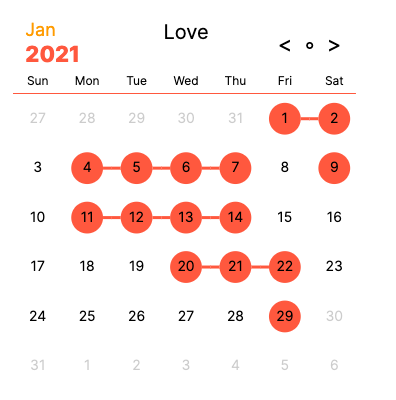

Also, is it possible to go to the desired daily/weekly/monthly note directly by clicking the corresponding date/week/month?
A use case for this would be as follows:
- One check the number of uncompleted/completed tasks from the calendar view
- One go to the desired daily/weekly/monthly date by clicking the corresponding icon
Hi @wenlzhang,
For the first question, what do you want to show on the graph? Two numbers below each day? Currently, if you have two targets (one for task done, one for not done), you can switch the graph by clicking the title.
For the second question, it’s possible. Will consider adding this feature.

Currently, if you have two targets (one for task done, one for not done), you can switch the graph by clicking the title.
@pyrochlore For my use case, I would be more interested in the number of uncompleted tasks. So, one number denoting the number of uncompleted tasks below each day would be fine. Of course, two numbers showing the uncompleted and completed tasks would be better, if it looks nice visually.
The option for switching the graph by clicking the title is also a nice way of showing this, as I am more interested in the number of uncompleted tasks each day.
Also, I would like to add a few things to the second question, if they are not too difficult to achieve:
- If one press the Control/Option when clicking a day, it would open the specific daily note in a new pane.
- Besides the daily note, one can also open the monthly or weekly notes.
- For this, would it also be possible to use number(s) for denoting completed/uncompleted tasks in the weekly and monthly notes?
As a temporary workaround, I would like to see if there are (any) tasks on a specific date. The following query gives an error message: Error parsing YAML.
searchType: task.done, task.notdone
searchTarget: '*', '*'
datasetName: Done, Not Done
month:
    color: tomato
    headerMonthColor: orange
    todayRingColor: orange
    selectedRingColor: steelblue
    showSelectedValue: false
@wenlzhang, for the last post, Tracker accepts regular expressions, not wildcard characters. So use '.*' instead of '*'. Also, you have to wrap all targets in one pair of quotes, like this
searchTarget: '.*, .*'
Or use YAML array
searchTarget: [ '.*', '.*']
This is a limit from YAML.
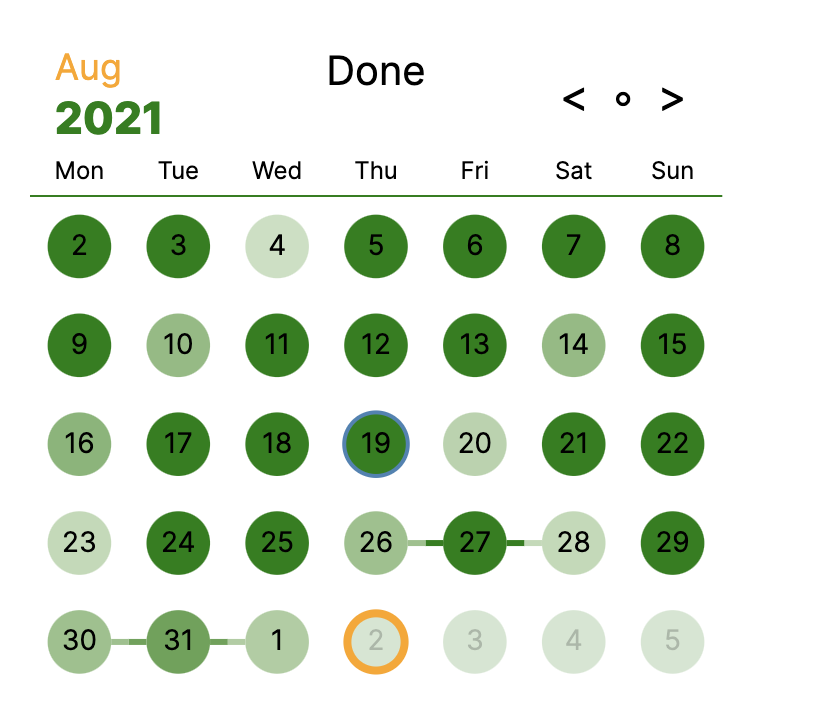
With the following query, I got the calendar figure which uses color to indicate the number of tasks within each daily note. However, it would show a deep color even if the corresponding daily note does not exist. For instance, the daily note 2021-08-19 does not exist, but it has very deep color, as can be seen from the figure below.
Another observation is that, if I set circleColorByValue: false, then those non-existing daily notes would not show any color, which is as expected.
Is there a way to avoid having deep colors for those non-existing daily notes? I checked the parameters that we can use
The query:
searchType: task.notdone, task.done
searchTarget: '.*, .*'
datasetName: Not Done, Done
month:
	startWeekOn: 'Mon'
	threshold: 0, 0
    color: green
    headerMonthColor: orange
	dimNotInMonth: false
    todayRingColor: orange
    selectedRingColor: steelblue
	circleColorByValue: true
    showSelectedValue: true
The figure:
The feature request "go to the desired daily/weekly/monthly date by clicking the corresponding icon" was moved to issue #70.
Great! circleColorByValue: true works as expected for non-existing daily notes now.
Will close this issue. More questions and suggestions are still welcome.
I realize another tiny issue. When there is only 1 task on a specific day (2021-09-09 and 2021-09-12), there would not be any color on that day, which is the same as the case when there are no tasks (2021-09-10 and 2021-09-11).
The query:
searchType: task.notdone, task.done
searchTarget: '.*, .*'
datasetName: Not Done, Done
month:
	startWeekOn: 'Mon'
	initMonth: +0M
	threshold: 0, 0
    color: green
    headerMonthColor: orange
	dimNotInMonth: false
    todayRingColor: orange
    selectedRingColor: steelblue
	circleColorByValue: true
    showSelectedValue: true
The figure:
