

 pyrevitlabs
Copy text from print ouptut to clipboard by Ctrl+C
Is your feature request related to a problem? Please describe.
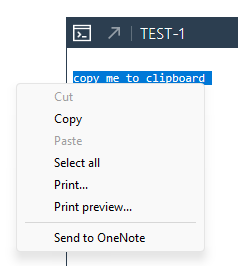
Currently, when pyRevit outputs the text data using print(), the output text can only be copied via right-click -> Copy command:
Describe the solution you'd like
Possibility of copying to clipboard using Ctrl+C keyboard shortcut in addition to right-click command .
Describe alternatives you've considered
N/A
Additional context
I'm used to copy the text by ctrl+с and often forget that it is not currently possible in pyRevit. So have to redo it way too many times 😄

Until this gets solved: you can open the output windows contents in your browser with the button on the output windows header:

You can use ctrl+c there. This is how I do it when I need to copy a lot of stuff.

I really like this one, and it annoys me to no end during development too.
Would love to try and solve this one. Though I think I might need some direction or context as to why this is a problem in the first place.

Annoying, definitely! Worth a try, maybe, I kind of suspect this is a rabbit hole.
@sweco-begertjanvdb as for direction, from the little I know about this portion of pyRevit, the output window is built on top of the rather old WebBrowser from .NET if I am not mistaken
this happens here https://github.com/eirannejad/pyRevit/blob/57c54be397a18b42cafd6319aa9d81a75bde8dac/pyrevitlib/pyrevit/runtime/ScriptConsole.cs#L248
this is were it is instanciated
renderer = new System.Windows.Forms.WebBrowser();
There is the copy to clipboard from the button click at the top of the output window https://github.com/eirannejad/pyRevit/blob/57c54be397a18b42cafd6319aa9d81a75bde8dac/pyrevitlib/pyrevit/runtime/ScriptConsole.cs#L912
looking quickly at the .NET doc about webbrowser you could try
renderer.WebBrowserShortcutsEnabled = true
not sure this is in phase with the version used in pyRevit. also not certain this will work, I have read that this could be related to the focus being taken from the modeless by the Application(Revit)
https://stackoverflow.com/questions/25653518/why-do-tab-del-ctrlc-etc-not-work-in-my-windows-forms-webbrowser-control

Hmm i see what you mean. I already checked if I could bind the window and renderer.document to a KeyDown event in the hopes of manually copying the selection to the clipboard. But nothing seems to fire. Or at least. No events are received. Then again, my current 'breakpoint' is trying to open a dialog, so I can't say I'm 100% sure.
Either way, your response seems to point in that same direction.
Will keep you posted