pyrevitlabs
Load Error: Overflow during image processing
Describe the bug When launching any version of Revit 2018-2021 a stack overflow error is generated.
No errors on installation.
When running pyrevit attach master 277 --installed all items are attached
Tried uninstall and re-install. No change. Tried rolling back versions, no change.
To Reproduce Steps to reproduce the behavior:
Launch the software - happens everytime.
Expected behavior pyRevit loads normally
Screenshots

Desktop (please complete the following information):
- OS: Windows 10 Pro (10.0.19042)
- pyRevit Version: pyRevit 4.8.7
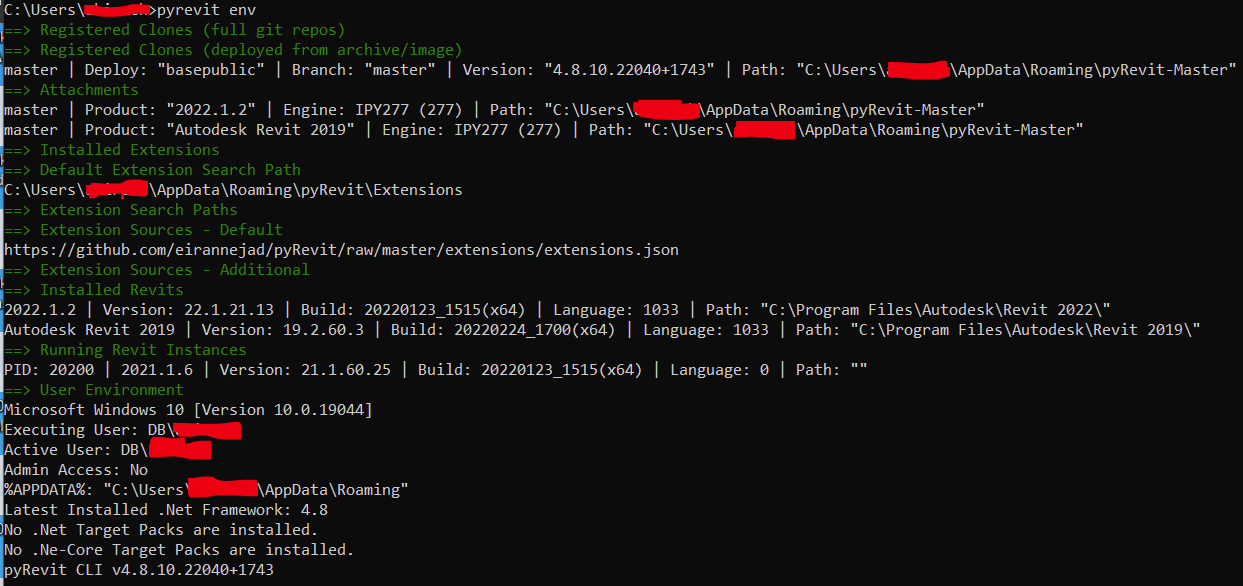
- pyRevit Environment:
==> Registered Clones (full git repos)
==> Registered Clones (deployed from archive/image)
master | Deploy: "basepublic" | Branch: "master" | Version: "4.8.7" | Path: "C:\Program Files\pyRevit-Master"
==> Attachments
master | Product: "2021.1.2" | Engine: IPY277 (277) | Path: "C:\Program Files\pyRevit-Master" | AllUsers
master | Product: "2020.2.3" | Engine: IPY277 (277) | Path: "C:\Program Files\pyRevit-Master" | AllUsers
master | Product: "2019.2.2 Hotfix" | Engine: IPY277 (277) | Path: "C:\Program Files\pyRevit-Master" | AllUsers
master | Product: "2018.3.3 Security Fix" | Engine: IPY277 (277) | Path: "C:\Program Files\pyRevit-Master" | AllUsers
==> Installed Extensions
==> Default Extension Search Path
C:\Users\Tyler\AppData\Roaming\pyRevit\Extensions
==> Extension Search Paths
==> Extension Sources - Default
https://github.com/eirannejad/pyRevit/raw/master/extensions/extensions.json
==> Extension Sources - Additional
==> Installed Revits
2021.1.2 | Version: 21.1.20.44 | Build: 20201109_1530(x64) | Language: 1033 | Path: "C:\Program Files\Autodesk\Revit 2021\"
2020.2.3 | Version: 20.2.30.42 | Build: 20200826_1250(x64) | Language: 1033 | Path: "C:\Program Files\Autodesk\Revit 2020\"
2019.2.2 Hotfix | Version: 19.2.20.24 | Build: 20190808_0900(x64) | Language: 1033 | Path: "C:\Program Files\Autodesk\Revit 2019\"
2018.3.3 Security Fix | Version: 18.3.3.18 | Build: 20190510_1515(x64) | Language: 1033 | Path: "C:\Program Files\Autodesk\Revit 2018\"
==> Running Revit Instances
PID: 18704 | 2019.2.2 Hotfix | Version: 19.2.20.24 | Build: 20190808_0900(x64) | Language: 0 | Path: "C:\Program Files\Autodesk\Revit 2019"
==> User Environment
Microsoft Windows 10 [Version 10.0.19042]
Executing User: GRANTER-DESKTOP\Tyler
Active User: GRANTER-DESKTOP\Tyler
Admin Access: Yes
%APPDATA%: "C:\Users\Tyler\AppData\Roaming"
Latest Installed .Net Framework: 4.8
No .Net Target Packs are installed.
No .Ne-Core Target Packs are installed.
pyRevit CLI 4.8.7.0```

**Additional context**
Add any other context about the problem here.

@eirannejad this is currently happening to me, i have tried running
pyrevit caches clear 2022
which apparently worked for some user in this thread: https://github.com/eirannejad/pyRevit/issues/1318
but didnt solve it for me