pyrevitlabs
Copy Legends to Other Documents does not copy reference planes
Describe the bug "Drawing Set | Legends | Copy Legends to Other Documents" does not include reference planes in objects that are copied.
To Reproduce Steps to reproduce the behavior:
- Create a Legend that includes reference planes (we use those for aligning views on sheets)
- Run "Drawing Set | Legends | Copy Legends to Other Documents"
- Text is copied, but reference planes are not
Expected behavior Would expect all objects in the Legend to be copied.
Screenshots If applicable, add screenshots to help explain your problem.
Desktop (please complete the following information):
- OS: Windows 10
- pyRevit Version 4.8.4
- pyRevit Environment:
==> Registered Clones (full git repos) ==> Registered Clones (deployed from archive/image) master | Deploy: "basepublic" | Branch: "master" | Version: "4.8.4" | Path: "C:\Users\sdurkee\AppData\Roaming\pyRevit-Master" ==> Attachments master | Product: "2019.2.2 Hotfix" | Engine: 277 | Path: "C:\Users\sdurkee\AppData\Roaming\pyRevit-Master" | Manifest: "C:\Users\sdurkee\AppData\Roaming\Autodesk\Revit\Addins\2019\pyRevit.addin" master | Product: "2018.3.3 Security Fix" | Engine: 277 | Path: "C:\Users\sdurkee\AppData\Roaming\pyRevit-Master" | Manifest: "C:\Users\sdurkee\AppData\Roaming\Autodesk\Revit\Addins\2018\pyRevit.addin" master | Product: "2017.2.5 Security Fix" | Engine: 277 | Path: "C:\Users\sdurkee\AppData\Roaming\pyRevit-Master" | Manifest: "C:\Users\sdurkee\AppData\Roaming\Autodesk\Revit\Addins\2017\pyRevit.addin" ==> Installed Extensions ==> Default Extension Search Path C:\Users\sdurkee\AppData\Roaming\pyRevit\Extensions ==> Extension Search Paths ==> Extension Sources - Default https://github.com/eirannejad/pyRevit/raw/master/extensions/extensions.json ==> Extension Sources - Additional ==> Installed Revits 2019.2.2 Hotfix | Version: 19.2.20.24 | Build: 20190808_0900(x64) | Language: 1033 | Path: "C:\Program Files\Autodesk\Revit 2019\" 2018.3.3 Security Fix | Version: 18.3.3.18 | Build: 20190510_1515(x64) | Language: 1033 | Path: "C:\Program Files\Autodesk\Revit 2018\" 2017.2.5 Security Fix | Version: 17.0.1169.0 | Build: 20190508_0315(x64) | Language: 1033 | Path: "C:\Program Files\Autodesk\Revit 2017\" ==> Running Revit Instances PID: 54580 | 2019.2.2 Hotfix | Version: 19.2.20.24 | Build: 20190808_0900(x64) | Language: 0 | Path: "C:\Program Files\Autodesk\Revit 2019" ==> User Environment Microsoft Windows 10 [Version 10.0.19041] Executing User: SA\SDurkee Active User: Admin Access: No %APPDATA%: "C:\Users\sdurkee\AppData\Roaming" Latest Installed .Net Framework: 4.8 No .Net Target Packs are installed. No .Ne-Core Target Packs are installed. pyRevit CLI 4.8.4.0
Additional context Add any other context about the problem here.

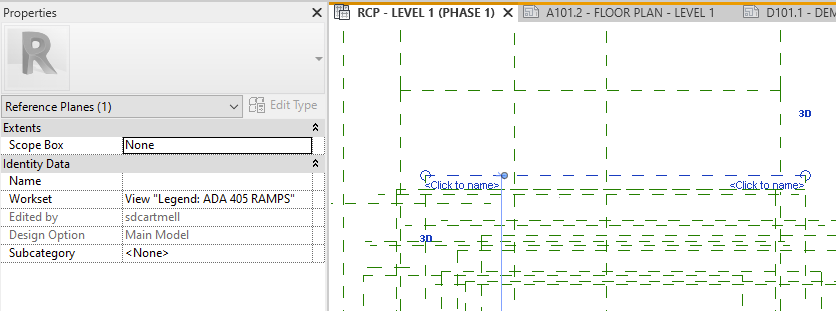
I too had this issue with "Drawing Set | Legends | Convert Drafting to Legend" and then I found all the reference planes pasted into the model. See attached: