pycaret
[BUG]: You must pass a freq argument as current index has none
pycaret version checks
-
[X] I have checked that this issue has not already been reported here.
-
[X] I have confirmed this bug exists on the latest version of pycaret.
-
[x] I have confirmed this bug exists on the master branch of pycaret (pip install -U git+https://github.com/pycaret/pycaret.git@master).
Issue Description
Hi there I have a dataset with the following columns.
 #   Column               Non-Null Count   Dtype
---  ------               --------------   -----
 0   PricePerUnit         146758 non-null  float64
 1   LeaseContractLength  146758 non-null  int64
 2   PurchaseOption       146758 non-null  object
 3   OfferingClass        146758 non-null  object
 4   Product Family       146758 non-null  object
 5   Location             146758 non-null  object
 6   Current Generation   146758 non-null  object
 7   vCPU                 146758 non-null  int64
 8   Memory               146758 non-null  int64
 9   Tenancy              146758 non-null  object
 10  Operating System     146758 non-null  object
 11  License Model        146758 non-null  object
 12  year                 146758 non-null  int64
 13  Network Performance  146758 non-null  float64
 14  EffectiveDate        146758 non-null  object
 15  DiskType             146758 non-null  object
 16  StorageSize          146758 non-null  int64
 17  dateTime             146758 non-null  datetime64[ns]
I am trying to use the time series functionality by version '3.0.0.rc3' of pycaret.
My setup is as follows
s = setup(df, target='PricePerUnit', ignore_features=['Network Performance', 'OfferingClass', 'Current Generation'], index= 'dateTime' )
And the index column I use is like this.
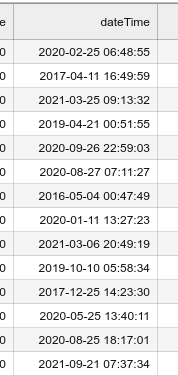
I get the following error
   1169 freq = self.freqstr or self.inferred_freq
   1171 if freq is None:
-> 1172     raise ValueError(
   1173         "You must pass a freq argument as current index has none."
   1174     )
   1176 res = get_period_alias(freq)
   1178 #  https://github.com/pandas-dev/pandas/issues/33358

ValueError: You must pass a freq argument as current index has none.
You may find the dataset here: https://dagshub.com/gfragi/PriceIndex/raw/ff0f7754da688915232f98c2a3fbbf6202e3b2b5/data/amazon_unique_dates.csv
Reproducible Example
from pycaret.time_series import *
# from pycaret.time_series import *
import pandas as pd
import numpy as np
import random

from random import randrange
import datetime

import plotly.express as px

df = pd.read_csv(f'data/amazon_unique_dates.csv')

s = setup(df, target='PricePerUnit', ignore_features=['Network Performance', 'OfferingClass', 'Current Generation'], index= 'dateTime' )
Expected Behavior
I suppose that by using the datetime64[ns] type on index was the appropriate to do in order to run the setup.
Actual Results
1169 freq = self.freqstr or self.inferred_freq
   1171 if freq is None:
-> 1172     raise ValueError(
   1173         "You must pass a freq argument as current index has none."
   1174     )
   1176 res = get_period_alias(freq)
   1178 #  https://github.com/pandas-dev/pandas/issues/33358
Installed Versions

Can you try to set the dataset index and frequency outside of pycaret for now and pass this dataset to setup without specifying the index argument there?

Hi again,
I tried but no luck. Let me explain
After loading the dataset I have set index to my column,
df = df.set_index('dateTime')
so the df.info() gives us at the moment
Index: 146798 entries, 2020-03-01 14:23:23 to 2020-11-10 15:35:36
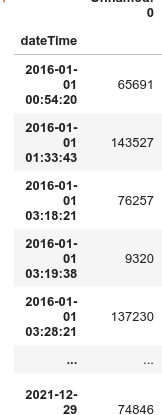
but now I get a different error:
ValueError: The index of your 'data' is of type '<class 'pandas.core.indexes.base.Index'>'. If the 'data' index is not of one of the following types: <class 'pandas.core.indexes.period.PeriodIndex'>, <class 'pandas.core.indexes.datetimes.DatetimeIndex'>, then 'seasonal_period' must be provided. Refer to docstring for options.
Do you have an idea if I am doing sth wrong here?
UPDATE: I checked to see whether my dates are continuous and cleared them if they are not. The error is still present.
ValueError: The index of your 'data' is of type '<class 'pandas.core.indexes.base.Index'>'. If the 'data' index is not of one of the following types: <class 'pandas.core.indexes.period.PeriodIndex'>, <class 'pandas.core.indexes.datetimes.DatetimeIndex'>, then 'seasonal_period' must be provided. Refer to docstring for options.
To clarify, as previously said, I set the index outside of the setup.
I suppose the issue here is that the index dates are not continuous!!
The issue is not about being continuous but rather being uniformly spaced. pycaret and sktime only work on uniformly spaced data. Can you resample the data to make it uniformly spaced? This might lead to missing data but missing values are ok, but you must have all index values (even if some have missing values).
@gfragi I looked into this data further and it does not look like the data is coming from a "single instance". Can you elaborate on what problem you are trying to solve? The time series module in pycaret currently only works on a single instance of data (coming from one product for example). Also, are you interested in time series forecasting, time series classification or something else?