

 py-pdf
Adding a HTML snippet with title shows title on the beginning of PDF
Error details
- In
fpdf.write_html()if we add<title>Something</title>in the innerhtmlsnippet thetitleshows at the starting line of the HTML content when rendered as a PDF.
Minimal code
from fpdf import FPDF

TABLE_DATA = (
    ("First name", "Last name", "Age", "City"),
    ("Jules", "Smith", "34", "San Juan"),
)

pdf = FPDF()
pdf.set_font_size(16)
pdf.add_page()
pdf.write_html(
    f"""
    <!DOCTYPE html>
<html>
    <head>
        <title>New HTML</title>
    </head>
    <body>
        <table border="1">
            <thead>
                <tr>
                    <th width="25%">{TABLE_DATA[0][0]}</th>
                    <th width="25%">{TABLE_DATA[0][1]}</th>
                    <th width="15%">{TABLE_DATA[0][2]}</th>
                    <th width="35%">{TABLE_DATA[0][3]}</th>
                </tr>
            </thead>
            <tbody>
                <tr>
                    <td>{'</td><td>'.join(TABLE_DATA[1])}</td>
                </tr>
                <tr>
                    <td>{'</td><td>'.join(TABLE_DATA[2])}</td>
                </tr>
                <tr>
                    <td>{'</td><td>'.join(TABLE_DATA[3])}</td>
                </tr>
                <tr>
                    <td>{'</td><td>'.join(TABLE_DATA[4])}</td>
                </tr>
            </tbody>
        </table>
    </body>
</html>""",
    table_line_separators=True,
)
pdf.output('table_html.pdf')
This shows following output pdf : table_html.pdf. The title New HTML is showing at the beginning of the Table.
Suggestion: Since this is a PDF rendering not a web-content rendering on a browser, the title should skip or it should show in such a place where it will look like a title.
Environment Please provide the following information:
- Operating System: Windows 10...
- Python version: 3.11.1
fpdf2version used:2.7.3

Hi @ssavi-ict!
the title should skip or it should show in such a place where it will look like a title
This is an interesting suggestion.
I think it would make sense if the content of a <title> tag does not appear on the document,
and ends up being passed to FPDF.set_title().
Would you like to work on a PR?
I have a few questions:
- what if there are several
<title>tags? (how does that behave on a web page?) - should this logic applies only to
<title>tags inside<head>tags?

I think it would make sense if the content of a
tag does not appear on the document, -
I also think the same.
ends up being passed to FPDF.set_title().
I did not catch it accordingly. Could you explain a bit more?
Would you like to work on a PR?
Well, I am trying to explore the Codebase specifically write_html() method. Could you give me some resources from where I can get help? I have seen fpdf using python's standard html parser to make pdf. Did we use any html validator inside?
- what if there are several
tags? (how does that behave on a web page?)
According to W3C, There may only be one title in any document.
- should this logic applies only to
tags inside tags?
According to W3C, The TITLE element should occur in the HEAD of the document.
ends up being passed to FPDF.set_title().
I did not catch it accordingly. Could you explain a bit more?
We could retrieve the content of the <title> tag and use it to define the PDF document title, using this method of fpdf2:
https://github.com/PyFPDF/fpdf2/blob/2.7.3/fpdf/fpdf.py#L642
what if there are several
tags? (how does that behave on a web page?) According to W3C, There may only be one title in any document.
Agreed, this should not happen based on the HML specification 😊
But we should should still decide how fpdf2 will behave when parsing this HTML string:
<head>
  <title>Hello</title>
  <title>World</title>
</head>
It's an edge case and there is no need to bother to much with it.
I suggest to avoid raising an exception, and simply call FPDF.set_title() each time that the HTML parser meets a <title> tag.
should this logic applies only to
tags inside tags? According to W3C, The TITLE element should occur in the HEAD of the document.
Alright, so should we ignore <title> tags outside <head> blocks?
I think we should test how web browsers handle this, but I bet they don't ignore <title> even if they are misplaced.
This is all about Postel's law: "be conservative in what you send, be liberal in what you accept"
Could you give me some resources from where I can get help? I have seen fpdf using python's standard html parser to make pdf. Did we use any html validator inside?
The best is to start reading the code of the HTML2FPDF class in html.py 😊
As it is a subclass of HTMLParser, it defines dedicated method for handling start tags (handle_starttag), end tags (handle_endtag) and tags content (handle_data).
You can experiment to implement the following strategy:
- Defines a new boolean attribute
HTML2FPDF.in_titlethat you set toTrueinhandle_starttagwhen the tag istitle, and then back to False inhandle_endtag - In
handle_data, ifself.in_titleisTrue, callself.pdf.set_title()with the string provided
We could retrieve the content of the
<title>tag and use it to define the PDF document title, using this method of fpdf2:
I am not pretty sure what FPDF.set_title() does right now. I tried to add it to the existing code. I did not find any such noticeable differences.
But we should still decide how
fpdf2will behave when parsing this HTML string: Alright, so should we ignoretags outside blocks? I think we should test how web browsers handle this, but I bet they don't ignore <title> even if they are misplaced.
I tried with an example earlier before posting the previous comment. That time I have seen the first title tag reflected. The others are skipped by the Browser. No matter where they are placed. They behave similarly even after they are placed inside the body. I think we can just skip processing the title tag.
I suggest to avoid raising an exception, and simply call
FPDF.set_title()each time that the HTML parser meets atag.
Agreed.
I am not pretty sure what
FPDF.set_title()does right now. I tried to add it to the existing code. I did not find any such noticeable differences.
It sets the document title, which is not visible inside the document, but usually displayed by the PDF viewer in its top window title bar.
For example the PDF generated by unit test test_put_info_all() can be found here: https://raw.githubusercontent.com/PyFPDF/fpdf2/master/test/metadata/put_info_all.pdf
Its sets the document title as sample title, which is displayed by Firefox internal PDF viewer:
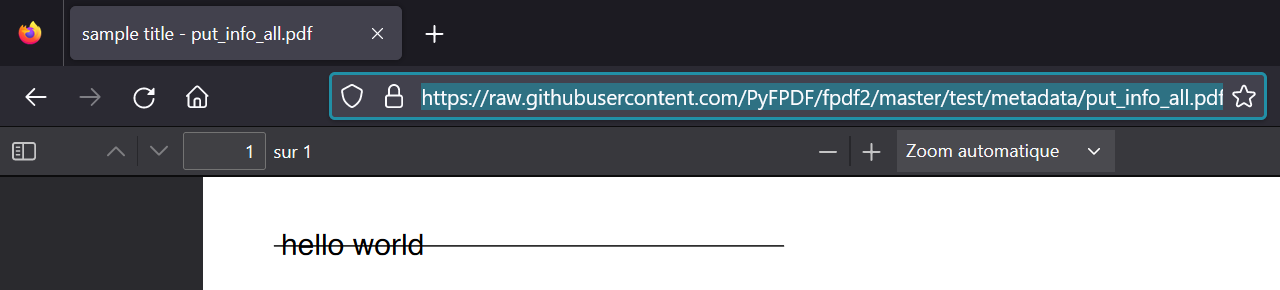
It sets the document title, which is not visible inside the document, but usually displayed by the PDF viewer in its top window title bar.
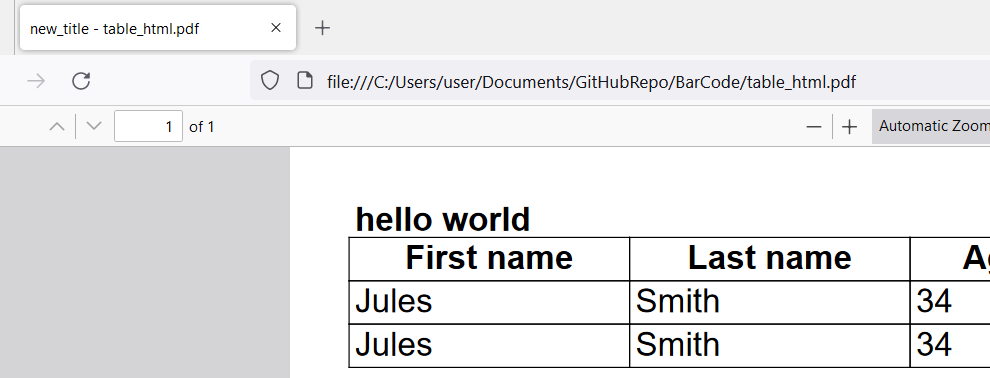
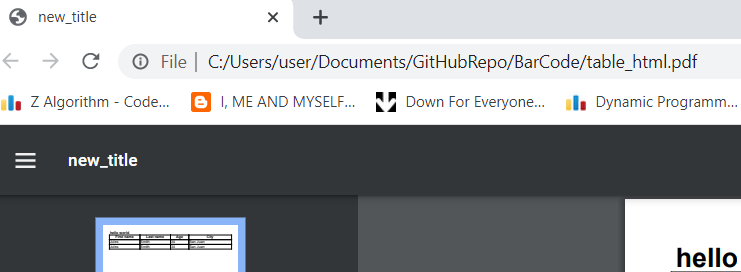
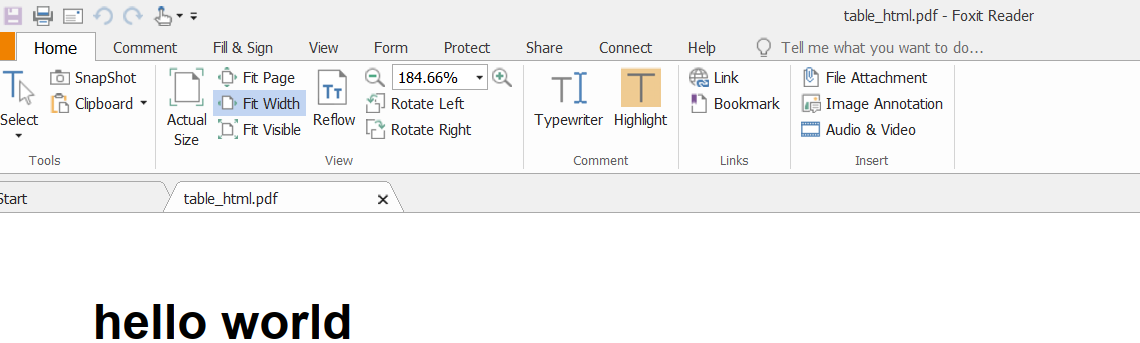
Ahh.. I got that now. However, it behaves differently based on the PDF reader. I tried to open generated PDF in Mozilla, Chrome, and Foxit Reader (the PDF reader I use). The result is following -
- Mozilla ( Shows Both filename and set title )
- Chrome ( Shows only the set title )
- Foxit Reader ( Shows only the filename )
Yeah, that doesn't really surprise me...
Maybe we could improve our documentation to describe more what this method does, and the fact that PDF viewers will not all display it? https://pyfpdf.github.io/fpdf2/fpdf/fpdf.html#fpdf.fpdf.FPDF.set_title
I generally agree that HTML meta data should rather be added to the PDF meta data, instead of appearing visually on the page.
On the other hand, a user can easily insert several HTML documents in a single PDF, each of which may have its own <title> tag. How are we going to handle this situation? Maybe we should make the meta data transfer optional? Possibly including an option of having it appear on page anyway?

On the other hand, a user can easily insert several HTML documents in a single PDF, each of which may have its own
<title>tag. How are we going to handle this situation?
We discussed that in a previous comments above 😅
In a similar way that PDF documents are independents, HTML pages are also very independents from each other. There is no concept of "sheets", like in Microsoft Excel, in neither of those formats.
PDF documents can be merged, so that 2 documents are appended one after the other in a file, and that can be useful for printing. But then the final document title does not have much sense, and I don't know of any software that has a notion of "several documents in a single PDF file".
For all those reasons, it seems better to me to not bother too much about this case,
and implement the basic rule that we discussed: avoid raising an exception, and simply call FPDF.set_title() each time that the HTML parser meets a
Maybe we should make the meta data transfer optional? Possibly including an option of having it appear on page anyway?
I am not sure this is a good idea.
In order for fpdf2 to be best predictable for our users, we should follow closely the behaviour of web browsers regarding how HTML tags are handled.
A <title> is never displayed on the page and always displayed in the status bar of a browser window / tab.
So I think that is what fpdf2 should do by default: never display the <title> tags content on the page, and alway use it as metadata to set the PDF document title.
If users want a visible big top header text at the beginning of their document, they can use a <h1>, which is designed for that purpose in the HTML syntax.
And regarding making this behaviour optional / configurable, it wouldn't be ideal to implement with HTML attributes (as this is a non-standard feature), and I don't see any good reason to have this degree of fine control...
End users will still be able to call FPDF.set_title("") if they want to remove a title inserted from HTML passed to write_html()
We discussed that in a previous comments above 😅
Yes, but I don't see a real conclusion.
In order for
fpdf2to be best predictable for our users, we should follow closely the behaviour of web browsers regarding how HTML tags are handled.
As a default, that seem reasonable (as far as possible).
Within a single HTML document, that is fairly easy:
- Ignore
<title>tags outside of<head>(even if browsers will try to process invalid HTML, in this case I think we shouldn't) - Witin
<head>, place the first<title>in the PDF meta title, and ignore all others after that.
If we process several HTML files, it gets a bit trickier.
Your suggestion seems to be to just call FPDF.set_title() each time we encounter a valid HTML <title>. This would mean that the <title> of the last imported HTML file overwrites all previous ones. As a user, this is not really what I'd expect to happen.
Maybe we should set the PDF title to a HTML <title> only if the pdf.title attribute is still empty? That way a document title previously set by the user won't be overwritten. And when importing several HTML files, the <title> of the first one persists. This behaviour would make the most sense to me, and extends the concept behind the HTML specs (use the first seen) to a multi-document situation.
Independently of and in addition to the above, we should keep the option available to deliberately make the <title> show up on the page. This could be useful if a user imports several HTML snippets, and wants the source of each one to be shown, maybe with a suitable H# styling. Obviously, such an option would have to be off by default.
Fpdf2 has shown the title on the page for many years. Eliminating this possibility completely might cause difficulties for some existing users.
Maybe we should set the PDF title to a HTML
<title>only if thepdf.titleattribute is still empty? That way a document title previously set by the user won't be overwritten. And when importing several HTML files, the<title>of the first one persists. This behaviour would make the most sense to me, and extends the concept behind the HTML specs (use the first seen) to a multi-document situation.
Agreed, this also makes sense to me and seems like a good idea! We should clearly document this behaviour in our documentation though.
fpdf2 has shown the title on the page for many years. Eliminating this possibility completely might cause difficulties for some existing users.
That is a good point.
Alright, let's add a new optional display_title_tag or render_title_tag parameter to HTML2FPDF then, with a default value to False, and clearly document this change in CHANGELOG.md
@ssavi-ict are you considering writing a PR implementing this? 😊
Do you have questions regarding what we discussed? Is it all clear for you?
@Lucas-C, yes it is clear so far.
I am reading the Codebase basically how HTML contents are parsed into fpdf2 and how the contents are rendered into the output pdf. Once I get this, I will surely implement this. I am reading the HTML2FPDF class.
Will that be enough? Do I need more things to explore?
I will try to find something out by the weekend. Actually a bit busy with office assignments nowadays and also the implementations are also taking to understand.
Will that be enough? Do I need more things to explore?
I think that should be enough. The unit tests may also be helpful: https://github.com/PyFPDF/fpdf2/blob/master/test/html/test_html.py But if you have any questions, please ask away! 😊
Actually a bit busy with office assignments nowadays and also the implementations are also taking to understand.
No worries and no hurry, take your time 👍
Hi @ssavi-ict!
Have you been able to work towards this?
If not, no worries 😊 I'd just like to know if we should invite other contributors to work on this issue.
@ Lucas-C, it'd be better to assign someone else. I would like to contribute to something else anytime in the future. Busy with something else.
I am a newbie and would like to work on this issue, could you please guide me a little through the process?

Hi @0x00zer0day and welcome!
Sure, I will try to guide through the process 🙂
-
First, setup a development environment by forking this GitHub repository, cloning your fork, and follow the instructions in our documentation page dedicated to
fpdf2development: https://py-pdf.github.io/fpdf2/Development.html (especially the "Installing fpdf2 from a local git repository" & "Testing" sections). If you work under Windows, I would also recommend to instal Sumatra PDF reader, a great PDF document viewer that can hot-reload PDF files when they are modified. -
Start by adding unit tests, in
test/html/test_html.py, taking inspiration from existing tests. The goal is to write the minimal code possible that covers the feature you are implementing. Initially, you will need to passgenerate=Truetoassert_pdf_equal()in order for a reference PDF file to be generated. -
Then, modify the code in
fpdf/html.pyin order to implement the feature. -
Finally, when your tests are passing and you are happy with your code, create a Pull Request in order to get a code review from maintainers. Also please a mention of this bahaviour in
docs/HTML.md
For this specific issue, the goal is to:
-
add support for
<title>HTML tag inHTML2FPDF.handle_starttag(). The logic should be: ifgetattr(self.pdf, "title", None)isNone, then set it, else do nothing. -
add a new
render_title_tag=Falseparameter toHTML2FPDF.__init__, and store it as._render_title_tag. When this isTrue, then a<title>HTML tag should be rendered as a heading (likeh1,h2...).
Do you have any question about those instructions? 😊
i am a newbie and i am not able to find this issue in the repo can you please help me

Hi @yashj09
What do you mean by "i am not able to find this issue in the repo" ?

Hi @yashj09 & @sankarebarri?
Is one of you actively working on this? Do you need help?
Or else, can other fpdf2 contributors work on this?
Hi @Lucas-C , i am actively working on it.
I have already created a test which is failing. I am inspecting the code fpdf/html.py.HTML2FPDF. It's taking me time to figure out what is what. I should be able to finally fix it before next Monday. If not, then you can assign it to someone else.
Thanks.
I have already created a test which is failing. I am inspecting the code
fpdf/html.py.HTML2FPDF. It's taking me time to figure out what is what. I should be able to finally fix it before next Monday. If not, then you can assign it to someone else.
Excellent! Sure, no hurry, it's totally OK to take your time. You can rely on our (the maintainers) help if you need! 😊
I have already created a test which is failing. I am inspecting the code
fpdf/html.py.HTML2FPDF. It's taking me time to figure out what is what. I should be able to finally fix it before next Monday. If not, then you can assign it to someone else.Excellent! Sure, no hurry, it's totally OK to take your time. You can rely on our (the maintainers) help if you need! 😊
Hello @Lucas-C, i hope i am not doing this wrong. Help from anyone would be highly appreciated. I have 2 cases: Case 1:
-
In
/tmp/pytest-of-runner/pytest-0/test_html_simple_table0, i can only see actual.pdf but not actual_qpdf.pdf and expected_qpdf.pdf contrary to the documentation -
So, i tried to do go around it. I initially did
assert_pdf_equal(pdf, HERE / "html_render_title.pdf", tmp_path, generate=True)which created
html_render_title.pdfintest/html, with no title in the html because i consider this pdf to be the one to be matched, i.e the expected pdf. So i am now running the test against the actual.pdf being generated everytime i runpytest -k test_render_titlebut with title in the html and generate=True not being called,.
Is that the correct way to compare the expected pdf and the actual pdf? or is there a better way?
I have already created a test which is failing. I am inspecting the code
fpdf/html.py.HTML2FPDF. It's taking me time to figure out what is what. I should be able to finally fix it before next Monday. If not, then you can assign it to someone else.Excellent! Sure, no hurry, it's totally OK to take your time. You can rely on our (the maintainers) help if you need! 😊
Hello @Lucas-C, i hope i am not doing this wrong. Help from anyone would be highly appreciated. I have 2 cases: Case 1:
1. In `/tmp/pytest-of-runner/pytest-0/test_html_simple_table0`, i can only see **actual.pdf** but not **actual_qpdf.pdf and expected_qpdf.pdf** contrary to [the documentation ](https://py-pdf.github.io/fpdf2/Development.html) 2. So, i tried to do go around it. I initially did `assert_pdf_equal(pdf, HERE / "html_render_title.pdf", tmp_path, generate=True)` 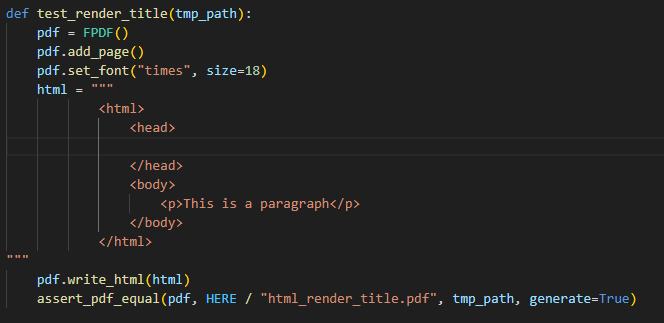 which created `html_render_title.pdf` in `test/html`, with **no title in the html** because i consider this pdf to be the one to be matched, i.e the expected pdf. So i am now running the test against the actual.pdf being generated everytime i run` pytest -k test_render_title` 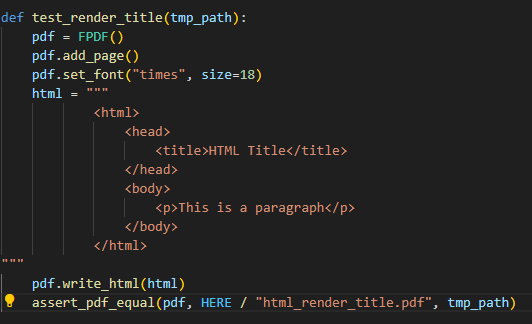 but with **title in the html** and generate=True not being called,.Is that the correct way to compare the expected pdf and the actual pdf? or is there a better way?
Case 2:
I have add support for <title> HTML tag in HTML2FPDF.handle_starttag().:
and set it too:
In handle_starttag, i have done
and in handle_data i have done:
I thought handle_data should be extracting the contents between the html tags and convert them to the expected pdf, but i can't seem to get my head around it.
This is my first time trying to contribute to a code of high caliber like this, please bear with me while you walk me through.I am actually getting familiarised with the the codes and I am seeing myself being a long time contributor to this repository, if i finally know my way around.
Thanks.
This is my first time trying to contribute to a code of high caliber like this, please bear with me while you walk me through.I am actually getting familiarised with the the codes and I am seeing myself being a long time contributor to this repository, if i finally know my way around.
It helps to understand that the HTML parser is essentially a state machine (even if not a very sophisticated one).
Every time it encounters a start tag, it changes its internal state accordingly, and when it encounters the matching end tag it resets back to the previous state (you're not currently doing that). And while in any specific state, handle_data() needs to adapt its behaviour, and put the text it receives into the appropriate bucket.
In your case, first I don't understand why you want to make render_title_tag a constructor argument. There's no good reason to make this functionality configurable, so just establishing a private attribute is enough. You may also want to give it a different name, since rendering the title is explicitly not what should happen. You could initialize it eg. with self._in_title = False
While in title parsing state, you just want to collect all the text that comes in (could theoretically be in several consecutive calls). So all that handle_data() needs to do is collect its data. Therefore you need another private attribute with an (originally empty) list as ist value, where handle_data() appends its data, say eg. self._title_data = [].
Only when the title tag gets closed (in handle_endtag()) can you finally process the collected data. Strangely, FPDF.title does not get initialized by default (you could change that). In any case, if it either doesn't exist or is None, then now you want to concatenate the collected strings, maybe clean up the result with _WS_SUB_PAT.sub(" ", data), and hand it over to FPDF.set_title(). If FPDF.title already has a value, you shouldn't touch it and throw the collected data away. And as the last thing you need to clear the title parsing flag and empty the title data list again.
It's not really all that complicated, once you have grasped the basic concept.
I initially did
assert_pdf_equal(pdf, HERE / "html_render_title.pdf", tmp_path, generate=True)which createdhtml_render_title.pdfintest/html, with no title in the html because i consider this pdf to be the one to be matched, i.e the expected pdf.
Yes, this file you successfully generated will be the expected PDF to be matched in your test.
But for this reason, it SHOULD have a title matching the <title> tag used in your unit test.
The idea of using assert_pdf_equal(..., generate=True) is that you call it ONCE with generate=True,
when you already have a functional implementation, in order to generate a reference PDF file used by the new non-regression test.
This is not like in Test Driven Development where you define the expected result BEFORE writing your implementation.
assert_pdf_equal(..., generate=True) can only be used once you have some functional code.
Hi!
Just wondering if there are still people working on this? 🙂
Else I guess this is up-for-grabs.