

 pupudu
Should we support sorting and filtering in this library?
There are many ways to do those two. So we can either be agnostic or opinionated about them. This is to discuss the pros and cons

As someone currently looking for a sortable, filterable table solution this would be great for what we need. It might be enough to document an established pattern for passing in sort functions into Table column header cells, and a way to designate columns as keys to use in a filter function that is also passed into the component.

Hi @bzeffren-rms Thank you for paying interest in this library. I will definitely add a recipe to the guides section explaining how I usually do sorting and filtering. In the meantime, I will consider this as a +1 for making sorting and filtering built in.
Cheers.
Hi @bzeffren-rms I've added basic filtering support and documented the intended usage in the website: https://window-table.netlify.com/ Hopefully, It's a good first step towards adding sorting and filtering support to this library, without bloating the bundle size.
Cheers.
Awesome work @pupudu !!!
But sorting (with the caveat being it might affect performance) is much needed. Thanks for the addition of Filtering example and code.
I followed your steps for sorting. It is not working as stated. Better provide as a sample code for sorting, no need to integrate 'sorting' to the core function of this library.
That is only functionality that stops me using this in my team, and promote this.

@prabhakhar Thanks for paying interest in this library. I just made an online example for you: https://codesandbox.io/s/sorting-in-window-table-69wjb
Please let me know if you find any issues with this.
One thing to note (also mentioned as comments): The example uses the mapsort library to do the sorting. This is optional. You can use any library you prefer to do the sorting. However, the sorting should not happen in place. The sort function should not make any changes to the original data array. This is not a limitation of the library, but rather how React works.
@pupudu that was quick! Thank you for the online example. It looks great. I tried the same.
But in my application (Semantic UI based react-app) there is an other table element, rendered by the library, that consumes the click and so no 'sort' happening. Pardon my UI knowledge here.
I am seeing the 'other' table in the online example also. please note the table with a collapsed first row in the screenshot.
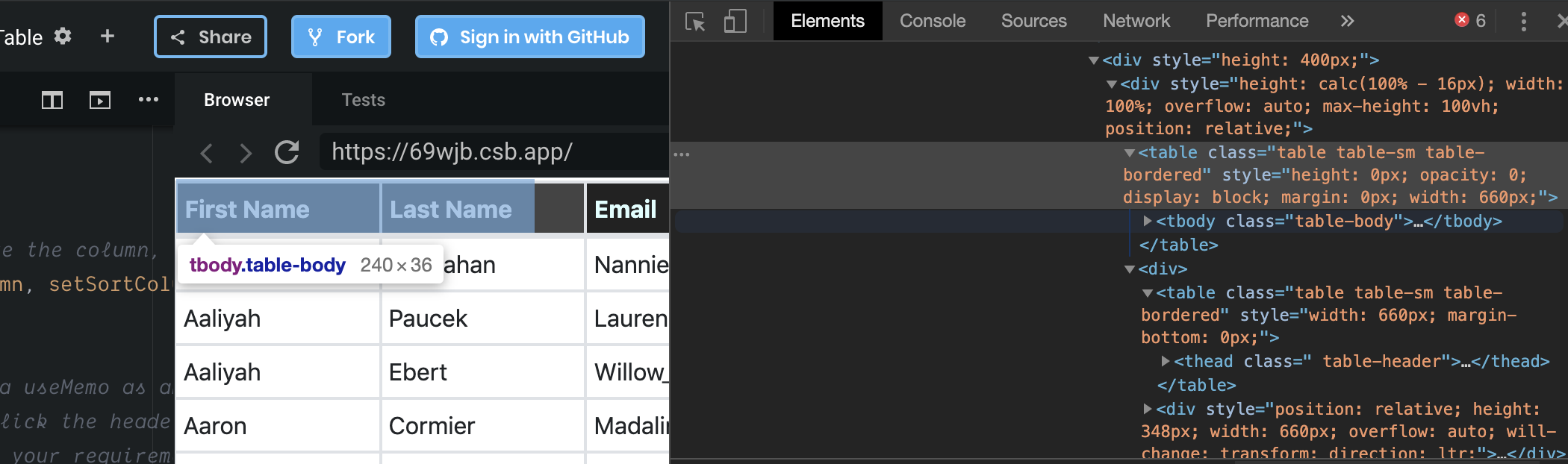
I will dig further why the focus in your example, is the header, though the example also has the 'other' dummy table in the background. If you know the problem/solution out of your head, please let me know.
The other table you see here is there for a different purpose. That's unlikely the cause of your problem. Would it be able for you to create an online version of your table. Then I can debug and add anything missing to the library.
https://codesandbox.io/embed/semantic-ui-example-i6bnp is the one with my data and style.
Please click near the "Zone" header to see actually the underlying table row gets the click. I have console.log print for all Cells.
Hi @prabhakhar I had a look the other day. It seems there is a compatibility issue with sematic UI. Should be an easy fix. But I need to find the exact cause. I can probably have a deeper look by EOD tomorrow. Sorry for taking longer to find the issue.
Hi @prabhakhar Apologies for taking too long. I spent some time today on this and I think I've fixed the issue. Can you please check if it works for you as well?
https://codesandbox.io/embed/semantic-ui-example-lmf4i
(The fix is in v0.9.0)