

 ptitSeb
So box64 isn't working for me inside an aarch64 container and even inside proot container
So i installed box64 with no errors. I even pointed BOX64_LB_LIBRARY_PATH to a centos 7 chroot (x86_64) and I still get isses. I tried Blender, Paraview and both Ansys and StarCCM+.
These are the errors I get:
Blender
bash-5.1# box64 /rootfs/CentOS-7-x86_64/blender-3.2.2-linux-x64/blender
Dynarec for ARM64, with extension: ASIMD AES CRC32 PMULL ATOMICS PageSize:4096
Box64 with Dynarec v0.1.9 642260b built on Aug  6 2022 20:43:43
BOX64_LD_LIBRARY_PATH: /rootfs/CentOS-7-x86_64/rx86_64/:/rootfs/CentOS-7-x86_64/Ansys/Ansys2022R1/ansys_inc/v221/fluent/
Using default BOX64_PATH: ./:bin/
Counted 18 Env var
Looking for /rootfs/CentOS-7-x86_64/blender-3.2.2-linux-x64/blender
Error, memory map (@0x400000 0x134a7000/0x1000) for elf "/rootfs/CentOS-7-x86_64/blender-3.2.2-linux-x64/blender" allocated @0x7fb6a0b59000
Error: allocating memory for elf /rootfs/CentOS-7-x86_64/blender-3.2.2-linux-x64/blender
Segmentation fault (core dumped)
bash-5.1# /rootfs/CentOS-7-x86_64/blender-3.2.2-linux-x64/blender
bash: /rootfs/CentOS-7-x86_64/blender-3.2.2-linux-x64/blender: No such file or directory
Paraview
bash-5.1# box64 /rootfs/CentOS-7-x86_64/ParaView-5.10.1-MPI-Linux-Python3.9-x86_64/bin/paraview --no-mpi
Dynarec for ARM64, with extension: ASIMD AES CRC32 PMULL ATOMICS PageSize:4096
Box64 with Dynarec v0.1.9 642260b built on Aug  6 2022 20:43:43
BOX64_LD_LIBRARY_PATH: /rootfs/CentOS-7-x86_64/rx86_64/:/rootfs/CentOS-7-x86_64/Ansys/Ansys2022R1/ansys_inc/v221/fluent/
Using default BOX64_PATH: ./:bin/
Counted 18 Env var
Looking for /rootfs/CentOS-7-x86_64/ParaView-5.10.1-MPI-Linux-Python3.9-x86_64/bin/paraview
argv[1]="--no-mpi"
Error, memory map (@0x400000 0x400000/0x200000) for elf "/rootfs/CentOS-7-x86_64/ParaView-5.10.1-MPI-Linux-Python3.9-x86_64/bin/paraview" allocated @0x7f0751cec000
Error: allocating memory for elf /rootfs/CentOS-7-x86_64/ParaView-5.10.1-MPI-Linux-Python3.9-x86_64/bin/paraview
Ansys Fluent
bash-5.1# /rootfs/CentOS-7-x86_64/Ansys/Ansys2022R1/ansys_inc/v221/fluent/bin/fluent
/rootfs/CentOS-7-x86_64/Ansys/Ansys2022R1/ansys_inc/v221/fluent/bin/fluent: line 529: hostname: command not found
/rootfs/CentOS-7-x86_64/Ansys/Ansys2022R1/ansys_inc/v221/fluent/fluent22.1.0/bin/fluent -r22.1.0
/rootfs/CentOS-7-x86_64/Ansys/Ansys2022R1/ansys_inc/v221/fluent/fluent22.1.0/launcher/bin/launcher: line 115: /rootfs/CentOS-7-x86_64/Ansys/Ansys2022R1/ansys_inc/v221/fluent/fluent22.1.0/launcher/bin/../lnamd64/launcher1: No such file or directory
box64 /rootfs/CentOS-7-x86_64/Ansys/Ansys2022R1/ansys_inc/v221/fluent/bin/fluent
Dynarec for ARM64, with extension: ASIMD AES CRC32 PMULL ATOMICS PageSize:4096
Box64 with Dynarec v0.1.9 642260b built on Aug  6 2022 20:43:43
BOX64_LD_LIBRARY_PATH: /rootfs/CentOS-7-x86_64/rx86_64/:/rootfs/CentOS-7-x86_64/Ansys/Ansys2022R1/ansys_inc/v221/fluent/
Using default BOX64_PATH: ./:bin/
Counted 17 Env var
Looking for /rootfs/CentOS-7-x86_64/Ansys/Ansys2022R1/ansys_inc/v221/fluent/bin/fluent
Not an ELF file (sign=#!/b)
Error: reading elf header of /rootfs/CentOS-7-x86_64/Ansys/Ansys2022R1/ansys_inc/v221/fluent/bin/fluent, try to launch natively instead
StarCCM+
bash-5.1# /rootfs/CentOS-7-x86_64/Siemens/Star-CCM+/16.02.009-R8/STAR-CCM+16.02.009-R8/star/bin/starccm+
/rootfs/CentOS-7-x86_64/Siemens/Star-CCM+/16.02.009-R8/STAR-CCM+16.02.009-R8/star/bin/starenv: line 258: hostname: command not found
Error: does not support linux-aarch64-2.34 architecture.
       Installed architectures are: linux-x86_64-2.17
bash-5.1# box64 /rootfs/CentOS-7-x86_64/Siemens/Star-CCM+/16.02.009-R8/STAR-CCM+16.02.009-R8/star/bin/starccm+
Dynarec for ARM64, with extension: ASIMD AES CRC32 PMULL ATOMICS PageSize:4096
Box64 with Dynarec v0.1.9 642260b built on Aug  6 2022 20:43:43
BOX64_LD_LIBRARY_PATH: /rootfs/CentOS-7-x86_64/rx86_64/:/rootfs/CentOS-7-x86_64/Ansys/Ansys2022R1/ansys_inc/v221/fluent/
Using default BOX64_PATH: ./:bin/
Counted 18 Env var
Looking for /rootfs/CentOS-7-x86_64/Siemens/Star-CCM+/16.02.009-R8/STAR-CCM+16.02.009-R8/star/bin/starccm+
Not an ELF file (sign=#!/b)
Error: reading elf header of /rootfs/CentOS-7-x86_64/Siemens/Star-CCM+/16.02.009-R8/STAR-CCM+16.02.009-R8/star/bin/starccm+, try to launch natively instead
I am curious what I could be missing. Running them normally gives no directory found or wont run due to arch mis-match, however running with box64 in front causes segfaults and something regarding elfs?
I am running this on Fedora 36 aarch64, with all pre-requisites, including qemu installed. Any help is appreciated.

For Blender and Paraview, the address to which the binary wants to load is not free. Nothing box64 can do. Check with cat /proc/self/mmaps or something like that (I don't have a correct machine to test right now), what is at the 0x400000 address.
For the 2 other, it's a shell script, not a program that are launching. For this to work you need box64 to be registered on your system with binfmt, but to my knowledge this is not available in termux. Try modify the shel script to insert box64 when the actual binary is launched.

For Blender and Paraview, the address to which the binary wants to load is not free. Nothing box64 can do. Check with
cat /proc/self/mmapsor something like that (I don't have a correct machine to test right now), what is at the 0x400000 address.For the 2 other, it's a shell script, not a program that are launching. For this to work you need box64 to be registered on your system with binfmt, but to my knowledge this is not available in termux. Try modify the shel script to insert box64 when the actual binary is launched.
I have fe36 aarch64 running inside doxker container using qemu-aarch64 for testing purposes, and I have box64 inside proot distro as well. Are these the reason as to by I get elf errors? Also how do i know if box64 is registered with binfmt? Was there a command I was supposed to run to get It to be registered?
Thanks
I have fe36 aarch64 running inside doxker container using qemu-aarch64 for testing purposes, and I have box64 inside proot distro as well. Are these the reason as to by I get elf errors?
I have no idea, never tried this kind of configuration
Also how do i know if box64 is registered with binfmt? Was there a command I was supposed to run to get It to be registered?
In box64 tests folder, launch ./test01. If it runs, binfmt integration is there. If not, then it's not. Read the COMPILATION.md, but basically, it's sudo make install and then a restart of the binfmt service.
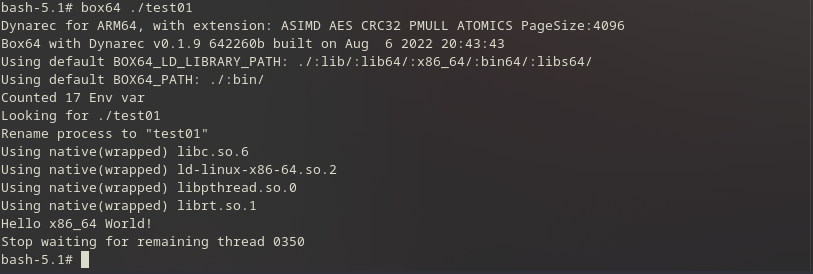
Ok, but I meant launching without using box64 (as it should be used automatically if binfmt integration is there)
Any news? can this ticket be closed?
Running script by itself doesn't work. I rebuild box64 3 times and made sure to restart binfmt. Also there was nothing in those memory address I checked. Is this something to do with qemu-aarch64? Because I use that that to run the docker and I'm trying to test box64 inside that
You should be able to run script using the x86_64 version of bash that is in the test folder. I don't think you can use binfmt integration inside a docker image, so box64 will not be integrated in the system and will be need to called manualy, so use the x86_64 version of bash for scripts.