
PrusaSlicer
 PrusaSlicer copied to clipboard
 prusa3d
Wipe wall/skirt
Description of the bug
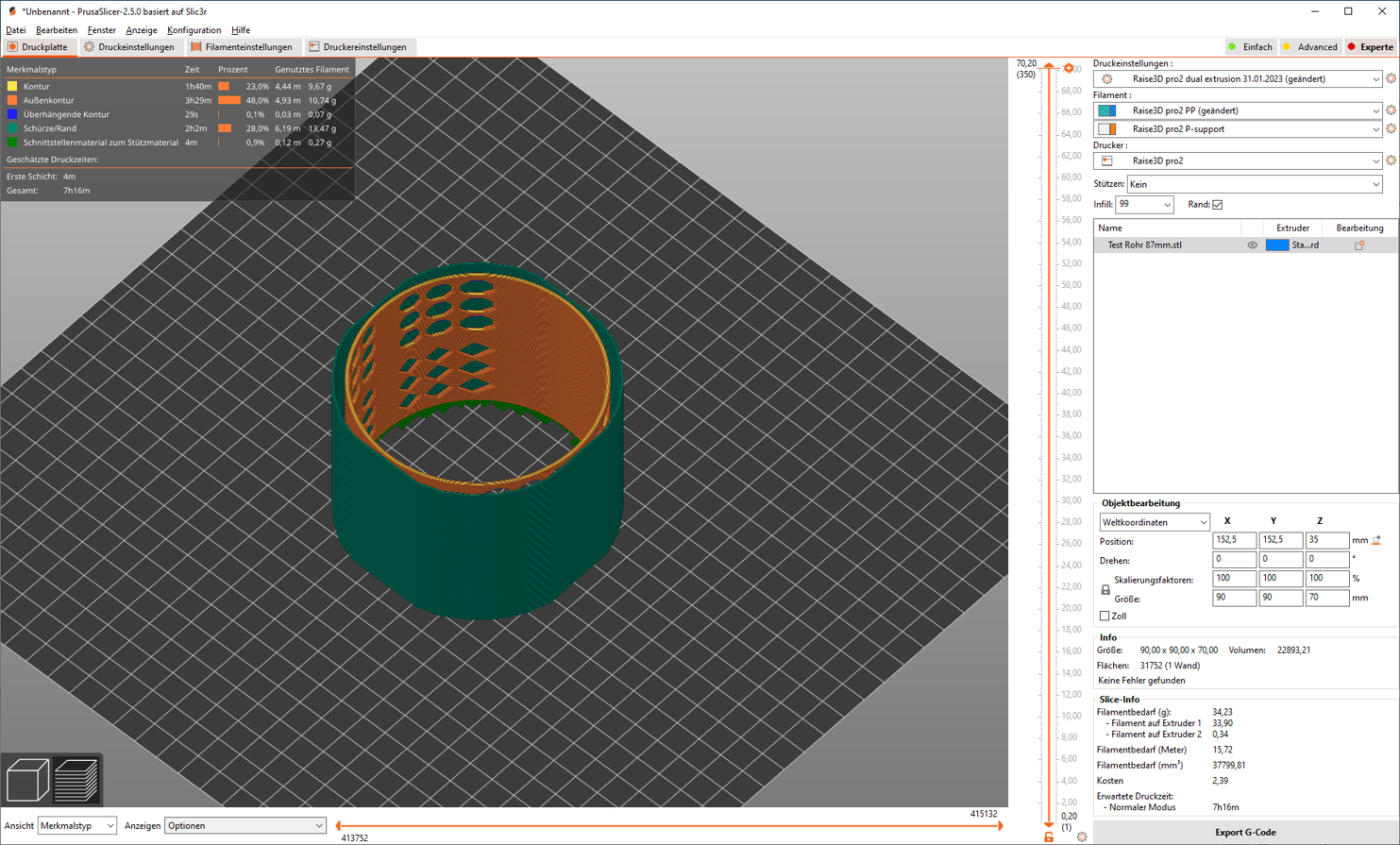
New Prusa Slicer 2.5: When using dual-head printing and selecting a raft, then always a wipe wall/skirt is printed around the raft. Even the skirt/brim is set to "0".
Project file & How to reproduce
When using dual-head printing and selecting a raft, then always a wipe wall/skirt (see attached picture, green wall) is printed around the raft.
Even the skirt/brim is set to "0".
Checklist of files included above
- [ ] Project file
- [X] Screenshot
Version of PrusaSlicer
2.5
Operating system
Windows 10
Printer model
every dual head printer

Could be Draft Shield enabled (see Printer settings/skirt and brim/Draft shield. In case please attach 3mf. We can check it.

Sorry, now I found the problem. The wipe wall comes along when activating the Ooze prevention and a Temperature variation of 100°C.
@UBTChristian Does it mean that your problem is solved? Would you please close the issue then?
