
PrusaSlicer
 PrusaSlicer copied to clipboard
 prusa3d
bridging perimeters can not print well because fans always between opening and closing
Description of the bug
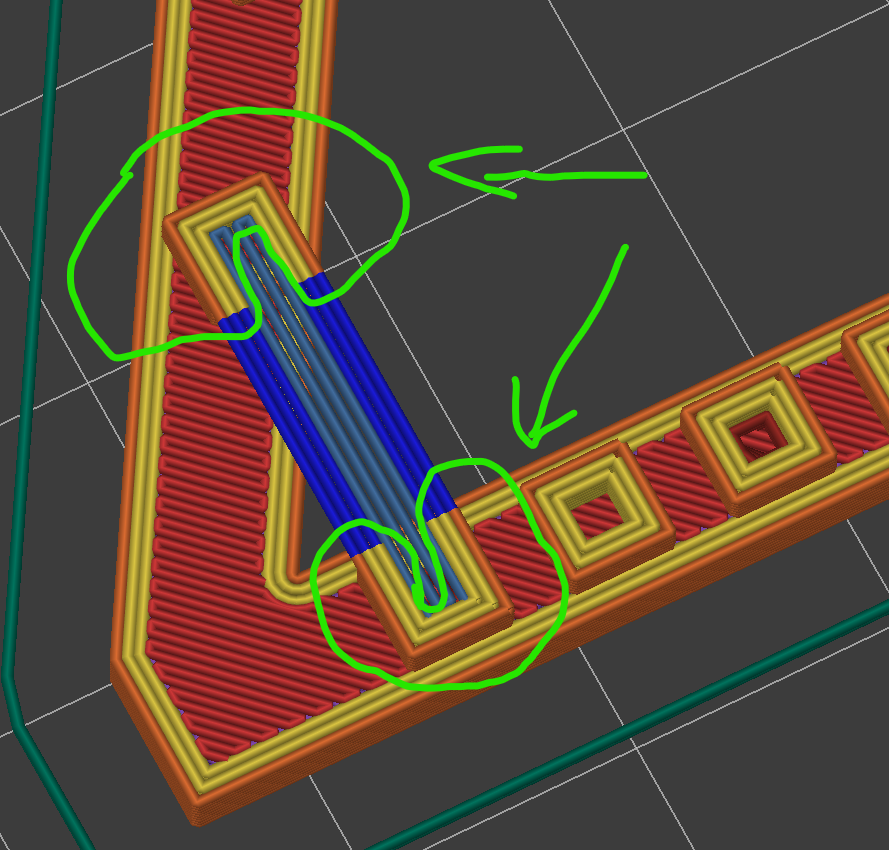
When print bridgings perimeters, The cooling fan is always off(Min fan speed) in the green circle and on(Bridges fan speed) at the blue line, which is as expected, but the fan has inertia and need takes a few seconds to ramp up to max speed. This results in a complete lack of cooling for the first few seconds of each suspension. This problem does not exist in bridge infill. sorry for my bad english
Project file & How to reproduce
Checklist of files included above
- [X] Project file
- [X] Screenshot
Version of PrusaSlicer
2.5.0
Operating system
Windows 11
Printer model
Ender 3 V2 with custom Fans

+1 I came here to ask for this same feature. I have an Ender 3 S1 with 5015 cooling fan... and I run a lot of PETG with very low fan speeds for most layers... but bridges need 50-75% for good output. Even with bridge speed set to 15, it takes a moment for the fan to get up to speed, so that first small portion of the bridge doesn't have much cooling (going from 1% to 66%).
It would be cool if either:
- the fan could be set to spin up a full second before it hits the bridging area
- a short pause (1 second?) to occur right before the bridging output occurs
Maybe something like this:


This should be handled by the FW. Prusa Printers, for example, have this implemented, the fan receives a short strong impulse to help spin it before every fan command in the code. If I were you, I'd ask Creality to fix it, what do you think?

This was one of the things added into Super Slicer. The strong impulse at fan start is to overcome the initial start of a fan from stop, many wont actually spin at all if commanded to go to say 10% but will happily run at 10% if coming from a faster speed.
The issue raided here is not related to the same thing, its more about the inertia of a fan changing speed and the extra time it takes to get up to that speed.

This should be handled by the FW. Prusa Printers, for example, have this implemented, the fan receives a short strong impulse to help spin it before every fan command in the code. If I were you, I'd ask Creality to fix it, what do you think?
I agree with @neophyl . That doesn't work, I mean the software can only control the fan by duty cycle, Unable to exceed 100%, and the bridgings speed is usually 100%, so changing this value won't have any effect on this problem. I'm actually using the Klipper firmware and change the kick_start_time to 1 second, but I still have this problem. Fixing this in the firmware shouldn't be easy. gcode is sequential and fw can't predict what will happen next. But in slicing software, it should be simple to insert gcode before printing the bridgings.
This should be handled by the FW. Prusa Printers, for example, have this implemented, the fan receives a short strong impulse to help spin it before every fan command in the code. If I were you, I'd ask Creality to fix it, what do you think?
That's what I hoped too, but it's not possible according to Marlin devs: https://github.com/MarlinFirmware/Marlin/issues/25243
The planner just doesn't have that many instructions buffered and could not pre-start/stop far enough in advance to achieve what we're looking for. I agree that it would be nice to be able to configure in Prusa Slicer a fan pre-start/stop time and/or a pause when there's not enough time between on/off cycles.
