
PrusaSlicer
 PrusaSlicer copied to clipboard
 prusa3d
Faded layer issue with resin prints on PrusaSlicer
Version
Version 2.4.0+win64
Operating system type + version
- Microsoft Windows 10 Pro
- Version 10.0.19043 Build 19043
3D printer brand / version + firmware version (if known)
- Prusa SL1S
- Firmware 1.6.4
Behavior
PrusaSlicer when using any "Faded layers" fades the layers for about 80% of the layers that are set to be faded and the rest of the layers aren't faded which results in a raised lip around the bottom of the print. An example is if the "Faded layers" is set to the default "10" the first 8 layers would fade as expected but the last two layers (9,10) print at the full size of the model with no fade, this is what is resulting in the lip around the bottom of the print.
If this "Faded Layers" setting faded up to the value set fully this would result in a tapered bottom as expected with the elephant. I have contacted prusa support and the Pedro from support set the faded layers to 6 and 10 and once the file was sliced the faded layers was working as expected, the fade was all the way up to 6.
I have tried reinstalling PrusaSlicer 2.4.0 and also the 2.4.1 beta with the same result on both, I have also installed prusa slicer on a different system with the same result.
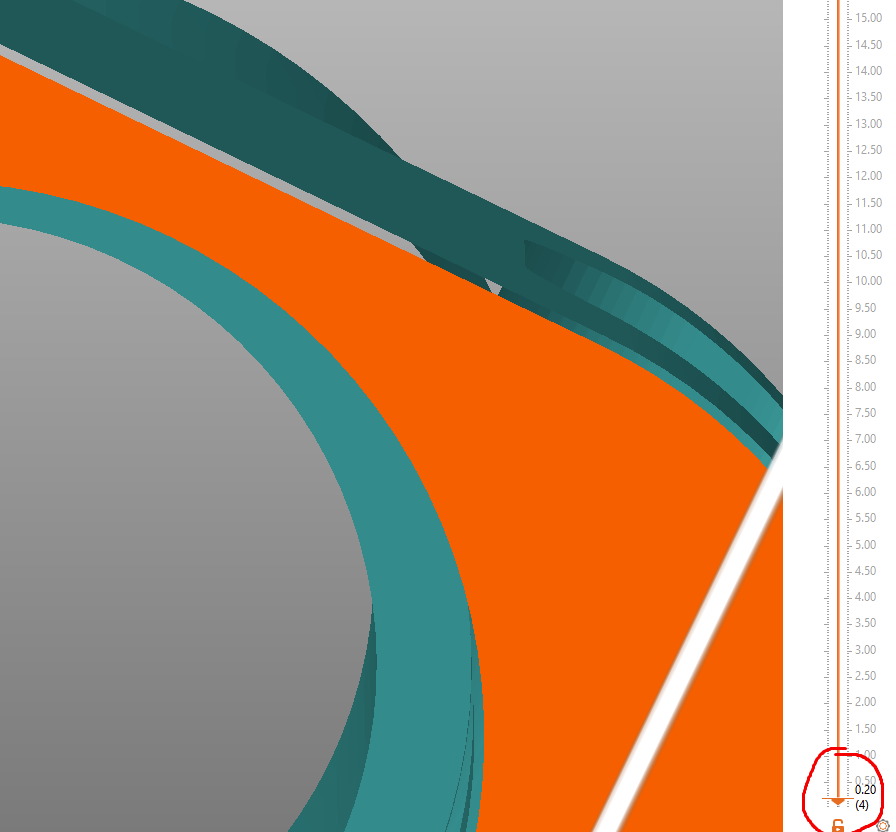
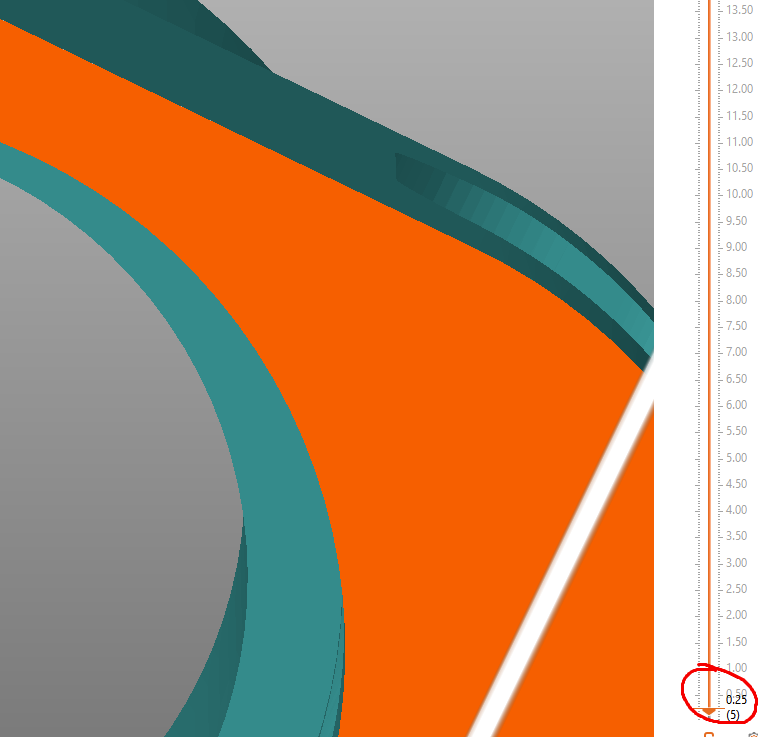
The images attached shows the layer and the gap around the model, on layer 4 there is a fade around the model, on layer 5 there is no fade anymore. The faded layers setting was set to 6 here.

Hi kromeninja, I just stumbled across your issue report. We are having the same problem for quite a while, but until now couldn't figure out the reason. Thanks for your explanation!
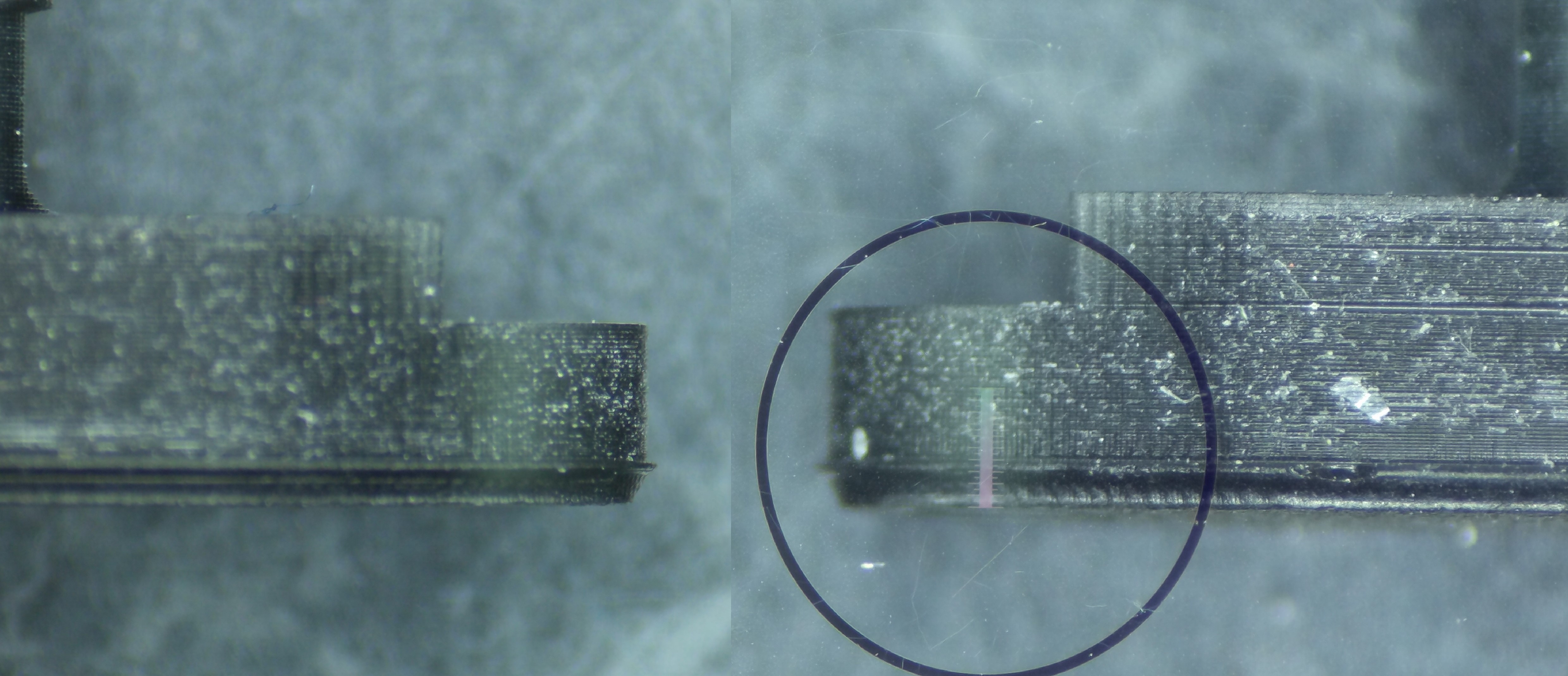
I attachted a picture of the resulting print (the scale is in total 1 mm). Does this correspond with your prints?

Hi kromeninja, I just stumbled across your issue report. We are having the same problem for quite a while, but until now couldn't figure out the reason. Thanks for your explanation!
I attachted a picture of the resulting print (the scale is in total 1 mm). Does this correspond with your prints?
Hey 10th10 , that is exactly the same issue I am getting, I can't find a way to resolve it either sadly. The fade just doesnt fade all the way to the value set, so you end up getting that lip at the end of the fade :/
@cybergurke: I'm happy to be not the only one with this issue ;-)
I tried to optimize the settings so I could print to the bed directly. Often this is not needed but for thin mechanical parts often an advantage. BUT right now it's not fully usable since there is a large burr (0.1mm) around the part.
Prusa SL1S PrusaSlicer 2.5.0 Firmware 1.7.1 Material: Prusament tough orange
Here is a detailed picture of my print:
(First attempt with elephant foot compensation set to 0.4mm)
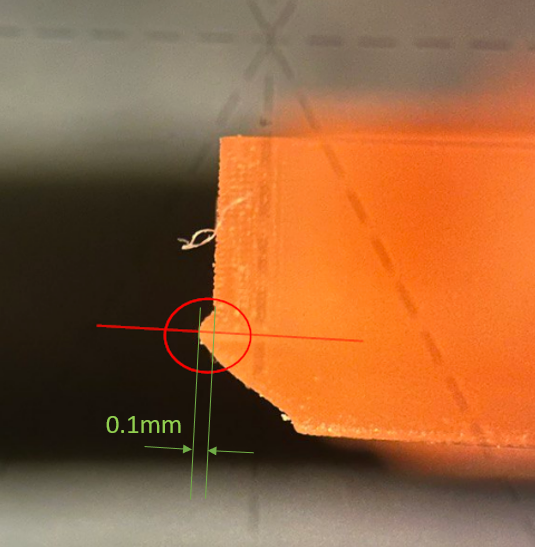
What I tried to reduce that was the following procedure:
- Keep elephant foot compensation: 0.4mm
- Faded layers 10 (easy to check in the slicer)

- Generated .SL1S print file
- Edited that print file as described here: https://help.prusa3d.com/article/creating-a-resin-calibration-object-sl1-sl1s_235292 Changed two lines in the .ini files: config.ini => numFade = 5 prusaslicer.ini => faded_layers = 10
- I expected then that the printer fades from layer 1 to 5 and then print layer 6 to 10 with standard exposure whereas the geometry is still fading (point 2). This way I hoped to get it right
BUT it seems that the exposure fading is hard coded in the printer? Happy to hear from a Prusa developer at this point ;-)
In the next graph you can see graphically what I just expained:
blue: What the printer did
orange: What I expected after I edited the .ini files.
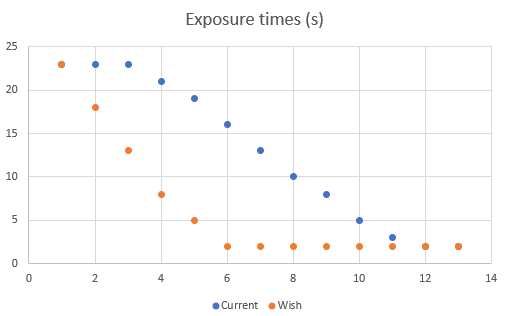
Wish: We (customers) want to have full control over exposure times. Or at least to set the from to fading layer somewhere in the slicer or on the printer.

Nope sadly not, there hasn't been any new information on this issue since i posted about it from what i can tell. We still have that sudden layer exposure change at the end of the fade resulting in that lip :(
@cybergurke: I'm happy to be not the only one with this issue ;-)
I tried to optimize the settings so I could print to the bed directly. Often this is not needed but for thin mechanical parts often an advantage. BUT right now it's not fully usable since there is a large burr (0.1mm) around the part.
Prusa SL1S PrusaSlicer 2.5.0 Firmware 1.7.1 Material: Prusament tough orange
Here is a detailed picture of my print: (First attempt with elephant foot compensation set to 0.4mm)
What I tried to reduced that was the following procedure:
1. Keep elephant foot compensation: 0.4mm 2. Faded layers 10 (easy to check in the slicer)  3. Generated .SL1S print file 4. Edited that print file as described here: https://help.prusa3d.com/article/creating-a-resin-calibration-object-sl1-sl1s_235292 Changed two lines in the .ini files: config.ini => numFade = 5 prusaslicer.ini => faded_layers = 10 5. I expected then that the printer fades from layer 1 to 5 and then print layer 6 to 10 with standard exposure whereas the geometry is still fading (point 2). This way I hoped to get it rightBUT it seems that the exposure fading is hard coded in the printer? Happy to hear from a Prusa developer at this point ;-)
In the next graph you can see graphicly what I just expained: blue: What the printer did orange: What I expected after I edited the .ini files.
Wish: We (customers) want to have full control over exposure times. Or at least to set the from to fading layer somewhere in the slicer or on the printer.
Thanks for the comment! This shows exactly the issue and as you mentioned with mechanical parts or parts you need to fit into other objects exactly this makes tolerance pretty hard to manage.
Would be nice to either have that final layer when using faded layers to actually fade or allow us to have more granular control over the faded layers. Hopefully a prusa dev for the SL1 firmware can chime in here as we haven't heard anything sadly and nearly a hear on from posting this thread :/
Thanks for the comment! This shows exactly the issue and as you mentioned with mechanical parts or parts you need to fit into other objects exactly this makes tolerance pretty hard to manage.
Would be nice to either have that final layer when using faded layers to actually fade or allow us to have more granular control over the faded layers. Hopefully a prusa dev for the SL1 firmware can chime in here as we haven't heard anything sadly and nearly a hear on from posting this thread :/
I was in contact with Prusa Support which is great in general and just informed him about this thread. I hope we see some movement here or even better Prusa joins in the discussion. I'd say the more control, the better. This way we are not constrained by the software and are able to fine-tune to our needs. This would be amazing!

More requests from the forum https://forum.prusa3d.com/forum/prusaslicer/elephantfoot-compensation-vs-sl1-speed/#post-637548
Just reviving this thread to see if anyone has had any success with this since the 1.7.2 firmware? I haven't had the chance to test it yet, but will be very soon. Hoping this is finally resolved 🤞
New firmware release:
https://github.com/prusa3d/Prusa-Firmware-SL1/releases/tag/1.7.2